
Summary: I’ve used QTrade for over a decade as the (until recently) exclusive provider of all my retirement savings. They do some things really well, but in other areas it’s clear they are falling behind.
A Brief Intro
I am perhaps not a typical client. My needs are pretty simple. I rely on my platform to execute transactions clearly, efficiently and without human involvement whenever possible. If I need human involvement, I expect it to be knowledgeable, prompt and consistent. I don’t rely on the platform to provide research, advice, news or fancy trading features. I probably use less than 10% of what’s on offer on the QTrade platform.
QTrade is not the same thing as Questrade. The latter you have probably seen commercials about. The former (and the one I’m talking about) is about as fun as dry toast. (Their webinar, while informative, should not be attempted while driving heavy machinery.)
I picked QTrade based on the Globe’s annual rankings1 many years ago2. That was the extent of my research back then.
Things QTrade is good at
Good: Portfolio Analysis Tools
This feature is really quite useful, since if you set it up correctly, you can get insightful scores for your ENTIRE portfolio, across all accounts (RRIF, TFSA, Investment). Here’s my overall score as shown by the platform:
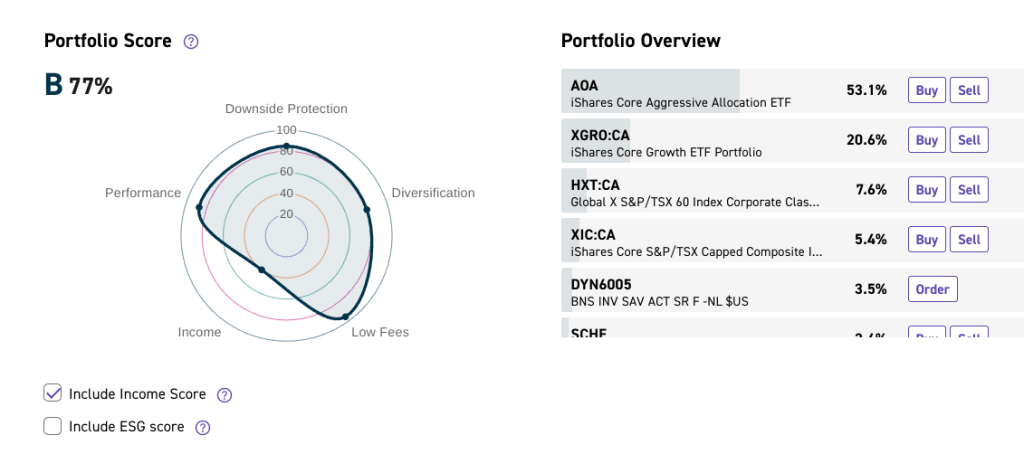
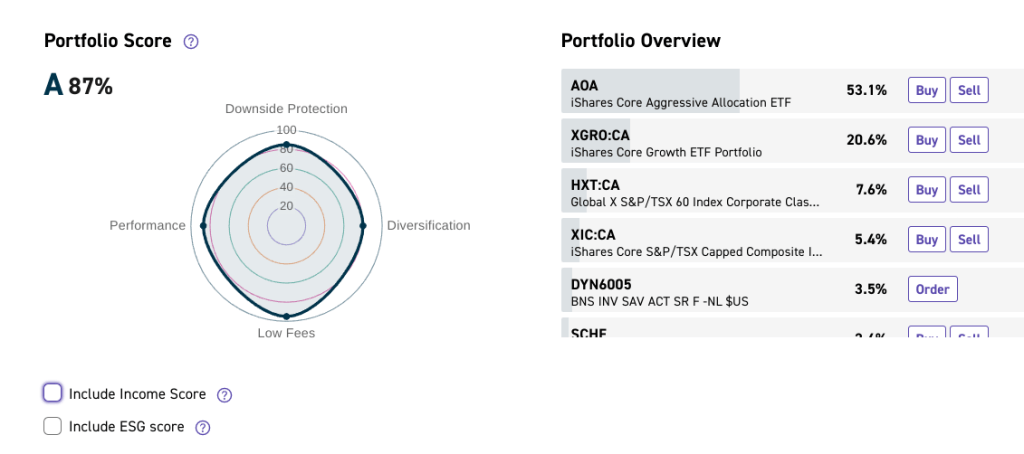
My lack of focus on generating income in my portfolio (as stated elsewhere, total return is what matters to me) drags down my overall score — but with one click, that can be ignored:
And if you don’t like your score, you can see what impact on adding/removing other stocks/ETFs might have by using the Portfolio Simulator. Let’s see what happens if I allocated 10% of my portfolio to Nvidia back in 20143!
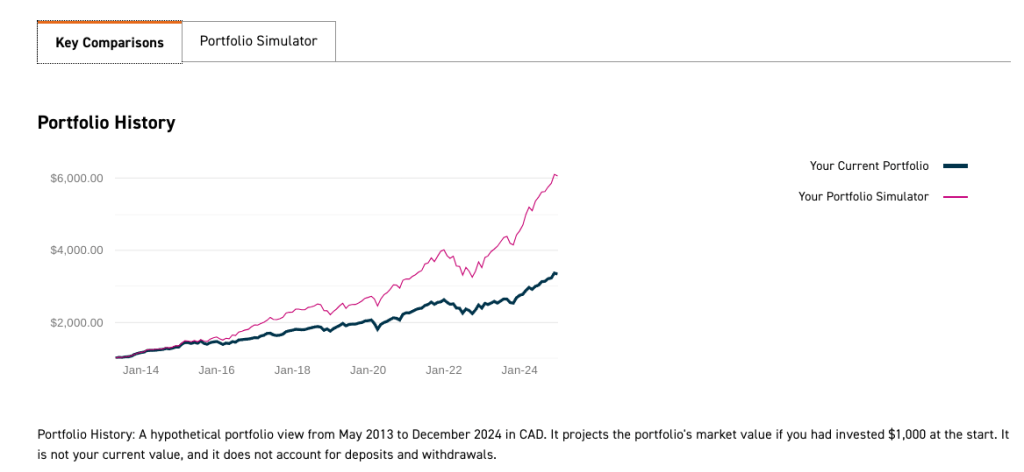
Hindsight is clearly 20/20. Anyway, besides allowing you to have a bit of fun, the simulator gives you good feedback as to your asset mix. This feature taught me a lot about portfolio modeling.
Good: US Dollar Accounts everywhere
If you like trading US stocks and ETFs4, QTrade has you covered. You can have USD accounts for every need:
- Non registered accounts
- RRSPs and Spousal RRSPs
- TFSAs
- RRIFs and Spousal RRIFs
RESPs are not supported in USD, though. Not a big deal.
Good: Free-to-trade list of ETFs
I hesitated putting this in the “good” category, since other providers have better deals when trading ETFs5. But the list QTrade has covers my needs, so in the spirit of this being a selfish assessment, it’s fine. The list includes my two main holdings, namely XGRO and AOA. Mutual funds are also free to trade, if that’s your thing.
Good: Broad selection of high-interest savings accounts (HISAs)
The list is extensive, but like a lot of things with QTrade, not particularly well organized on the website. You reach this list by navigating to the “Trade: Mutual Funds” category, and then noticing the teeny tiny link that appears below the trade screen:
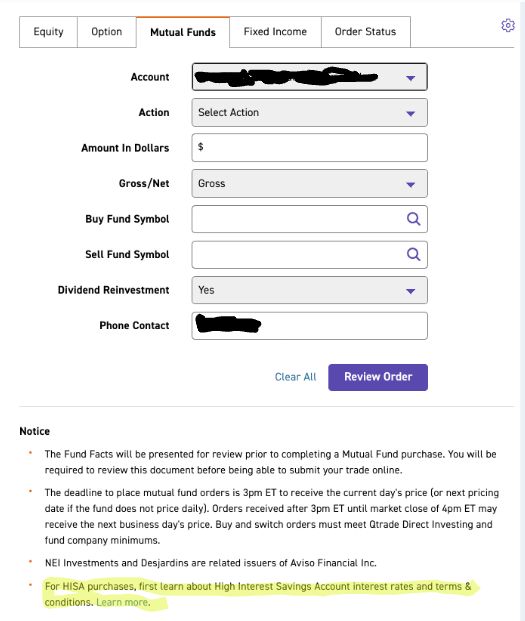
The supported providers include HISAs from Royal Bank, Bank of Nova Scotia, Equitable Bank, TD and half a dozen others. Bank of Nova Scotia (DYN6004/5) has been the historical best deal out there with rates 0.25% above everybody else’s.
It appears QTrade imposes a $1000 minimum purchase (not certain, you can only tell by trial and error) on any of these products, regardless of what the Ts and Cs of the particular HISA might be.
Things QTrade is not so good at
I believe every provider has rough edges, and that’s part of the price of admission into the DIY world. Whether these are deal breakers for you is a matter of personal preference and personal habit.
Bad: Support
I rarely need to talk to a real person. And iff QTrade’s RRIF applications worked the way they should, I would not have had to spend hours on hold with support. To QTrade’s credit, it’s all now working more or less as I expect, and after filing a formal complaint, I was granted some free trades for my trouble, so they did try to fix things.
But it’s clear that this is an area that could be improved upon. QTrade offers 3 ways to contact them, and as far as I can tell, there’s no real coordination between these various channels.
- Phone support is available from 830am to 8pm EST. Expect very long wait times. Last few times I called it was 30 minutes or more on hold. There is no callback feature, and no voicemail. I’m not a fan of their user verification for phone calls either (no voice prints, no push codes).
- Email support is available via DirectInvesting@qtrade.ca. There is no robot behind it; it seems to land in a shared inbox among the support team and they get to it when they get to it.
- Secure messaging is available in the platform, but sometimes seems to go unanswered for days at a time.
- They have an “AI” chatbot, but it is not well trained. Google search is way better.
There are times where you get lucky and you successfully connect to one of their knowledgeable L2 staff, but my sense is that there are not enough of them, and without any sort of ticketing system to coordinate issues among the various channels of contact, expect dropped balls everywhere.
Bad: No transparency in FX rates
Although QTrade will report your entire portfolio value in CAD, nowhere will you find what FX rate they are using to come up with that number. It’s a long-standing issue. I’ve estimated that they use their FX rate, which is the spot rate minus 1.5%. Changing currencies on QTrade is best accomplished by running Norbert’s Gambit — not fast, but way cheaper for larger sums.
Falling behind: New account application
Although you can submit a new account application online, it still has that distinctive paper-form-to-online-conversion feel. (If I recall correctly, my first account applications with QTrade had to be faxed in; the forms still look the same, but now you can fill them in online and submit an e-signature).
So-so: Mobile Client
It’s been recently revamped, and looks nicer than the old one, but lacks functions — you can’t access the secure message center, for example. Every time I try to buy a USD HISA on it, the mobile client looks like it’s going to pay in CAD. Thankfully, the desktop website is usable (with patience) on a mobile device. On the plus side, it does support biometric login, so that’s a nice time-saver.
Summing up
QTrade still meets my reasonably simple needs, but given my recent exposure to Wealthsimple, it’s clear they are falling behind on fees, user experience and support6. Wealthsimple has become a serious consideration for my “everything” provider, but they still lack some things (self-directed spousal RRIFs) that I absolutely require, no matter how much free money7 they throw my way.
If you want to give QTrade a no-risk spin, you can register and get a free fake account.
Do you use another platform and want to share your experiences? I’d love to hear your feedback!
- Sorry, this link is paywalled. My library gives free online access to many newspapers, maybe yours does too? #cheapskate ↩︎
- There’s another source of rankings that gets mentioned on QTrade’s website, but I cannot recommend relying on it (Survisicor) ↩︎
- Something I would never do in real life. Diversification is everything. For every NVDA story, there’s 100 sad stories of companies that didn’t pan out. ↩︎
- Timely article by Mr.Carrick on that topic over at https://www.theglobeandmail.com/investing/markets/inside-the-market/article-canadian-investors-do-you-really-want-to-hold-us-listed-etfs/ ↩︎
- Questrade and Wealthsimple both charge $0 for trading ETFs and stocks. ↩︎
- The small issue I had with them took 17 minutes to resolve on the phone. First call pickup took 30 seconds, and the level 2 staffer who handled the call was live with me after less than 10. The level 2 staffer knew why I was calling since the level 1 agent PASSED HIM THE NOTES and I didn’t have to repeat the problem I was experiencing. In support, stupid little things like this matter. ↩︎
- Their Big Winter Bundle is a seriously good deal if you have RRSPs. ↩︎
Discover more from The Money Engineer
Subscribe to get the latest posts sent to your email.
 The Money Engineer
[…] make trial accounts to test drive them. I myself use QTrade for my investments. Like all providers, it does some things really well, and others, not so much. I have either personal experience or friends using (in alphabetical order) BMO Investorline, […]
LikeLike
[…] of you who read my mini-review of QTrade will know that I don’t consider their support a strong […]
LikeLike
[…] view reminds me of how QTrade does their portfolio assessments, something I thought was a plus of that provider. The downside protection warning indicated that I have too much invested in too […]
LikeLike
[…] to move their money. I’ve been a QTrade client for many years (you can read my take on them here), but this year moved most of my holdings to Questrade1 (my take […]
LikeLike