
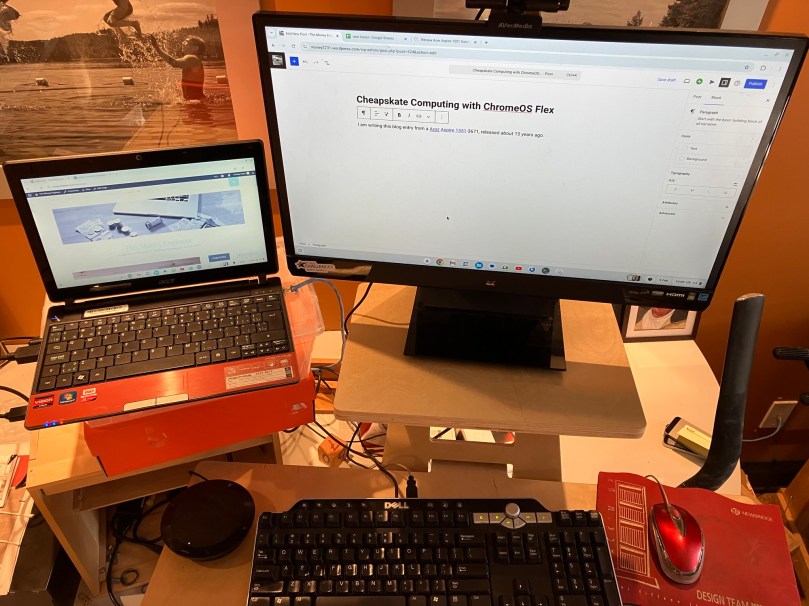
I am writing this blog entry from a Acer Aspire 1551, released about 15 years ago, a time when Windows 7 was the state-of-the-art PC OS. When I took this laptop out of the closet, it had Windows 10 on it, and was essentially unusable because the poor CPU1 just couldn’t eke out enough hamster-wheel turns to make it go. It looked like it was headed to the great bit bucket in the sky2. This caused me a bit of pain, since, after all, I had paid good money for that laptop3.
But then I discovered ChromeOS Flex.45 It seems capable of turning just about any old hardware (PC or Mac, I’ve done both) into something quite usable, if not terribly feature-rich6. Simply put, it’s the operating system used on Chromebooks that have been widely deployed to students everywhere.
And installing it really is quite easy. You just need a USB stick, some other internet-connected computer, and about 30 minutes7 to complete an installation. You can test-drive an installation before committing, too, since you can boot right from the USB stick. All the steps are outlined here.
The result is (more or less) a Chromebook with support for a modern browser (Chrome). And since I write this blog using WordPress, all the tools I need to build this site are accessible from that browser. And of course with Google Sheets, Google Docs and Google Slides (all quite feature-rich from the browser), I have no need for Microsoft Office, either8.
The only investment I made (and even this probably wasn’t strictly necessary) was to purchase a new SSD to replace the creaky old spinning hard drive in the original model. Total cost: $30. The keyboard and mouse are from Value Village9 (about $10 total) and the external monitor I had lying around.
So what’s a ChromeOS Flex machine good for? Off the top of my head,
- Writing a blog
- Inexpensive bare-bones laptop to take when traveling
- Simple laptop/desktop for a favorite relative
If you want to breathe new life into old hardware, then I declare Chrome OS Flex cheapskate-approved. You can see it in action, below:
- An AMD Athlon II Neo X2 K325, no less. I think it had a flux capacitor. ↩︎
- City of Ottawa has alternatives: https://ottawa.ca/en/garbage-and-recycling/recycling/waste-explorer ↩︎
- The cheapskate refrain! ↩︎
- There are of course a plethora of Linux distributions out there for the more adventuresome and/or those with a lot more time on their hands. I’ve played around with a bunch of those, too. But ChromeOS Flex is the simplest installation experience I’ve experienced on a range of computers. On some computers, you can actually get a working Linux shell underneath ChromeOS Flex. ↩︎
- “Chrome OS” is what Chromebooks run. “Chrome OS Flex” is what I’m talking about. Similar, but different. Google carefully. ↩︎
- You’re probably not editing your Hollywood movie on a Chrome OS Flex machine. ↩︎
- Google’s instructions say 5. I think it took me that long to remember how to get into the BIOS so I could boot from the USB stick. ↩︎
- Full disclosure, I own shares in Alphabet, Microsoft and 10000 other companies. ↩︎
- A most excellent place to get vintage hardware. ↩︎
Discover more from The Money Engineer
Subscribe to get the latest posts sent to your email.
 The Money Engineer