

***This is no longer accurate; my new diagram is found at The Mechanics of Getting Paid in Retirement: 2026 Edition ***
DIY investing also means DIY decumulation. I recently completed a change in online broker from QTrade to Questrade and this is how I get paid in retirement; I’ll refer to the letters in the diagram below so you can follow along.
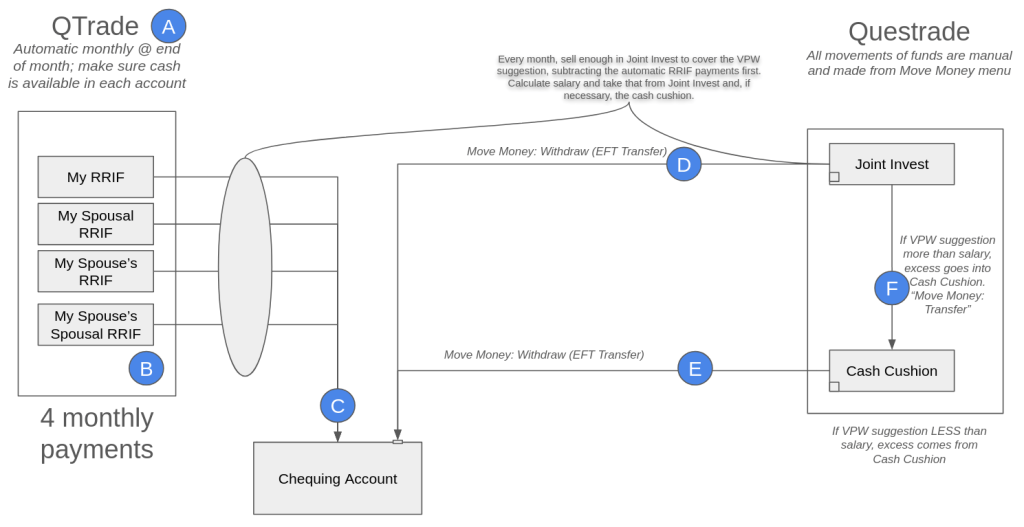
A: QTrade? What?
I know I started by saying I completed the transfer from QTrade to Questrade, but due to an unexpected snag, I still have 4 accounts with QTrade which are currently paying a monthly obligatory RRIF-minimum contribution to my salary. I talked about the snag here, but suffice it to say I could have moved these accounts too, but at the expense of foregoing monthly payouts for the remainder of 2025, which I didn’t think was worth it.
Next year, those accounts will disappear and Questrade will handle the RRIF minimum payments.
B: Yes, there are multiple RRIF accounts
When I started the paperwork to open RRIF accounts, I was surprised that the same choices were offered as were offered for RRSPs — individual and spousal. I’m sure that some of the reason is due to the attribution rules for spousal RRIFs, but anyway, there are 4 RRIF accounts generating 4 individual payouts every month. This is automatic, so I have to make sure that there is cash available in the 4 accounts each month, or else my provider will happily charge me an arm and a leg1 to do the necessary asset sale.
The asset sale takes a few seconds; and with T+1 settlement, the cash is available the next day. Right now I try to do all my moves on the 22nd of the month, but admittedly, this is more time than strictly necessary.
C: Opening the RRIF account includes providing your banking information
I don’t know whether there is any provider out there who permits RRIF payments to be paid to a non-registered account, but so far it seems that they all prefer to make EFTs into a bank account. That’s not a problem for me but this may not be what you’re expecting. The money just shows up like a paycheque on or near the last day of the month.
D/E: The sum of all RRIF payments isn’t enough to fund my desired lifestyle
I’m withdrawing RRIF minimum payments and funding the rest of my monthly paycheque by liquidating assets held in my non-registered account. Another approach would be to increase the RRIF payments, but then that attracts withholding tax, which I hate. The monthly liquidation of assets in my non-registered account generates taxable capital gains each time, naturally. The advice I got from my retirement planner suggested I should be able to maintain an overall 15% tax rate by making sure that I have a mix of favorable taxable income (capital gains and dividends) along with the unfavorable2 RRIF income.
I keep an eye on my 2025 tax bill by using the tax calculator I mention on https://moneyengineer.ca/tools-i-use/. I can always choose to switch gears if needed.
In Questrade, movements of cash are done from their aptly-named “Move Money” menu. Setting up your bank account in Questrade was a bit clunky3 and relied on some app like Plaid to get the job done. Moving funds in this way isn’t instant, expect a delay of at least two business days in each case.
Another oddity with Questrade is that any joint non-registered account is set up as a margin account, which means it’s shockingly easy to borrow money you don’t have4.
One unknown with Questrade — I was able to move money instantly after an asset sale. It’s not clear to me whether this uses margin or not5. I’ll know more once I get my April statement, I guess. If I get charged margin interest, I’ll have to hold off moving money until the day after the asset sale.
F: Variable Percentage Withdrawal (VPW) requires the use of a cash cushion
I described the methodology I use to calculate my take-home pay in a previous post, but in essence my salary is related to my real-time net worth, filtered through a 6-month moving average so an anomalous month on the stock market doesn’t impact my take-home pay quite so quickly. VPW makes a “suggestion”, this suggestion is added to the cash cushion, divide by 6, and presto, the “suggestion” is converted to a monthly “salary”.
In any given month, the cash cushion is either being augmented by the sale of some assets in my non-registered account (the suggestion is larger than the salary), or the cash cushion is being depleted to make up the shortfall in my calculated salary (the suggestion is less than the salary). All of those movements are manual. Transferring cash between non-registered accounts is supported by Questrade, but it wasn’t supported by QTrade6.
All in all, this process should take less than 15 minutes a month. The first time included a learning curve and extra setup, but now that pre-work is done. Next step is making sure my spouse knows how to do this, too!
- Assuming your arm and leg are worth $40. ↩︎
- Unfavorable because it’s treated as straight income, and since RRIF-minimum, no witholding tax. I’m expecting a decent tax bill come April next year. ↩︎
- Bank accounts showed up in my mobile app but not on the web portal. To get them to show up there I had to set up my account — again — and successfully transfer a nominal amount. Only then would the web app remember my bank accounts. ↩︎
- Which I inadvertently did, paying myself from the wrong non-registered account. Sigh. ↩︎
- Since the transfer isn’t instantaneous, and since the cash really is available the day after, one could make the case that this doesn’t require margin. But I really have no idea. ↩︎
- For QTrade I had to use my bank account to get around this restriction. ↩︎




 The Money Engineer