Quick Tip: Tax Loss Harvest by December 30!

Tax loss harvesting is the strategy whereby assets in non-registered accounts are sold to generate a capital loss1. These losses can be used to offset capital gains, either this year, in previous years (up to three years back), or in future years (forever)2.

Since CRA uses the settlement date of your asset sale, and since most (all ?) brokers take a day to settle a trade, this means to get your capital loss in fiscal 2025 you have to sell by December 30 to settle on December 31, the last business day of 2025.

  1. After the current buoyant year in the markets, there’s probably not too many examples of this, but if you bought bonds in 2022…. ↩︎
  2. All this and more detailed over at https://www.canada.ca/en/revenue-agency/services/tax/individuals/topics/about-your-tax-return/tax-return/completing-a-tax-return/personal-income/line-12700-capital-gains/capital-losses-deductions.html ↩︎

iPhone Cheapskate

I know Apple devices have a reputation as being premium/pricey devices and so seeing “iPhone” and “cheapskate” in the same sentence is probably controversial, but if you’re a long time owner of Apple devices (4 Mac computers1, 2 iPads, 2 iPhones, one old iPod still ticking), there is a strong ecosystem factor that makes it hard to break free2. Addtionally, the hardware3 is really quite rock solid (if nearly impossible to repair nowadays), so you do get a bit of longevity when you spring for an iDevice.

But let me share with you a new thing I discovered yesterday that may save you from an upgrade that isn’t necessary.

I’ve been struggling with “out of storage” warnings on my iPhone4 for a number of months now. Every time I got one, I checked for the usual culprits:

  • Too many photos/videos on my phone. I try to keep the number very small (often zero) since I use Google Photos to back up any image to the Google cloud. No need for local copies, since I can grab them on demand from the cloud5.
  • Too many photos/videos sent via messaging apps (and I use a bunch: Messenger, WhatsApp, Messages, Slack)
  • Too many downloaded podcasts (listening to podcasts while on road trips or runs is a favorite habit of mine; the offerings of Pushkin are generally very high quality)
  • Too many apps that I used once and then moved on from

And after going through the list, I would normally clear up enough space to quiet the warnings for a while. The last time I got one, i got a little infuriated and deleted 95% of the music I keep on my iPhone because I don’t listen to music on it all that often.

But less than 2 weeks after the extreme purge, I got yet another “storage low” warning. I was a bit exasperated at this…what’s the point of having a phone if I’m spending hours every week reducing its capabilities? No photos, no music, no podcasts? No way!

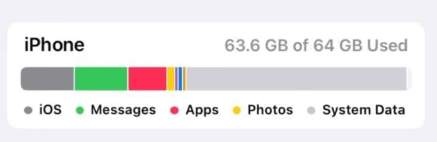
So I took a much closer look at the “storage” report on the iPhone, and it looked something like this6:

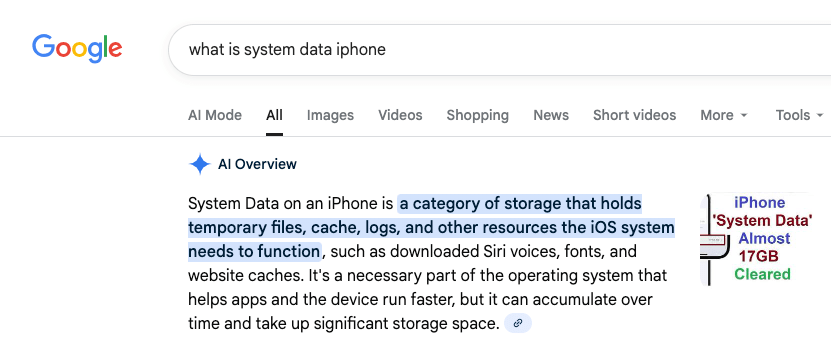
“System Data”, the light grey bar (not to be confused with iOS, the dark grey bar) had grown to take up an ENORMOUS amount (~30GB) of data on my phone. What, exactly is “System Data”, you may ask?

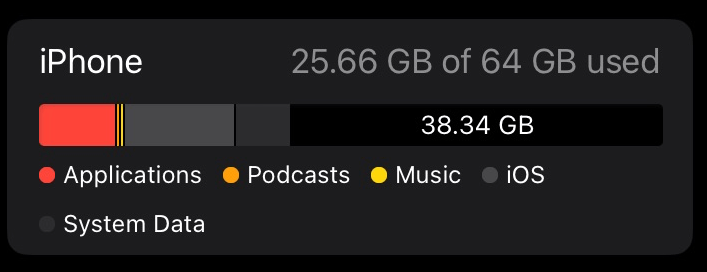
That, it would seem, is a rather accurate description. Once I determined that this stuff was probably expendable, I set out researching how to get rid of it. I’ll save you sifting through dozens of bad videos and terrible advice and cut to the chase. Here’s what my iPhone storage looks like this morning:

You’re seeing that right — 38GB free, up from 1GB free. “System Data” reduced from around 30GB to 5.75GB. So what did I do?

Rather than spend hours trialing and erroring deleting apps and re-installing them, I went nuclear. I backed up the phone to iCloud and completely erased it7, then restored it. This is an extreme measure that isn’t for everyone but the results are quite clear.

Here’s a non-exhaustive list of why you should be very careful before doing this to prevent loss of data — don’t say I didn’t warn you!

  • you don’t back up your photos/videos anywhere
  • you haven’t backed up your iPhone to iCloud
  • you don’t have your music backed up somewhere (if purchased in iTunes, all can be re-downloaded; if synced from a computer, that can be redone)

Anyway, for me, having migrated phones more than once, I was pretty confident I wouldn’t have much in the way of downsides in doing this. Some things you have to re-do

  • rescan your fingerprint for TouchID
  • retrain Siri to respond to your voice
  • Re-enter your payment cards for Apple Pay
  • Re-authenticate into some/all of applications that require it
  • Resync your music

Anyway, all this to say that before you think you need to upgrade your phone because you’re out of space, maybe take a closer look…

  1. One running Linux MX because it’s over 10 years old, one gifted to me from Wealthsimple, one in the upstairs office that I should probably sell, and one that I’m typing this from (another ancient laptop with a “battery” in name only that should probably get the Linux MX or Chrome OS treatment at some point). ↩︎
  2. Most lately, Apple’s Passwords app is so so good ↩︎
  3. The collection of still-functioning and largely functional hardware is a testament to that. ↩︎
  4. A 64GB iPhone SE gen 3, if you’re wondering. Yes, it’s old. I’m a cheapskate, remember? ↩︎
  5. Of course my free Google storage is beginning to get squeezed, but a small time investment can usually generate pretty big gains; a lot of what I take pictures of nowadays is stuff I’m trying to get rid of. ↩︎
  6. Not from my phone, just a nice image with the correct attributes I found; enormous System Data contribution, and less than 1GB of free space on my phone. ↩︎
  7. Except for my Airolo eSIMs, that was something iOS offered to keep around after selecting “Erase Content and Settings”. ↩︎

News: Vanguard reduces fees on their all-in-ones

Summary: Vanguard asset allocation funds aka all-in-one funds VEQT, VGRO, VBAL, VCNS. VSIP have reduced their management fees to 0.17%, down from 0.22%, effective November 18, 2025.

It’s a good time to be an all-in-one investor, as I am. New to all-in-ones? Read all about them here.

The summary pretty much says it all. It just got cheaper to own Vanguard’s all-in-one funds. The amount of the reduction amounts to 50 cents for every $10001 invested per year, but compounded over many years, and multiplied by however much you have saved for retirement, it can be a surprisingly large number.

All-in-ones are much cheaper than either roboadvisors or your typical financial advisor, but as we studied before, they’re not without some cost, so fee reductions are always welcomed. Vanguard joins TD and BMO in reducing the cost of their all-in-ones. We looked at the makeup of each of these funds lately; there’s not a huge amount of difference, no matter which one you pick.

Anyway, you may note that Blackrock’s XEQT/XGRO/XINC family is now the most expensive of the lot; there’s no reason for that to be true given the competitive landscape. I would expect Blackrock to follow suit, or if not, I’ll probably be making some moves to get to lower fees, since a lot of my retirement portfolio is currently tied up in XEQT/XGRO. ZEQT/ZGRO I think is the closest in makeup to the XEQT/XGRO family.

  1. Of course, if you only have $1000 saved for retirement, you have other worries. ↩︎

Update: Credit Card Cheapskate

As you may have read, last month, I began the journey of switching credit cards to take advantage of better benefits with lower fees. A side effect of this was switching my tv/phone/internet provider to Rogers. This turned out to be more effort than I expected, but not for the reasons you might think.

I had decided to get the Rogers Red Elite Mastercard which offers 2% cashback on all purchases if you have any Rogers services, and effectively 3% if you purchase Rogers services with the card. This was just fine with me, as my Bell Fibe services had been creeping upward in price for months — it was time to churn providers, too.

Applying for the Rogers card was the easy part. It arrived quickly and setting it up was relatively pain-free. One unexpected downside was that its credit limit was a lot lower than my former primary credit card; about once a year, normally around vacation time, that actually becomes important. (I always, always, always pay credit balances in full). So, instead of getting one new card, I got two:

  • Rogers Red for most things (but with a lower credit limit)
  • And a CIBC Costco Mastercard1 to replace my fee-based CIBC Dividend card. “Replacement” in this case is quite literal; I called CIBC and explained I wanted to switch credit card products, and confirmed that this was possible — credit limit and all.

So the cheapskate plan needed two more things to complete:

  • The installation of my Rogers service
  • The delivery of my CIBC Costco Mastercard (actually two — one for me, one for my spouse)

Little did I know that this would turn into two separate sagas…

The Rogers Saga

TL/DR: Two installation technicians, many hours on the phone with support, a formal complaint to the CCTS, and I now have fully functioning internet, television and home phone service. I would not wish their home phone service on my worst enemy. Oh, but I am getting 2% back on all my purchases now!

October 19: Technician arrives. Modem installed with no issue. TV “settop” installed, no issue. Dial tone on my home phone. Calls in/out seem to work (tested with cell phone). I sent the installer on his way after about 45 minutes.

October 20: I attempt to set up my home phone voicemail. *98 to get access. “Welcome to Rogers Wireless Voicemail”. uh oh. Mailbox not recognized, can’t leave a voicemail to my home phone. Off to support. Ticket of some kind raised.

October 21: Weird. My “Myrogers” profile shows i have no services installed, and my installation appointment (that took place 2 days ago) shows pending. I report this to support as well. They don’t seem to fussed about that, convinced it will show up in a day or two.

October 27th: still no change. I’m a bit annoyed. A highly articulate Rogers staffer calls me on Saturday morning, wondering why I’ve called support so many times. I walk her through the experience. She comes to the conclusion that the easiest solution is to send a 2nd installer to my house to try again.

October 27th: installer number 2. Installs new modem2. Can’t seem to get the phone to work properly. He’s talking with his own support. He also sees that the internet performance of the new modem is craptacular, more dial-up speed than high-speed. This will require a “push” from the “back office” to correct. I warn my installer friend that the Jays will be on in an hour or two, and I would like to watch the game. He splits the coax and leaves both old modem and new modem connected. I continue to watch tv off the old modem, so peace is saved.

October 28th: the promised push from the back office materializes and the new modem now performs like a high speed modem should. I move my home network to it. Still no working voicemail on my home phone, but now my MyRogers profile shows tv and internet services, so progress.

October 29th: This was my breaking point. After talking to someone senior, they decided that I’ve been talking to the wrong Rogers team and need to call the number portng team or something like that. 90 minutes of hold music, and I was done dealing with anyone from Rogers. I submitted a formal complaint to the CCTS3. https://www.ccts-cprst.ca/about-ccts/.

November 4th: I talk live with a person from “The Office of the President” (sounds important) who commits to resolving my issue. Some junior tech calls the next day to report that they need “a day or two” to resolve. What?

November 6th: I talk to an articulate tech person who I feel fully understands the issue (one could have expected him to read the case notes, but whatever). He suspects (as I do) that because I *used* to be a Rogers home phone customer (over 2 years ago), this caused problems when I tried to port my number *back* to Rogers (from Bell).

November 10th: I notice i have a phone profile in “MyRogers”. Voicemail now works. Wow. I say nothing, wondering how long the crack team at Rogers will take to figure out that they have fixed my problem.

November 14th: The articulate tech person from last week contacts me and asks to ensure my phone service is working. I assure them it is. An hour later the Office of the President emails me to tell me that they now consider the matter closed. i still haven’t been billed, but my profile shows a $90 credit. For what, I have no idea. Pain and suffering?

So net: everything works, I am getting 2% back, and I haven’t received a bill yet. Stay tuned…

The CIBC saga or does any Canadian company have decent customer service?

So as I mentioned, I called CIBC to confirm that I could switch credit cards. I should have done it on call one, but I wanted to make sure that it wasn’t going to have unintended consequences on preauthorized charges. The day I decided to make the change was a day I was routed to a call center that sounded somewhat like an airport gate area. Unbelievably noisy and hard to hear what the agent was telling me4.

After 25+ minutes on the phone, most of it repeating and re-repeating my Costco membership numbers, it seemed I was good to go. A few minutes after hanging up, I got an email from CIBC letting me know that I could choose to get delivery of my new cards5 to a branch instead of my home. Given the ongoing Canada Post work actions, I figured a branch might be a better bet.

A week or so later, I got an email from CIBC congratulating me on the use of my new card. Which would be impossible since I didn’t get it yet. Paranoia sets in, and so I hop on the line with CIBC to make sure someone hadn’t intercepted my card somehow. After being disconnected after explaining my predicament the first time, I tried again. (The first agent was just as confused as I was…he seemed to know the number of my new card, even if I didn’t). The second agent assured me nothing untoward was going on, just an automated email. Fine. (Well, not fine, so if anyone at CIBC is reading this, you might want to look into how those emails get generated).

A day or so later, my wife received her card via Canada Post. Naturally.

I waited a few more days, no contact from my branch. I was in the neighbourhood so I stopped in and asked. The teller seemed to think it wasn’t really possible for a letter addressed to me to go unreported to me, but in the interest in humouring me, she look a look in the drawer (!) behind the counter. And to her surprise, there was indeed an envelope waiting for me. She laughed it off and handed it to me without comment, apology or anything else to say other than “my old PIN will work fine”.

I ended up in the branch again a few days later on an unrelated matter (depositing a cheque addressed to my. late mother’s estate…only possible via a human-to-human interaction), when the teller there thought she thought I had mail at the branch. Turns out it was a PIN code letter. Which again, no one had told me about, and one that I had been told wouldn’t be coming my way.

Anyway, I changed the PIN at the branch and went on my way.

Everything else worked as expected. In a strange twist, since this was a card change, my Apple wallet updated itself automatically to start using the new card as soon as I enabled it.

  1. I’m already a Costco member, so no big deal. The cashback isn’t as good as the Rogers card, with the exception of restaurants and Costco gas, both of which give 3% cashback (with a cap). ↩︎
  2. Actually, I think he tried two or three different ones. ↩︎
  3. Possibly my new favourite organization. Thanks! ↩︎
  4. I personally think every CEO should call their own call centres at least monthly. Most of them are terrible. ↩︎
  5. 2 cards, 2 emails. Weird. But ok. ↩︎

Chasing Free Money with Wealthsimple

As I’ve been alluding, my relationship with QTrade is coming to an end. It would have ended back in March 2025 when I moved the majority of my holdings to Questrade, but having an active RRIF can make things a bit more complicated when it comes to changing your online broker.

Anyway, the plan all along was to move the last of my QTrade holdings — 4 RRIF accounts: 2 for me, 2 for my spouse — to Questrade around now, after most of the RRIF payments for 2025 have been taken care of1.

But then Wealthsimple came around and decided to throw free money on the table2. And they even helpfully extended the registration deadline — multiple times — to make it even easier. Now, I know I preach about simplifying your arrangements in retirement to make it easier on your heirs, but hear me out….

Because of a problem with my DPSP, (another cautionary tale for those who are considering retirement), I already had a RRIF with Wealthsimple (and a nice shiny MacBook Air) as a reward for my troubles. If I wanted to keep my MacBook, I had to keep my money with Wealthsimple3 until January 2026, so that RRIF wasn’t going anywhere…I reasoned I wasn’t really making things more complicated. I’m going from using three brokers to using two, so that’s clearly an improvement.

Moving accounts from another provider to Wealthsimple, like many things Wealthsimple does, is totally digital, and very, very easy to accomplish. All that was needed was the account number and a recent statement from my sending broker, and that was it. I think it took all of 10 minutes to get the ball rolling. No printers. No pictures. No pens. Just clicks and swipes.

And even better is Wealthsimple’s super-clear status indicator, visible in the app or when using the web:

How clear is that? Of course, one could complain about how it could possibly take a month for things to move along (I know I did), but it’s stuff like this that makes me realize how far ahead of the competition Wealthsimple is when it comes to serving their clients.

What’s more, the transfer finished *way* ahead of schedule, being fully complete on November 8th, around 2 weeks after initiating the request. And, to make things even more pleasant, Wealthsimple has already reimbursed me the $150 plus GST that QTrade charged me for moving the account — no need for me to provide “proof” — the industry standard is well known to all, including, lately, the federal government.

I’ll provide an update once the free money starts rolling in. I have to update my workflows on how I get paid, since it’ll be a new world starting in January!

  1. I take RRIF payments monthly to make it more like a salary. And to avoid large stock sales all at once, since getting paid means selling assets. ↩︎
  2. I wonder if the gravy train in this space will end — read more about my thoughts on that here ↩︎
  3. The catch with free money (or free gifts) from brokers always involves keeping your money intact with them for some non-trivial amount of time. 12 months and 24 months are both pretty common. No big deal to me, I intend to stay retired a lot longer than that. ↩︎