Questrade Example: Exchanging USD/CAD with Norbert’s Gambit

Norbert’s Gambit is a way to change USD to CAD or vice-versa cheaply. (Most brokers take 1.5% off of such transactions). I talked a bit about the Gambit previously, and a very up-to-date blow by blow account of how to do it is found here, but I figured I’d show the practical benefits of doing it.

On April 14th, I decided it was time to covert some of my USD RRIF holdings into CAD. I did this by selling some of my AOA shares. I then immediately purchased DLR.u on the TSX, using the US dollars from the AOA sale. (DLR is the usual ETF people use to do the Gambit, but any inter-listed stock/ETF will do.)

After making sure I had sufficient cash in my account to cover the journaling fees ($9.95 plus HST = $11.24 CAD), I submitted the journal request on the Questrade website.

Two days later (April 16th), the journaling fee was charged to my account.

And then one day later, April 17, DLR showed up in my account, replacing the DLR.u that had been there.

I immediately sold the DLR shares to create CAD in my account, which I then used to buy XEQT.

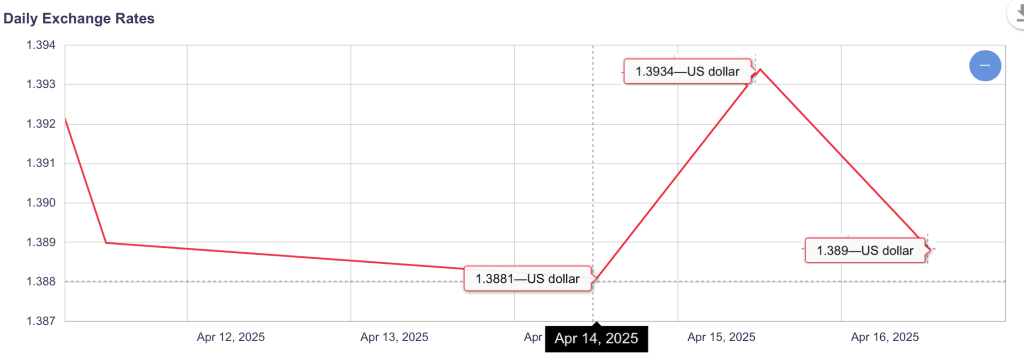
After subtracting the fees, my effective conversion rate was 1.385. Compare this to the Bank of Canada’s published rates, and I think you’ll agree that it’s a pretty sweet deal:

I’m tracking all my Gambit transactions over here, so I can see how often I come out ahead.

News: GlobalX TSX 60 ETF now at 0% MER

This just in!

GlobalX just announced that their Canadian Equity fund CNDX will rebate the management fee for the rest of the year. Up until now, I couldn’t recommend this ETF since prior to this news, its MER was a relatively stratospheric 0.13%1. But 0% is a MER I can live with!

They also have a bunch of their segment ETFs doing the same thing, but I don’t do segment bets. Just asset classes.

I don’t currently own any of this ETF.

  1. Compare Vanguard’s VCE or BlackRock XIC at 1/3 the price. Ok, not letter for letter the same thing, but c’mon… ↩︎

Another money saving idea with Fizz

I’m starting my fourth month with Fizz, a newish provider of cellular services, owned by Quebecor/Videotron. I previously talked about my experience with US roaming (TL/DR: it was positive1) but this week, I found another way to save money, if you’re a Fizz user in Ontario or Quebec.

That is thanks to the Fizz Wallet.

In essence, the wallet allows you to pay as you go for services you don’t use a lot. For me, that could be SMS messaging. With the rise of data-based messaging apps (iMessage, Messenger, WhatsApp to name a few) the need for sending2 SMSes3 in my world is diminishing on a daily basis.

Right now I’m paying $20/month for unlimited Canada wide voice/text and 3GB of data. Right now I could choose to change my plan, eliminate texts and save $4/month, but 3GB monthly data is no longer an option — it’s either 1GB (which I’m not sure is sufficient) or 7GB (which is way more than I’d ever need, and $1 higher4 than what I’m paying now).

Fizz isn’t perfect: no 5G, no caller ID and I still haven’t quite figured out the limitations regarding roaming and voicemail, but it certainly is inexpensive: the current low-price offer is $19/month for unlimited Canada-wide calling, SMS, voicemail and 1G of data. Crank that up to 7G and it’s still just $25/month.

My dear wife became a client yesterday to take advantage of the $35 referral bonus; with Fizz eSIM support, the migration to Fizz took about 30 minutes from start to finish. And since I had a bunch of data piling up, I sent her 500M to get started.

If you want to give Fizz a try, my referral code is INSWI — it’s worth $35 to you (and me :-)).

  1. One aspect that I failed to mention is that buying a travel add-on for roaming on Fizz is valid for the current AND NEXT billing cycle, which, on average, means your travel add-on will be valid for 45 days. In my case, my add-on was valid for two trips taken 3 weeks apart, so that was an even bigger savings since I only had to buy the 2G add-on once instead of twice. ↩︎
  2. Receiving SMS is always possible. ↩︎
  3. iPhone users: that’s “green bubble” texts ↩︎
  4. The first rule of subscription services: never willingly pay more a month than what you’re currently paying. Like the proverbial frog in the pot, small increases to monthly costs are easy to ignore until your budget is cooked. ↩︎

Buying US Stocks or ETFs? Save money on US dollar foreign exchange.

I have a lot of US dollar assets in my retirement portfolio. I’m not really convinced it’s a good idea, but it has taught me the ins and outs of USD foreign exchange rates. Here I’m talking about getting access to (or changing from) US funds for the purposes of investing in your brokerage account. Getting access to US funds to buy things is a different1 animal, one that I covered in a previous post.

Here’s a few things I’ve learned.

Google is your friend for real time foreign exchange (FX) rates

“1000 USD in CAD” is a terrific search term to get an instant FX rate. (also: Euro, GBP, THB…). This is as close as you’ll get for the absolute best FX rate and should serve as your target.

For most brokerages, foreign exchange is a profit center

Meaning: They’re making money every time you convert one currency to another, usually on the order of 1.5% a transaction. Some providers seem to go to great lengths to hide what rate they are using on any given transaction. (I’m looking at you, QTrade2).

There are exceptions in the brokerage community, to be sure.

  • Interactive Brokers comes very close to the ideal rate for any sizable transaction3 and is the big winner when it comes to converting currency for investing purposes45
  • Wealthsimple recently introduced a tiered FX rate depending on how much you’re converting6:
    • Under $10k, 1.5%
    • Up to $25k, 1%
    • Up to $100k, 0.5%
    • Over $100k, 0%

The cheapest way to convert at most brokerages is to use Norbert’s Gambit

Norbert’s Gambit, in a nutshell, involves the following steps.

I must say at this point that although the steps are reasonably straightforward, there are usually delays introduced at each step. For example, you probably have to wait a day for the initial trade to settle before making the journaling request. And journaling may not be instantaneous either11.

With no guarantee that any of these are accurate, here are the specific steps to do the Gambit on a number of popular platforms.

  1. For most people. Since I am a CIBC USD savings account client, using Norbert’s Gambit is also a way for me to fund my USD shopping purchases. ↩︎
  2. When attempting to buy a USD ETF from my Canadian account, the only indication I’m about to get fleeced is the warning message “The account funds do not match the market currency. Currency conversion and foreign exchange rates will apply.” No indication of what the exchange rate they are using. ↩︎
  3. Their posted rates are very close to the google ideal, but there is a small (very small) minimum charge of $2 per trade per https://www.interactivebrokers.com/en/pricing/commissions-spot-currencies.php ↩︎
  4. It’s not ideal for getting cash access for shopping since they have very long hold periods where you cannot withdraw your money. See https://www.interactivebrokers.com/campus/glossary-terms/withdrawable-cash-subject-to-origination-restriction/ for the details. ↩︎
  5. But that web interface, wow is it ever complicated ↩︎
  6. See https://www.wealthsimple.com/en-ca/legal/fees/trade for the details. You’ll need a Wealthsimple USD account to pull this off, of course, and the only kind of USD account Wealthsimple offers is non-registered. ↩︎
  7. Did this at BMO Investorline since you cannot buy DLR online. Apparently you can buy it if you call in your order. At BMO using RY, I was able to get USD on the same day. ↩︎
  8. HOW to do this will vary considerably depending on who your broker is. Best to Google for specific instructions involving your broker. ↩︎
  9. Possibly for buying and selling the ETF, possibly a fee imposed for journaling, something Questrade is doing starting April 1, 2025. ↩︎
  10. And minus (or plus) any changes in the price of the thing you bought. Depending on your broker, each step in the process may take a day or two. If you do the Gambit often enough, I figure this sort of thing just averages out. Sometimes you win, sometimes you lose. ↩︎
  11. Per https://www.questrade.com/learning/investment-concepts/dual-listed-securities/journaling-shares it can take five (!) business days. ↩︎

Questrade Bonus Capability: Passiv

**** Update: Per email communication on October 24 2025, as of January 31, 2026, Passiv will not be offered at all by Questrade, as they are planning to launch their own integrated portfolio monitoring and rebalancing tools”.

**** Update: As of June 1, 2025, Passiv Elite is no longer offered for free for Questrade Clients. It’s now part of a subscription service called Questrade Plus***

As you may have heard, I’m in the middle of a transition between online brokers1. And so I’ve been spending some more time getting to know what Questrade offers to the DIY investor besides free buying and selling of stocks and ETFs.

One thing I looked into lately was Passiv, a service that is offered for free for all Questrade clients.

In brief, Passiv is a 3rd party web application2 that allows you to track your investments from a single screen, no matter if they are found in multiple investment vehicles (e.g. TFSA, RRSP, RRIF) or if they are found across multiple providers (full list of supported brokers is here)3.

What’s more, it also evaluates your portfolio against a model that you define. For example, if you (like me) have an investment portfolio with a target allocation of 5% cash, 15% bonds, 20% Canadian equity, 36% US equity, and 24% international equity, Passiv can assess your current holdings against these targets, and even do the trades to rebalance the portfolio!

Astute readers will note these are a lot of the same benefits I’m a fan of — and one of the big reasons most of my portfolio is invested in all-in-one asset allocation ETFs. (Are these ETFs unfamiliar? You can read about them here.)

I tried to use Passiv to model my own portfolio, but discovered that all-in-one asset allocation ETFs aren’t really supported by the tool4. Once I thought about it some more, it’s clear why — Passiv really markets itself as an ALTERNATIVE to using all-in-ones. Here’s a clear marketing pitch from Passiv that demonstrates its approach: https://passiv.com/feature-posts/model-portfolios-that-cost-less-than-all-in-one-funds-or-robo-advisors.

So to get the full benefit of Passiv, instead of holding XGRO, you would instead hold the constituent components of XGRO, a fund I’ve broken down previously. This would save you some management fees over time. Passiv helpfully does the math to calculate how much here5.

As a certified cheapskate, I’m always interested in saving a bit of money. But there are some downsides I could see in the Passiv approach:

  • You have to actually DO the rebalancing now and then. Not a big deal, but a fund like XGRO does this as part of their offer6.
  • You have to do the rebalancing no matter what. By this I mean that you have to buy when others are selling, and sell when others are buying. You can’t get overly attached to any one segment of your portfolio, because then you start making bad decisions based on “gut instinct”. Humans are notoriously bad at this7.

On the plus side, you will definitely save on management fees, and you could certainly tweak the contents to avoid products you wouldn’t normally buy (e.g. XGRO has some hedged funds, which I don’t like, typically).

An unknown for me is how foreign exchange is handled. That’s always something I consider since a lot of my retirement savings are in USD. Some experiments required 🙂

Anyway, it’s given me something to think about. I’ll have to see how easy it is to use in practice once all my accounts are back in place. Any Passiv users out there? I’m interested in your take — just drop a line to comments@moneyengineer.ca.

  1. And some (not all) of the funds are now showing up in Questrade, about 3 weeks after starting the process. Switching providers is not for the impatient. ↩︎
  2. WARNING: they don’t have an app. But someone named “Pasiv” does, and it looks very similar. ↩︎
  3. Other benefits include tracking of dividends, performance charts, etc. All stuff Questrade is apparently not very good at. ↩︎
  4. One asset class per stock symbol. My home-grown spreadsheet supports dividing symbols by asset class. ↩︎
  5. The calculation doesn’t include Passiv’s fees for the service, which are waived if you are Questrade client. ↩︎
  6. Per BlackRock “XGRO’s portfolio will be monitored relative to the asset class target weights and will be rebalanced back to asset class target weights from time to time at the discretion of BlackRock Canada and/or BTC. Generally, XGRO’s portfolio is not expected to deviate from the asset class target weights by more than one-tenth of the target weight for a given asset class.” [source] ↩︎
  7. If you’re interested in how behavior shapes investing, https://www.looniedoctor.ca/2024/12/13/etf-investor-behavior/ is a very good introduction to the topic. ↩︎