Online brokerage promos: when does the gravy train end?

Online brokers are busily throwing money around to attract new customers; a quick search reveals many active promotions as I write this from Webull Canada, RBC, TD, QTrade, Wealthsimple….All of it has a bit of “if this seems too good to be true, it probably is” flavour to it.

I asked this same question on Reddit and the consensus seemed to be that this is the new normal in the online brokerage world, just like it’s normal for telcos/cablecos/ISPs to throw around big discounts in order to steal customers from one another.

But yet, I feel a little uneasy how money for nothing has become the norm. For DIY investors like me, it’s hard to see how my providers make any money off of me. I did a bit of research into the best proxy I could think of…Robinhood.

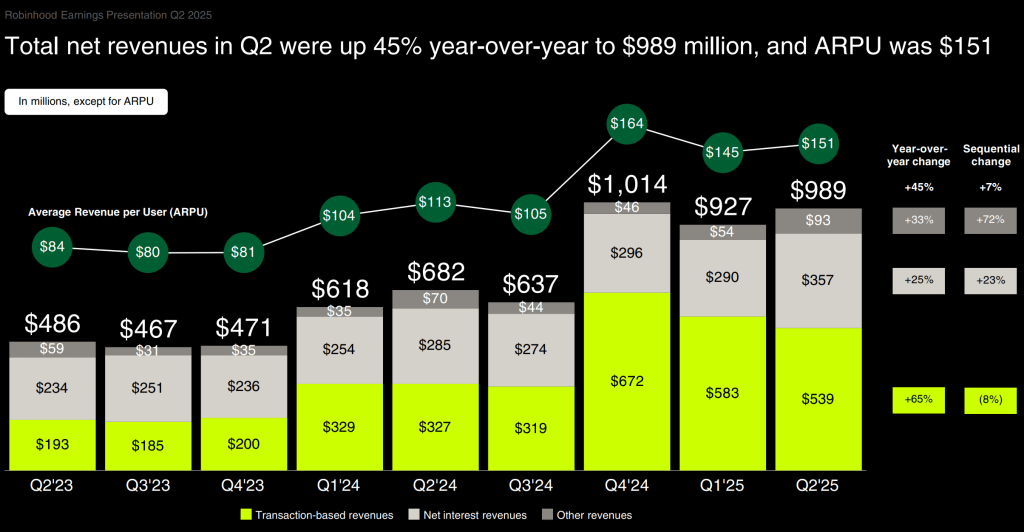
As I mentioned in a previous post, Robinhood is now part of the S&P 500 lineup; this is no fly-by-night company. Their quarterly results are public, and it was quite illuminating. Robinhood’s most recent quarter’s results are shown below.

Robinhood revenue sources: Source Robinhood Q2 2025 Earnings Presentation

So it looks pretty straightforward; revenue is coming from three sources, and their average revenue per user (ARPU) is a pretty healthy $151 dollars. Let’s look a bit further:

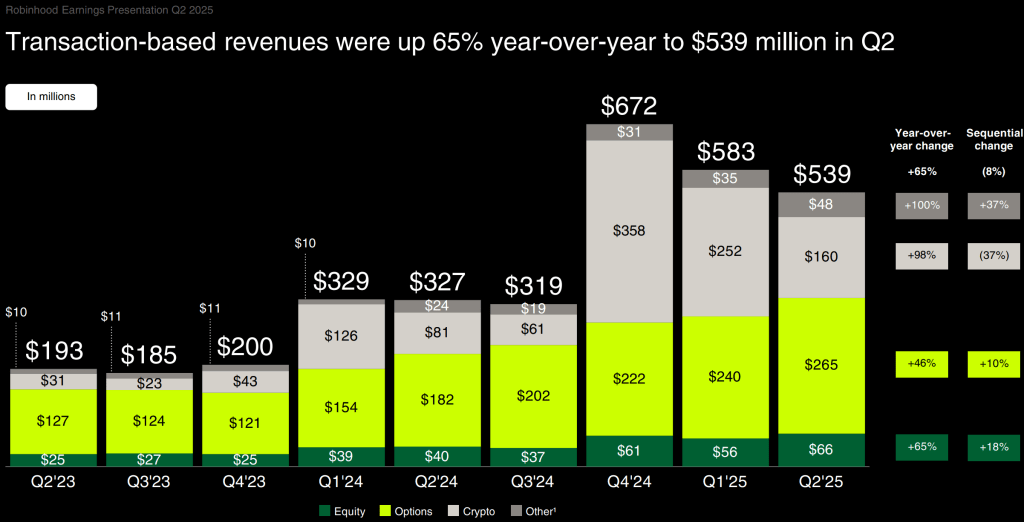
  • Transactions: Options trading and Crypto trading make up the bulk of the revenues here, but roughly 15% of their transaction revenue comes from basic equity trades ($66M in Q2’25).
  • Interest: a large chunk of this is interest made from margin ($114M in Q2’25), but a growing percentage comes from credit card interest charges.
  • “Other”: not elaborated further, but it’s small, so we can ignore it. Perhaps this accounts for the revenue from their 3.5M “Robinhood Gold” subscribers1

The transaction revenue was surprising to me since equity trades are free on Robinhood, yet they are still finding a way to make money. Further reading indicates that the exchanges are sharing some of their bid/ask spread revenue with Robinhood, which seems like a win/win/win: Robinhood makes a tiny bit of revenue on each trade, the exchange gets more volume which allows them to make more spread revenue, and the customer gets free trades2.

Robinhood transaction revenue: Source Robinhood Q2 2025 Earnings Presentation

So, assuming the Wealthsimples and Questrades of the world are following Robinhood’s lead, they are making money off of me every time I place a trade. (Sorry, I don’t trade options, I don’t trade crypto, I don’t trade on margin, and I don’t run a balance on any credit card I use). Since switching to Questrade (and getting free trades) I can tell you that my own behaviour has changed; I have always hated seeing non-productive cash in any of my accounts, and so with free trades, I can freely buy one share of something to clean up the last dribs of cash I may have in any given account. My “getting paid in retirement” strategy also requires a monthly flurry of trades (see the details here).

All this to say I feel less uneasy about the free money being thrown around; Canada’s online brokerage community seems to be following a successful playbook:

  • Get lots of customers, even if you have to pay them to get on board
  • Expand your offers, especially profitable offers, and entice as many of your army of fans to use them (crypto, margin trading, options trading, credit cards, subscription offers)
  • Invest just enough in your platform to not lose too many clients; switching online providers can take a lot of work (I know, I did it: read more here)

So my advice is to absolutely take advantage of the free money out there and enjoy the gravy!

  1. Perhaps serving as the inspiration for Questrade Plus? ↩︎
  2. Not everyone thinks this is a great idea ↩︎

Passiv guide to investing

Passiv is a tool I was introduced to via my online broker of choice, Questrade1. As I mentioned elsewhere, Passiv’s main mission is offer an alternative to all-in-one ETF funds by automating trades to make sure your individual holdings support your overall target.

Anyway, Passiv is a nice add-on for me because it’s a way better way for me to see accounts for which my spouse has given me trading authority (it’s a real weakness of the Questrade platform). On one screen, I can see all the accounts in the retirement portfolio.

Anyway, since I use Passiv, I get the occasional email from them. Recently, they posted a blog called The Beginner’s Guide to Passive Investing which I think is a pretty good summary of my own approach to investing; it’s a pretty good article to share with a new investor, too. There’s lots we agree on:

  • Saving is different from investing (my view here)
  • Passive investing is the way to go (I own no individual stocks in my retirement portfolio)
  • You don’t need an advisor. We disagree on why. For me, it’s because there’s all-in-one ETFs. For Passiv, it’s because there’s Passiv 😉
  • Invest consistently, and without thinking. Pay yourself first.

They end the blog with a section called How Do I Start Investing?, which has a lot in common with an article I wrote called Ok, I’m ready to fire my advisor. What do I need to do? Let’s take a look at what I agree with and what I disagree with in that part of the article.

Open a Brokerage Account

Passiv seems to think there’s only two brokers out there, namely Wealthsimple and Questrade2. Given that the Passiv platform supports direct connections to these two brokers, this is somewhat understandable. But make no mistake, there’s plenty of other options out there. And what’s right for your neighbour may not be right for you. What broker to use will depend on a bunch of factors, and I talked about some of them here.

Set up Your Accounts

Yup, that’s something you need to do. I broke it down in some detail over here, since I switched brokers earlier this year. Since the target audience is new investors, non-registered accounts don’t get a mention here, but for many long-term investors, a non-registered account ends up being part of the mix. And RRIFs, of course.

Choose Your Investments

Passiv doesn’t have any use for all-in-ones (aka asset allocation ETFs) since that’s kinda core to what they offer. So while their recommendations are sound if you want to buy into the five funds they recommend3, it’s more complicated than it needs to be. For me, it’s a two-step process

Set up Passiv

It’s of course a bit self-serving, but a tool like Passiv is quite useful to track your allocations if you choose not to use an all-in-one. Or you can use a spreadsheet like I do.

Fund Your Account

If you’re transferring from some other financial services provider expect a lot of form filling. I documented some of the issues with transfers in a general sense here and specific to the RRIF holder here.

Buy Your Investments

No argument here; if you don’t actually invest, your money is just sitting idle. If you buy an all-in-one ETF, that’s one trade per account.

Automate and Chill

Yes, Passiv can in fact do trades on your behalf. (That’s an upcharge, though). A Passiv-run portfolio is possible4. All-in-one ETFs are also automated, since part of what they do is periodically rebalance their holdings automatically. In retirement, automation seems difficult. There’s a lot of steps to get paid.

In conclusion

Passiv’s blog is an excellent primer on how to get started; feel free to share it with your kids, colleagues and relatives. Just be aware that it promotes the Passiv approach which, if followed to its logical conclusion, requires a subscription to Passiv Elite — worth it, if that’s the direction you prefer.

  1. Like most online brokers, Questrade is good at some things, not so good at others. You can read my review here. ↩︎
  2. They are both fine providers; I have accounts at both. And QTrade too, but that should be done by the end of 2025. Anyway, buying and holding ETFs is offered by all Canadian brokers. No need to limit yourself to just these two. ↩︎
  3. Three equity ETFs for the Canadian (VCN), US (VFV), and International markets (VDU) and two bond ETFs covering the Canadian (VAB) and US (AGG) markets. Before I retired, I had a similar approach, but chose different ETFs. In retirement, I chose to simplify. ↩︎
  4. Be mindful that trades executed in non-registered accounts generally have tax implications. ↩︎

News: QTrade launches free money promo

What seems to be normal nowadays is to have online brokers write cheques to investors in an attempt to attract new money. I wrote about Wealthsimple’s latest offer yesterday, and now I see that QTrade is the latest broker to try to entice investors to move their money. I’ve been a QTrade client for many years (you can read my take on them here), but this year moved most of my holdings to Questrade1 (my take here).

Anyway, the maximum possible free money you can earn is $2000 with this latest QTrade promotion. All the details are captured here, and the fine print is found here.

I’ll save you the trouble, the details as I see them:

  • To be eligible, you can be a new or existing client, but you have to open a new account23 with QTrade before November 30, 2025 using the promo code QTRADE20254
  • Fund your account5 before the end of the year to be eligible for your free money
    • 5% matching on the first $15k (total possible: $750)
    • 1% matching on the next $125k (total possible: $1250)
    • No matching after that (i.e. the total reward is capped at $2000)
  • Keep your money there until December 31, 2026 and get paid in a lump sum in February 20276.
  • If you’re also a new client, you get free trades7 until the end of the year

Comparing Wealthsimple’s latest offer to QTrade’s offer might be fun. In the table below, I’m ignoring the margin account bonus offered by Wealthsimple and the impact of free trades offered by QTrade8.

If you move…Wealthsimple BonusQTrade BonusWinner
$15k$09$75010QTrade
$25k$250$850QTrade
$50k$500$1200QTrade
$100k$1000$1600QTrade
$150k$1500$200011QTrade
$200k$2000$2000Wealthsimple12
>$200k1% of amount, up to $20k$2000Wealthsimple

QTrade’s offer is the clear winner for amounts up to $200k, but Wealthsimple wins if you’ve got more loose change. One big difference is how fast you get your hands on the bonus money. Wealthsimple starts paying out 1/12 of your bonus 60 days after the money lands, whereas QTrade makes you wait a whole year (and then some) before giving you the money.

As a certified cheapskate, I’m always happy to take advantage of free money, and more and more providers13 seem to be taking this route in an effort to attract new customers. It’s a good time to be a DIY investor!

  1. To take advantage of THEIR free money offer, naturally ↩︎
  2. My interpretation of the Ts and Cs is that opening multiple accounts will NOT increase your ability to collect free money. The limit is $2000 per client, across all new accounts opened by that client ↩︎
  3. There’s no restrictions that I see on the type of account. QTrade provides all of the ones you might care about: TFSAs, RRSPs, RRIFs, RESPs, non-registered. They also support USD accounts. ↩︎
  4. Speaking as a current QTrade client, opening a new account takes only a minute or two. I would expect it take a little longer for a new client, but this step needn’t dissuade you. ↩︎
  5. Has to be “net new” money, so my thought of shifting from one account to another isn’t eligible. Darn. ↩︎
  6. Paying out bonuses month by month seems to be a more common way of doing this, but to each his own I guess. ↩︎
  7. Most of the ETFs I care about are included in QTrade’s “Free to Trade” list ↩︎
  8. And the time value of money. ↩︎
  9. Wealthsimple requires minimum $25k before paying out ↩︎
  10. 5% for the first 15k, 1% after that ↩︎
  11. QTrade’s bonus cap is $2k which kicks in at $140k ↩︎
  12. Because Wealthsimple pays out faster than QTrade does ↩︎
  13. WeBull and moomoo (not making those names up, promise), two new providers on the scene, also have promotions. ↩︎

News: Wealthsimple Summer Promo

UPDATE September 18th: Wealthsimple extended the registration window; it’s now October 15th. Still time to get free money if interested.

Summary: Wealthsimple announced a new promotion in an effort to drum up more business today. Ignoring the margin component, you could stand to make 1% cash back on new deposits, up to $2M. That’s up to $20k in free money.

The promotion is featured here, and the fine print is all here.

You may get the impression that the promotion is only targeting investors who trade on margin1, something I don’t do myself2. But no — they are paying 1% match for all money moved, margin or not. I think it’s worth taking a closer look if your current broker isn’t giving you free money to earn their business3. 1% cash back is a nice incentive, right?

The details of the promotion as I see it (you’re welcome):

  • You must first register your intent to participate no later than September 5th October 15th.
  • Once registered for the promotion, you have 30 days to initiate a fund transfer, and you have 90 days to complete it.
  • You have to move at least $25k4, and 1% bonuses will be paid out to a maximum of $2M in assets moved
  • Bonuses are paid out in 12 equal monthly instalments
  • Removing more than 10% of what you transfer in within the year will cause your bonus to be reduced accordingly

As I still have a few RRIF accounts with QTrade (reasons why here), I thought, perhaps, I could score a bit MORE free cash. Unfortunately, Wealthsimple doesn’t support self-directed spousal RRIFs (and my call to support confirmed this) so I guess I’ll have to wait this one out. As it turns out, this is indeed possible, but spousal RRIFs cannot be opened as brand new accounts; they have to be converted from an already-existing spousal RRSP account. This means that you need special agent support to pull this off without issue. As I like free money, I’ll be giving this a try.

Anyway, if you’re new to the world of Wealthsimple, want to earn $25, and want to use my referral code, it’s here.

  1. The promotion pays 2% match for margin accounts if there is active margin. They want to make money off of people who borrow money to invest which makes sense of course. ↩︎
  2. My wife does, though, thanks to a spousal loan. I really should write a bit about that. It’s a nice way to get a bit of income-splitting in certain instances. ↩︎
  3. My broker (Questrade) pays me a bonus every month as a thanks for moving my business there. ↩︎
  4. $25k is the minimum amount that has to be moved before Wealthsimple will cover transfer-out fees as well ↩︎