Questrade’s offer of free money (to a maximum of $20k) applies to both new and existing clients. (Regrettably, I think that since I started my — still uncompleted — transfer last year, I won’t be eligible myself. Now isn’t that a kick in the head? Of course, I’m still collecting from the transfer I did in early 2025.)
Base reward: 1% cash back for registered1 accounts, 2% cash back for non-registered accounts
Move 3 or more kinds of accounts (one of which has to be non-registered) and double your base reward to 2% for registered accounts, 4% for non-registered accounts
Maximum cashback for registered accounts: $10k
Maximum cashback for non-registered accounts: $10k
Must start the transfer before Feb 2, 2026, and it has to complete by May 29, 2026
So one way to qualify for the maximum reward would be:
Move a TFSA worth $250k to get $2500 base
Move an RRSP worth $250k to get $2500 base
Move a non-registered account worth $250k to get $5000 base
This is 3 accounts so this triggers the multiplier that doubles the reward:
$5000 for the TFSA, $5000 for the RRSP, total $10k
$10k for the non-registered account
So by moving $750k, one could take advantage of a $20k reward. Which, admittedly, is a pretty high bar, but $20k is not nothin’ either3.
To me, if you’ve grown tired of not getting free money this seems like a pretty good deal, but only if you’re able to qualify for the bonus by moving 3 kinds of accounts. Otherwise, the reward is just 1% and brokers have been more generous than that of late (e.g. QTrade).
So act quickly and decisively, this one will be over before you know it. If you want to show some love, you can even use my Questrade referral code4 🙂
For example: TFSA, RRSP, RRIF, RESP. LIRAs are not listed in the Ts and Cs, though. ↩︎
You’re allowed to withdraw 5% with no penalty. If you exceed that, then you don’t get any more bonus payments. Exception: RRIF minimum payments :-). ↩︎
Something I never paid much attention to when I was building my retirement savings were the delays built into the system when it comes to moving money around. The Mechanics of Getting Paid in Retirement: 2026 Edition shows the steps I use to get a monthly paycheque, but it doesn’t show the delays. When I was working, I could predictably expect a paycheque twice a month. No guesswork. Now that I rely on these money movements to do things like pay bills, I’ve become a lot more attentive to where things slow down. Stressing about them isn’t helpful, but knowing about them in advance means you can build them into your plan so you don’t get caught in a cash flow crunch.
I should preface this by saying that I use Questrade and Wealthsimple for my providers, and how your provider handles things can be quite different, so take these as examples, not as absolutes. So where have I seen things slow down?
Time between selling an asset and having useable cash
Here I’m talking about cash as cash, not cash to immediately do another trade, i.e. sell ETF “a” and then use the proceeds to buy ETF “b”. For that example, I think most brokers allow you to sell to buy immediately after the trade executes, at least in my experience.
Here I’m talking about selling ETF “a” so you have the cash to pay your credit card balance. This is usually a multi-step process. The first step is having access to the cash you gain from the proceeds of a sale. This is generally speaking a business day after the trade executes. So if you sell on Monday, the cash appears in your account on Tuesday. If you have a margin account (which I do for my non-registered holdings), then it has the nice side benefit of providing access to the cash immediately after the trade executes.
So now that the cash is there in your trading account, you then have to get it to a place where you can spend it. And here there will be a lot of variability depending on who your broker is, who you bank with, and how you actually move the money (EFT, wire transfer, physical cheque).
For me, I use EFT withdrawals to my CIBC chequing account. And this has delays too.
As an example, I executed a trade in my Questrade non-registered account to help fund my December paycheque.
December 23rd: sold some HXT in the morning, immediately requested a withdrawal to my CIBC account using an EFT. The money was available instantly because I have margin in that account.1
December 29th: deposit received to my chequing account
# of business days: Dec 23rd (0.5) Dec 24th(1), December 29th (2)= 2.5 days to get my $$$
I also sold some funds in my Wealthsimple account on December 23rd. I wasn’t able to withdraw anything until the following day since this account isn’t a margin account. But on the 24th, when I made the request via EFT, the money appeared in my chequing account in minutes. This was 1.1 days2 to get my $$$$.
I do recall when I managed my parent’s BMOI account cash in a non-registered account could immediately be used for bill pay, cheque writing, eTransfers or ATM withdrawals, thanks to their “AccountLInk” service.
Delays in moving money between accounts at the same brokerage
In my VPW-driven decumulation methodology, I have a non-registered Questrade account that is exclusively used as the “cash cushion” — about 5 months of rolling average salary, invested in ZMMK and ICSH, two funds that are on my ETF All-Stars page. Every month, I either get paid from this account or I move money into it from my non-registered account. Getting paid undergoes the same delays as I mentioned above: about 2.5 days, but moving money into this account from another account (one would think) is instantaneous, no? No, not with Questrade.
Typically, it takes a day before the money becomes useable in the destination account. Not so with Wealthsimple, where transfers are instantaneous.
Delays in getting dividend payments
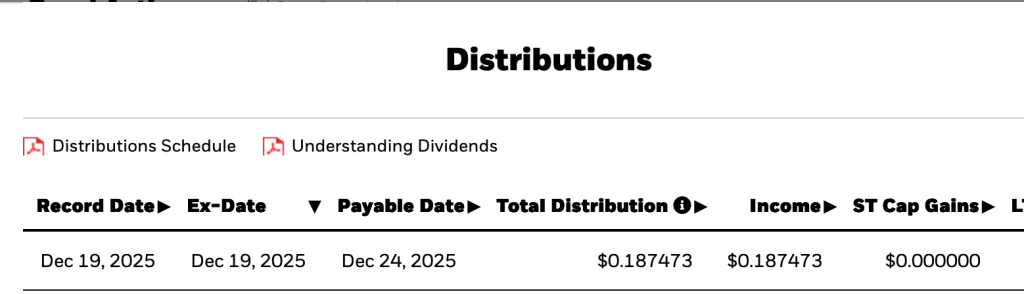
All ETFs publish their dividend schedule. For example, here’s what ICSH’S looks like:
“Ex-Date”, at least for my provider (Questrade) is the date used to indicate a “dividend event” notification. But “ex-date” isn’t when you should look for your dividend payment; you have to own the ETF in question by ex-date to take part in the next dividend payment. And so “Payable Date” is the one of interest, and the lag between the ex-date and the payable date is highly dependent on the ETF in question. Since most of my ETFs pay out either quarterly or monthly, often declaring ex-dividend on the last business day of the month, the first week of January will be active with new dividend funds rolling into my various accounts.
Delays: Just Roll with it
While I do find it irritating that my own money gets tied up for days at a time for no discernible reason, I’ve adapted my expectations accordingly and don’t worry about it. In the early days of retirement, be aware that things may not happen as quickly as you expect, so it’s probably a good idea to have a bit of cash flow leeway in the first month or two as you work out the kinks in your own decumulation system.
And no, I don’t get charged interest when I do this. I’m not sure why, but if I did, I would simply wait a day. I just like being able to make the move in the moment — still logged in, the amounts are fresh in my mind…. ↩︎
Fast transfers seem to be part of the Wealthsimple ethos. ↩︎
Used for monthly salary; held only in non-registered
XEQT: CAD 100% Equity
0%
6.5%
Mostly in TFSA
HXT: CAD Equity
7.4%
6.3%
Used for monthly salary; held only in non-registered
XIC: CAD Equity
5.3%
6.1%
Did not add or subtract from this holding this year
DYN6005: USD HISA
3.7%
0%
Replaced by ICSH
DYN6004: CAD HISA
2.6%
0%
Replaced by ZMMK
HXS: USD Equity
2%
0%
Sold off from non-registered accounts to fund monthly expenses
VCN: CAD Equity
1.8%
1.1%
In TFSA; reduced in favour of XEQT
What didn’t change much
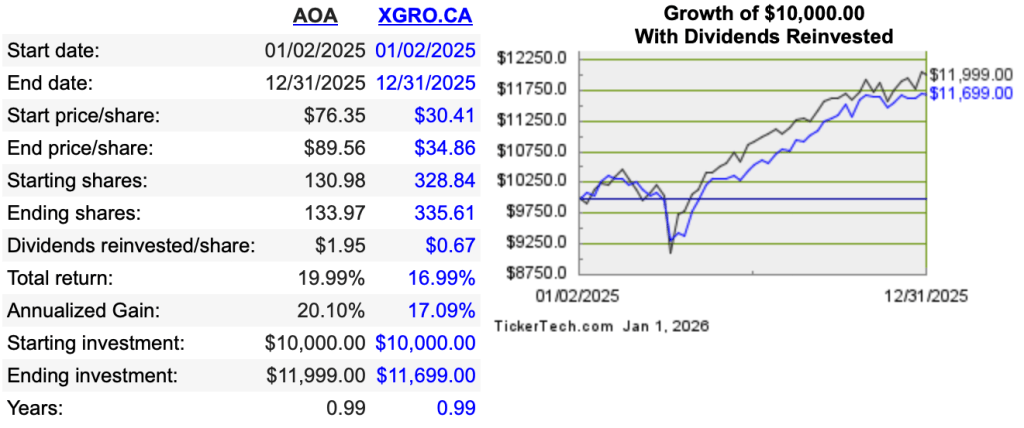
The portfolio is still dominated by XGRO and AOA (not coincidentally, these are two of my ETF All-Stars) and they both had excellent years, as shown by this tool:
What also didn’t change is my overall approach: decisions for shifting funds is totally dependent on maintaining my asset allocations that haven’t changed either:
5% in cash or “cash like” holdings
15% in bonds
20% in Canadian Equity
36% in US Equity
24% in International Equity
This approach meant that what I sold off in my non-registered portfolio to fund my day to day expenses changed throughout the year; as the year progressed I sold HXDM, then HXS (reducing this to zero), and then finally HXT, all in the service of keeping my assets in line with my targets.
What did change
As a result of changing brokers (QTrade to Questrade), I lost the ability to cheaply hold HISAs. And so I had to change tactics and hold “HISA-like” ETFs instead. (which, on Questrade, like all ETFs, can be bought and sold at no charge). At the same time, I realized that I could increase my returns by shifting more to the US market. Significantly higher interest rates in the US means that I can get more for my “safe” funds, with the small annoyance that I have to deal with USD. You can see the latest rates on my frequently updated page.
As I sold off “pure” equity funds from my non-registered accounts, I had to make changes to keep my bond percentages aligned with my targets3. This is the reason XEQT (a global 100% equity fund) now makes an appearance in the overall picture. The nice side-effect of adding XEQT is that my portfolio is now 76% held in all-in-one funds, up about 4% from the beginning of the year. All-in-ones do the rebalancing for you, which is a good way to avoid bad behaviours.
Behind the scenes I also tried to better focus each of the account types to make things simpler and clearer:
TFSAs are now 90% equity, with the rest held in bonds. The rationale here is that TFSAs will be the last things I touch to fund retirement, and hence have the longest time horizon. There are still too many individual ETFs here, and my January resolution is to simplify this further.
RRIFs now have only three funds: AOA, XGRO and ICSH.
Investment accounts will remain a bit chaotic as most of my retirement expenses are coming out of these. It also happens to be the place where my “free money” payments end up and so there is a small amount of inbound cash to purchase things with. The 2026 plan is to continue to draw down my non-registered funds since my spouse is still working and would be taxed higher on her capital gains.
What’s ahead in 2026: RRIF
My own calculations4 show that my household RRIF-minimum income will be up 19% YoY, a result of good returns in the RRIF (roughly 11% YoY by my calculation) and being a year older. Selling XGRO every month will cover the required payments, and quarterly I will shift a portion of AOA into XGRO, converting the USD to CAD using Norbert’s Gambit.
What’s ahead in 2026: TFSA
January will see an effort to reduce the number of ETFs here. There are multiple CAD equity ETFs which I should consolidate into one, for instance.
We continue to contribute monthly to the TFSAs. The goal is to maximize equity percentage while minimizing the number of funds held. Once the cleanup is done, I expect to purchase XEQT monthly. Questrade introduced automated investing which I’ll likely set up to accomplish this.
What’s ahead in 2026: Non-Registered Accounts
The same strategy as 2025 will continue. Shortfalls in my monthly salary will be covered by selling assets in the non-registered accounts. I ended last year up 2% YoY in my non-registered accounts; I don’t really expect a repeat there. All things being equal, I should be down in my non-registered accounts at this time next year.
Indirectly. I haven’t tried to do a USD withdrawal for a RRIF payment, but in theory it should be possible. Instead I convert my AOA into XGRO a little at a time using Norbert’s Gambit. ↩︎
My VPW cash cushion is about 50% of my cash position in the retirement portfolio. The other 50% of my cash position is inside the RRIF in order to avoid taxation on those monthly distributions. ↩︎
AOA and XGRO are both 20% bonds, not 15%, and so mathematically this has to be offset with 100% equity somewhere in the portfolio. ↩︎
My providers will give me the real numbers sometime in the coming weeks. How much hassle this will be is TBD. ↩︎
As previously noted, I’m in the process of closing off my last accounts with QTrade. No particular reason I did that other than to chase free money and to reduce complexity by reducing the number of brokers I deal with.
There were four RRIF accounts to move. I moved my own RRIF account to Wealthsimple in late October to take advantage of (you guessed it) free money, which left 3 other accounts to move to Questrade before the end of the year.
The Wealthsimple transfer was really simple, initiated online in about 5 minutes, requiring no follow-up on my part, and completed inside of 2 weeks. Wealthsimple even went so far as to proactively refund the $150 transfer out fee charged by QTrade. I received my first free money payment 2 weeks ago. Couldn’t have been easier.
For the last three RRIF accounts, I waited until my November RRIF payments had been made from QTrade in the normal way before initiating the transfer to Questrade1 on November 30th. But of course, for these three, there was a problem. Questrade is famously opaque in its transfer out messaging, but I provide the message provided from them verbatim:
Please be advised that RRIF/LIF account transfers are subject to the industry-wide cut-off date, November 28, 2025. This cut-off date is not specific to Questrade, but is arranged and agreed upon by all Canadian financial institutions to ensure yearly payments are made in an orderly and timely manner to all account holders.
After a number of phone calls to both QTrade and Questrade, it seems that the meaning of the above message is that RRIF transfers between brokers are not possible during the month of December. I found a few references to similar problems with different brokers from years gone by.
Anyway, that’s yet another bit of weirdness associated with RRIFs that I’ve encountered:
And now, that transferring out a RRIF cannot be done during the month of December
I could uncover no reason for why this restriction exists3, but I’m guessing it was once a problem in the days of manual calculations and mainframes that has never been changed. I am hoping at this point that the first week of the new year will get my RRIF moving again, but I don’t have any certainty that this will be the case.
Anyway, dear readers, take note: if you’re planning on moving a RRIF, make sure you initiate it by the beginning of November! And if anyone out there can tell me the reason, happy to be educated. Just drop me a line at comments@moneyengineer.ca.
You may wonder why I didn’t just move all my accounts to Wealthsimple. It was because they didn’t (at the time) support spousal RRIFs for DIY investors. They do now. Part of me wonders if Wealthsimple is going to end up with this money. ↩︎
Even if you take monthly payments from your RRIF as I do ↩︎
And, having exceeded the recommended annual exposure to clueless level one support agents, I thought the better of it for my mental health. ↩︎
Tax loss harvesting is the strategy whereby assets in non-registered accounts are sold to generate a capital loss1. These losses can be used to offset capital gains, either this year, in previous years (up to three years back), or in future years (forever)2.
Since CRA uses the settlement date of your asset sale, and since most (all ?) brokers take a day to settle a trade, this means to get your capital loss in fiscal 2025 you have to sell by December 30 to settle on December 31, the last business day of 2025.
After the current buoyant year in the markets, there’s probably not too many examples of this, but if you bought bonds in 2022…. ↩︎





 The Money Engineer