iPhone Cheapskate

I know Apple devices have a reputation as being premium/pricey devices and so seeing “iPhone” and “cheapskate” in the same sentence is probably controversial, but if you’re a long time owner of Apple devices (4 Mac computers1, 2 iPads, 2 iPhones, one old iPod still ticking), there is a strong ecosystem factor that makes it hard to break free2. Addtionally, the hardware3 is really quite rock solid (if nearly impossible to repair nowadays), so you do get a bit of longevity when you spring for an iDevice.

But let me share with you a new thing I discovered yesterday that may save you from an upgrade that isn’t necessary.

I’ve been struggling with “out of storage” warnings on my iPhone4 for a number of months now. Every time I got one, I checked for the usual culprits:

  • Too many photos/videos on my phone. I try to keep the number very small (often zero) since I use Google Photos to back up any image to the Google cloud. No need for local copies, since I can grab them on demand from the cloud5.
  • Too many photos/videos sent via messaging apps (and I use a bunch: Messenger, WhatsApp, Messages, Slack)
  • Too many downloaded podcasts (listening to podcasts while on road trips or runs is a favorite habit of mine; the offerings of Pushkin are generally very high quality)
  • Too many apps that I used once and then moved on from

And after going through the list, I would normally clear up enough space to quiet the warnings for a while. The last time I got one, i got a little infuriated and deleted 95% of the music I keep on my iPhone because I don’t listen to music on it all that often.

But less than 2 weeks after the extreme purge, I got yet another “storage low” warning. I was a bit exasperated at this…what’s the point of having a phone if I’m spending hours every week reducing its capabilities? No photos, no music, no podcasts? No way!

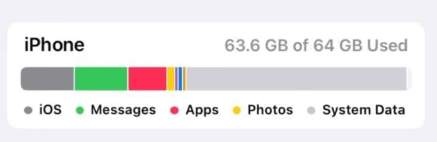
So I took a much closer look at the “storage” report on the iPhone, and it looked something like this6:

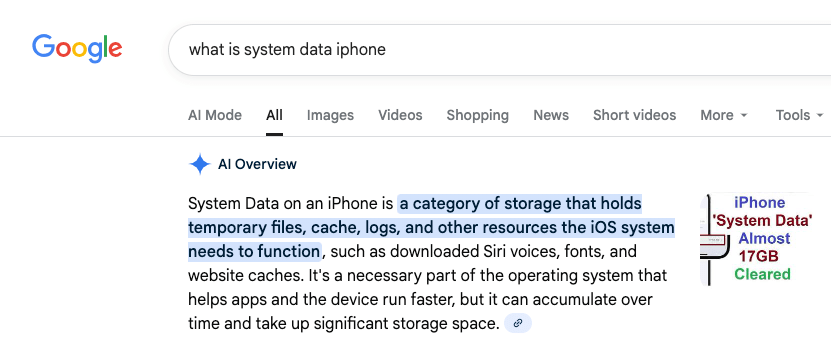
“System Data”, the light grey bar (not to be confused with iOS, the dark grey bar) had grown to take up an ENORMOUS amount (~30GB) of data on my phone. What, exactly is “System Data”, you may ask?

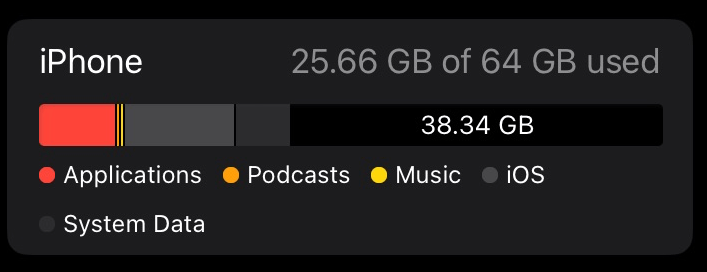
That, it would seem, is a rather accurate description. Once I determined that this stuff was probably expendable, I set out researching how to get rid of it. I’ll save you sifting through dozens of bad videos and terrible advice and cut to the chase. Here’s what my iPhone storage looks like this morning:

You’re seeing that right — 38GB free, up from 1GB free. “System Data” reduced from around 30GB to 5.75GB. So what did I do?

Rather than spend hours trialing and erroring deleting apps and re-installing them, I went nuclear. I backed up the phone to iCloud and completely erased it7, then restored it. This is an extreme measure that isn’t for everyone but the results are quite clear.

Here’s a non-exhaustive list of why you should be very careful before doing this to prevent loss of data — don’t say I didn’t warn you!

  • you don’t back up your photos/videos anywhere
  • you haven’t backed up your iPhone to iCloud
  • you don’t have your music backed up somewhere (if purchased in iTunes, all can be re-downloaded; if synced from a computer, that can be redone)

Anyway, for me, having migrated phones more than once, I was pretty confident I wouldn’t have much in the way of downsides in doing this. Some things you have to re-do

  • rescan your fingerprint for TouchID
  • retrain Siri to respond to your voice
  • Re-enter your payment cards for Apple Pay
  • Re-authenticate into some/all of applications that require it
  • Resync your music

Anyway, all this to say that before you think you need to upgrade your phone because you’re out of space, maybe take a closer look…

  1. One running Linux MX because it’s over 10 years old, one gifted to me from Wealthsimple, one in the upstairs office that I should probably sell, and one that I’m typing this from (another ancient laptop with a “battery” in name only that should probably get the Linux MX or Chrome OS treatment at some point). ↩︎
  2. Most lately, Apple’s Passwords app is so so good ↩︎
  3. The collection of still-functioning and largely functional hardware is a testament to that. ↩︎
  4. A 64GB iPhone SE gen 3, if you’re wondering. Yes, it’s old. I’m a cheapskate, remember? ↩︎
  5. Of course my free Google storage is beginning to get squeezed, but a small time investment can usually generate pretty big gains; a lot of what I take pictures of nowadays is stuff I’m trying to get rid of. ↩︎
  6. Not from my phone, just a nice image with the correct attributes I found; enormous System Data contribution, and less than 1GB of free space on my phone. ↩︎
  7. Except for my Airolo eSIMs, that was something iOS offered to keep around after selecting “Erase Content and Settings”. ↩︎

Mini-Review: ValueInvesting.io Backtesting

“Backtesting” is a commonly-used tactic to see how well the portfolio you have (or are considering) would have performed historically. While “past performance does not guarantee future results” it’s better than not knowing.

I stumbled upon valuetesting.io when I was trying to backtest…something, I don’t really remember what I was up to. Anyway, my random internet walk found valueinvesting.io, which seems to be chock full of all kinds of tools that I haven’t looked at, so I’m just going to focus on the backtesting tools, which I did spend a few hours playing around with. You have to navigate to https://valueinvesting.io/backtest-portfolio to access this portion, and if you want to save portfolios, you have to create an account.

So what, in a nutshell, does this tool do? In their words:

Our portfolio backtesting tool allows you to evaluate the historical performance of up to 3 portfolios. We support 2 portfolio types: asset classes and tickers (stock, ETF, mutual funds). Multiple backtesting scenarios are supported such as periodic capital inflows or outflows, allocation rebalancing frequency and leverage type. Our tool provides historical returns, risk metrics, drawdowns and rolling returns information about your selected portfolios.

https://valueinvesting.io/backtest-portfolio

Let’s take a look at the two kinds of portfolio types they support: asset classes and tickers.

Backtesting using asset classes

The downside of this tool as a Canadian investor is pretty obvious when you try to build a portfolio using asset classes. (Asset classes are integral to the way I think about my retirement portfolio — you can read more about my approach here.) There’s no “Canadian Equity” category to choose (boo!).

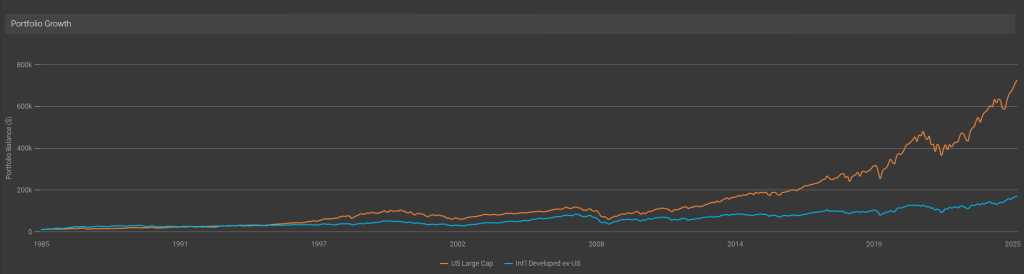
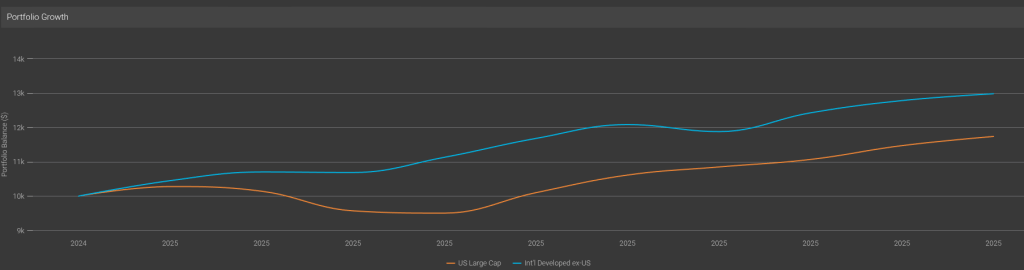
The class that would hold the most Canadian equity would be “Intl Developed ex-US Market”1, so let’s compare that to say the “US Large Cap” (which I take to be a good proxy for the S&P 500).

The good old S&P has left the rest of the developed world in the dust, it seems…Well, except for THIS year:

Anyway, the asset classes are good fun and all, but without a Canadian index to track, it’s not too useful to me. (And, inexplicably, nowhere could I find a definition of any of these in the tool, and an email to the support address remained unanswered at the time of publication). So let’s move on to something more interesting, namely the ticker backtesting!

Ticker Backtesting

As the name implies, this portion allows you to enter tickers, and there’s full and complete support for Canadian ETFs that I tried.

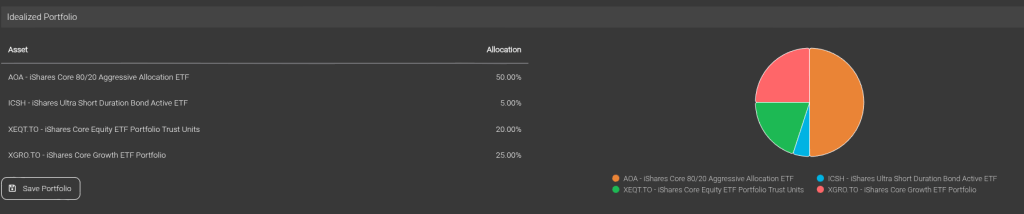
So of course I immediately tried to build my idealized portfolio, which is what my “What’s in my Retirement Portfolio” would look like without the non-registered assets2.

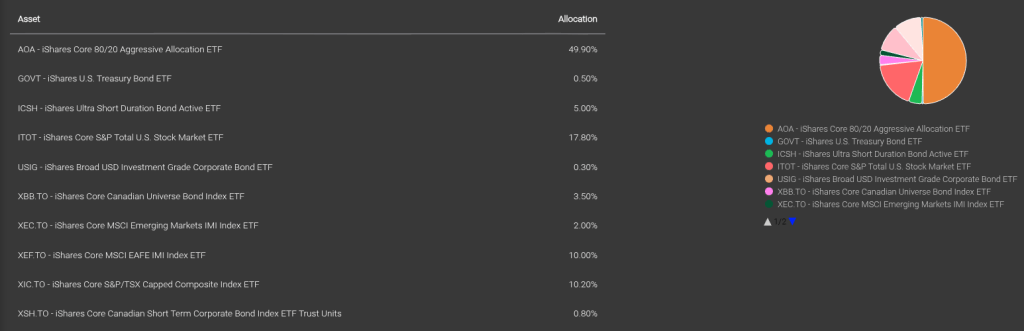
The problem? XEQT and XGRO (two of my ETF all-stars) haven’t been around all that long, and so I can’t backtest very far. No matter, by looking at the composition of XEQT and XGRO and doing some clever math, I can create the equivalent decomposed portfolio:

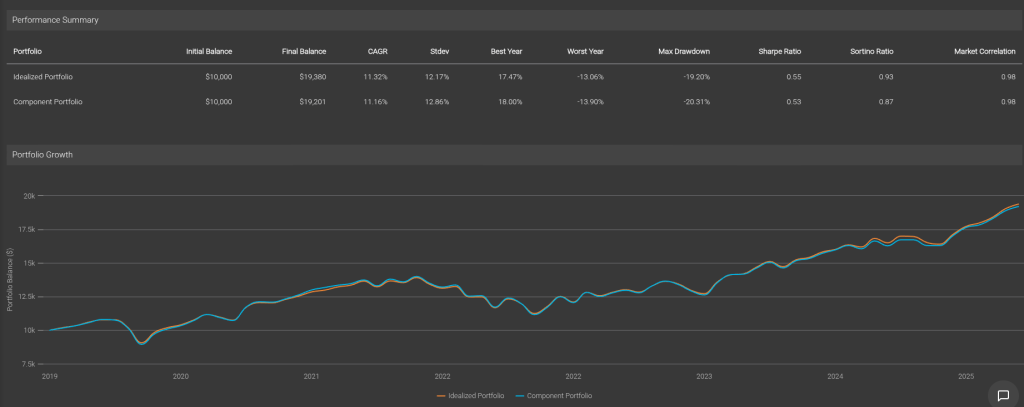
And I can prove that I got it right by backtesting the two against each other. Pretty good, eh?

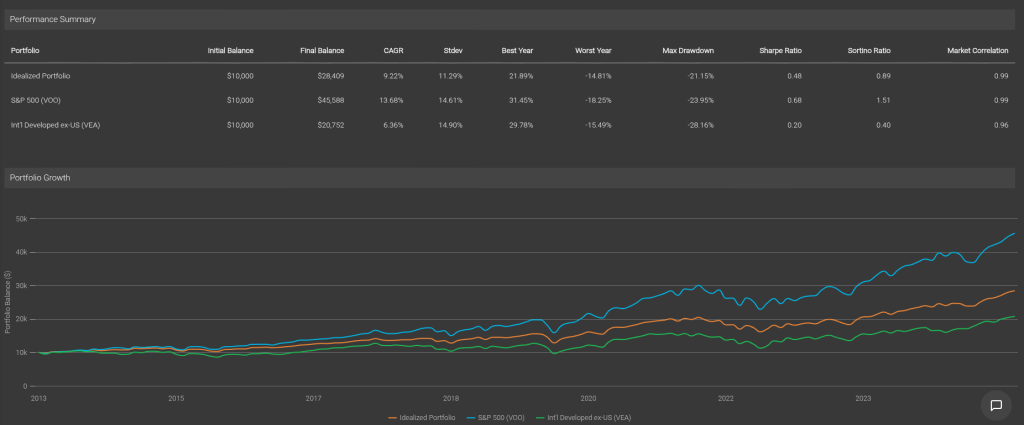
So with my decomposed portfolio at the ready, I can compare its performance long-term against (for example) just buying the S&P 500 index (VOO) or the International Developed ex-US index (VEA).

As expected, my portfolio has quite a bit poorer performance than the S&P, but better than the International ex-US. The bond/cash component smooths out the standard deviations (that’s “volatility”) so my worst years (although still a bit scary) are still a bit less than experience of owning 100% equity.

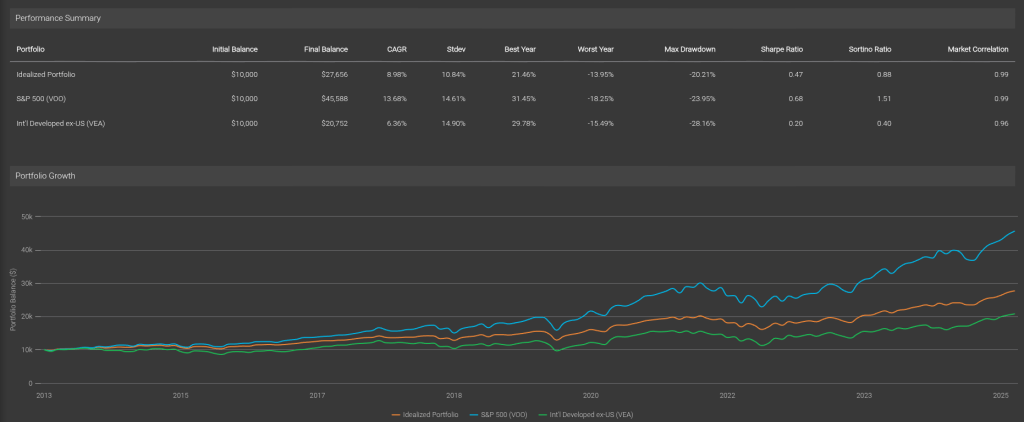
One more thing to look at — this backtesting assumes we don’t rebalance anything. That’s not correct, since that’s one of the benefits of holding ETFs like AOA, XGRO and XEQT — they automatically rebalance periodically. valueinvesting.io lets you choose monthly, quarterly, semiannually and annually. I know for a fact that AOA rebalances twice a year, so we will assume XGRO/XEQT do the same. This is what the result looks like:

This reduces the volatility and the return a bit, which if you stop and think about it, makes sense: equities consistently outperform bonds and cash over time so the rebalancing exercise makes sure the equities remain at an 80% contribution to the portfolio.

Conclusion

The backtesting portion of valueinvesting.io is a good tool to test various combinations of ETFs / stocks you may be interested in. There’s not very much documentation on the site, but it’s easy enough to use. The free account (which requires registration) is enough to get you that far.

  1. Did a bunch of tests and determined that VEA was the ETF that matched the performance of this index most closely. This ETF is about 11% Canadian Equity. ↩︎
  2. The non-registered assets are being sold off, little by little, to fund my retirement. This year, they have provided about 2/3 of my “salary” (RRIF minimum payments gave me the other 1/3), so I am –slowly– drifting toward the ideal portfolio. The AOA percentage in the ideal portfolio will get smaller over time as I transmogrify it as needed to XGRO using Norbert’s Gambit. ↩︎

News: The Wealthy Barber Reboots!

Thanks to the Canadian Financial Summit, I learned that David Chilton, aka The Wealthy Barber, has completely revamped his book and it’s scheduled to be released on November 4th, 2025.

David’s original book had a massive influence on me when I read it, um, back in 19891?

A lot has changed since then:

  • The invention of the low-cost ETF structure (I’m a fan)
  • The creation of the TFSA and FHSA
  • Online everything: brokers, banks, and research

The new edition will (per the author) echo the conversational tone of the original, so it’s a great read for new investors, too. Consider buying a copy for yourself or your children2!

  1. Per https://en.wikipedia.org/wiki/The_Wealthy_Barber ↩︎
  2. I pre-ordered already, shhh, don’t tell them. ↩︎

Cautionary Tale: Staying safe as a DIY Investor

A recent Globe and Mail article featuring a Questrade client who lost $70k from their investment account due to unauthorised access caught my eye. The article is behind a paywall, but I’m a subscriber and can gift you a link if you’re curious1.

This didn’t seem like a garden-variety incident; the victim seemed reasonably well-educated concerning cyber-security best practices, and the hack may have involved a compromised device. But there are steps we should all take to make it harder to fall victim to an attack.

Use Strong, Unique Passwords2

Don’t reuse them. Don’t think that by adding a random character to an existing password buys you safety. The best way to avoid reusing passwords is to not know any of them. You do this by using some sort of password manager3 that can generate long and complex passwords. Even a notebook in a locked cabinet is better than using “password”4.

Use Two Factor Authentication (2FA)

Most online brokers have some sort of two factor authentication you can enable, but it may not be mandatory. Turn it on. This is a second step added after you enter your password to make sure it’s you, since it’s based on something you have. Most brokers I’ve dealt with use SMS as a 2nd factor, but both Questrade and Wealthsimple offer the use of a separate authenticator app like Google Authenticator, Microsoft Authenticator, or Apple’s Passwords app. I prefer authenticator apps because they work with or without cell phone coverage. And the experts don’t much like SMS as an authentication method because it’s not that difficult to hack for the determined criminal.

Don’t “trust” devices

While it will considerably speed up the login process to your online broker if you “trust” a given device, I never do this. Trusting a device typically does things like render 2FA unnecessary, which becomes very dangerous indeed if the device itself has somehow become compromised.

Know how to contact your provider over the phone

Store their contact number so you can call them directly if you are at all suspicious of anything. This is far safer than absent-mindedly clicking a link received in an email or text message. And if you do get a call/voicemail from your provider, follow up quickly.

Add a Trusted Contact Person (TCP) to your account

The TCP is someone your provider is authorised to call if they have concerns about your account. I don’t know under what circumstances “concerns” are raised, but having one seems to me a better idea than not having one. A quick primer on TCP here. Your broker will have a process by which they can add a TCP, take advantage of it.

Got other tips for staying safe while investing? Drop me a line!

  1. Just drop a line to comments@moneyengineer.ca. ↩︎
  2. Or, if supported, use passkeys instead; I don’t know of any Canadian broker using them. ↩︎
  3. I use Apple’s native Password app but in my working life used Bitwarden. ↩︎
  4. The 4th most common password used, findable by brute force methods in less than a second, per https://nordpass.com/most-common-passwords-list/ ↩︎

Passiv guide to investing

Passiv is a tool I was introduced to via my online broker of choice, Questrade1. As I mentioned elsewhere, Passiv’s main mission is offer an alternative to all-in-one ETF funds by automating trades to make sure your individual holdings support your overall target.

Anyway, Passiv is a nice add-on for me because it’s a way better way for me to see accounts for which my spouse has given me trading authority (it’s a real weakness of the Questrade platform). On one screen, I can see all the accounts in the retirement portfolio.

Anyway, since I use Passiv, I get the occasional email from them. Recently, they posted a blog called The Beginner’s Guide to Passive Investing which I think is a pretty good summary of my own approach to investing; it’s a pretty good article to share with a new investor, too. There’s lots we agree on:

  • Saving is different from investing (my view here)
  • Passive investing is the way to go (I own no individual stocks in my retirement portfolio)
  • You don’t need an advisor. We disagree on why. For me, it’s because there’s all-in-one ETFs. For Passiv, it’s because there’s Passiv 😉
  • Invest consistently, and without thinking. Pay yourself first.

They end the blog with a section called How Do I Start Investing?, which has a lot in common with an article I wrote called Ok, I’m ready to fire my advisor. What do I need to do? Let’s take a look at what I agree with and what I disagree with in that part of the article.

Open a Brokerage Account

Passiv seems to think there’s only two brokers out there, namely Wealthsimple and Questrade2. Given that the Passiv platform supports direct connections to these two brokers, this is somewhat understandable. But make no mistake, there’s plenty of other options out there. And what’s right for your neighbour may not be right for you. What broker to use will depend on a bunch of factors, and I talked about some of them here.

Set up Your Accounts

Yup, that’s something you need to do. I broke it down in some detail over here, since I switched brokers earlier this year. Since the target audience is new investors, non-registered accounts don’t get a mention here, but for many long-term investors, a non-registered account ends up being part of the mix. And RRIFs, of course.

Choose Your Investments

Passiv doesn’t have any use for all-in-ones (aka asset allocation ETFs) since that’s kinda core to what they offer. So while their recommendations are sound if you want to buy into the five funds they recommend3, it’s more complicated than it needs to be. For me, it’s a two-step process

Set up Passiv

It’s of course a bit self-serving, but a tool like Passiv is quite useful to track your allocations if you choose not to use an all-in-one. Or you can use a spreadsheet like I do.

Fund Your Account

If you’re transferring from some other financial services provider expect a lot of form filling. I documented some of the issues with transfers in a general sense here and specific to the RRIF holder here.

Buy Your Investments

No argument here; if you don’t actually invest, your money is just sitting idle. If you buy an all-in-one ETF, that’s one trade per account.

Automate and Chill

Yes, Passiv can in fact do trades on your behalf. (That’s an upcharge, though). A Passiv-run portfolio is possible4. All-in-one ETFs are also automated, since part of what they do is periodically rebalance their holdings automatically. In retirement, automation seems difficult. There’s a lot of steps to get paid.

In conclusion

Passiv’s blog is an excellent primer on how to get started; feel free to share it with your kids, colleagues and relatives. Just be aware that it promotes the Passiv approach which, if followed to its logical conclusion, requires a subscription to Passiv Elite — worth it, if that’s the direction you prefer.

  1. Like most online brokers, Questrade is good at some things, not so good at others. You can read my review here. ↩︎
  2. They are both fine providers; I have accounts at both. And QTrade too, but that should be done by the end of 2025. Anyway, buying and holding ETFs is offered by all Canadian brokers. No need to limit yourself to just these two. ↩︎
  3. Three equity ETFs for the Canadian (VCN), US (VFV), and International markets (VDU) and two bond ETFs covering the Canadian (VAB) and US (AGG) markets. Before I retired, I had a similar approach, but chose different ETFs. In retirement, I chose to simplify. ↩︎
  4. Be mindful that trades executed in non-registered accounts generally have tax implications. ↩︎