Mini-Review: Optiml.ca

My fellow DIYing neighbour gave me a heads-up about this made-in-Canada retirement app and so I set up an account an gave it a whirl.

Optiml.ca helps you to “build and customize your financial strategy, stress-test different ‘What-if’ scenarios, or simply confirm you’re on the right track.”

Setting up an account was very easy since it supports integration with Google credentials. And they offer a fully-enabled trial for 14 days without requiring a credit card, which makes things even easier. I chose their most popular plan, the Pro Plan, which is $199 a year1.

The interface is clean and easy to navigate. I was able to get started right away without bothering with the offered tutorials.

I chose to set up the parameters of my current retirement savings manually, but it wasn’t difficult. You could instead choose to link with Wealthica and populate this sort of information automatically. I don’t use Wealthica myself, but perhaps I’ll give that a look in a future post.

Once your data is entered, you can run a “standard” scenario which is what a retirement planner would generate. This is table stakes for any tool, including some of the ones I mention in Tools I Use.

But it looks like Optiml goes much, much further in its analysis. You can ask it to auto-generate scenarios based on historical returns and different inflation rates to see how likely your plan would succeed, and you can choose other objectives, like maximizing spend or maximizing your estate value. You can also ask it to model the three phases of retirement where spending varies as you get older (aka go-go, slow-go, no-go23). You can ask it to play with CPP/OAS start dates, and so on. It seems quite comprehensive and well thought out. And what I really like about it is that it has pre-canned scenarios so you don’t have to think about (and overthink about) each and every input into the model.

And you can save your analysis on the tool itself, which is handy for comparing outcomes and trying different “what if” scenarios.

I encountered what I thought were some bugs in the system, but online support quickly set me straight with prompt, detailed, specific and accurate answers, which is highly unusual in the Canadian financial services space 😉

All this to say, I’m pretty impressed with what I see here. At this point in my retirement, I don’t see the need for it myself4, but for others who are still looking for a tool to help guide retirement spending, this looks like a winner.

  1. Given what this tool can do, this seems a more-than-fair price to me; the cost of a fee-based advisor (who is likely using a similar tool to generate the output) is a lot more than that. ↩︎
  2. This model, according to Google, is attributed to Michael Stein, author of “The Prosperous Retirement↩︎
  3. …and while intuitively this is something that makes a lot of sense, it’s the first time I’ve seen it called out so explicitly ↩︎
  4. In other words, I’ve passed the analysis phase and am just trying to enjoy retirement 🙂 ↩︎

Mini-Review: PortfolioPilot

I discovered PortfolioPilot (https://portfoliopilot.com/), a product of Global Predictions, because it’s mentioned in passing on Passiv’s dashboard. (You can read a bit about Passiv over here — the premium version of Passiv used to be offered for free to all Questrade users, but it’s now part of their shiny new subscription service1.)

So what is PortfolioPilot? Let’s hand it over to their AI assistant to weigh in on that question 🙂

PortfolioPilot AI Assistant v1.3 explaining what it is

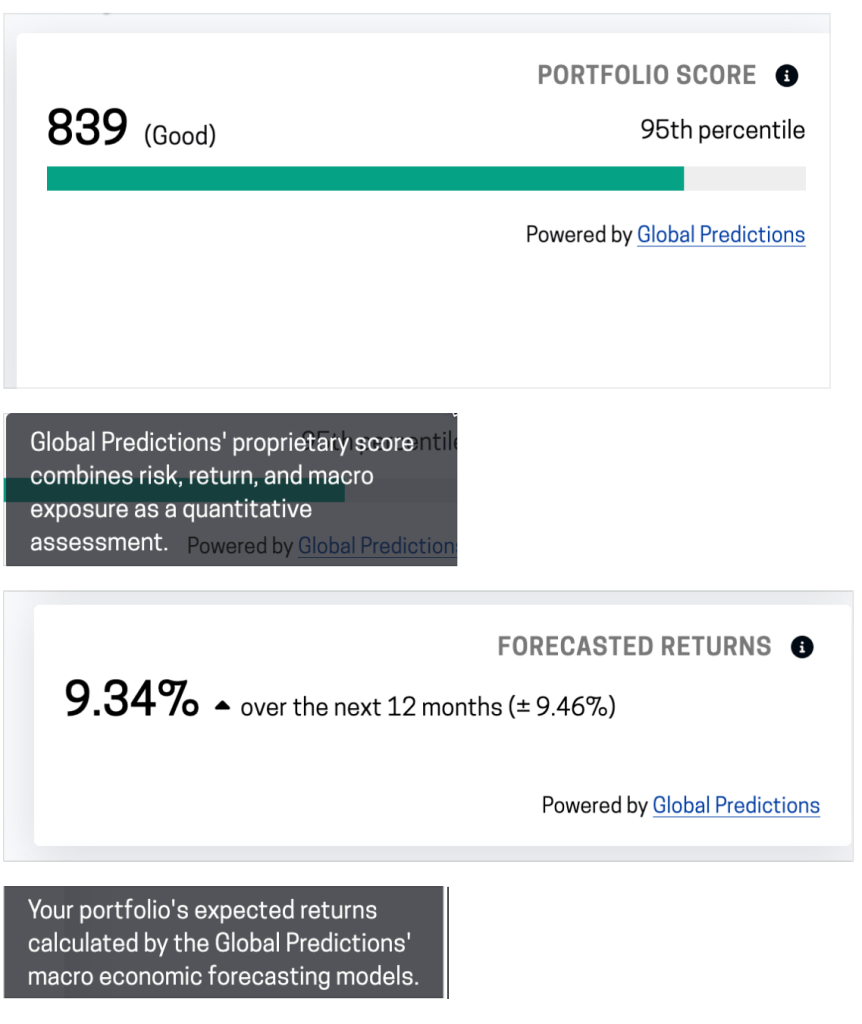
On Passiv, the data provided by PortfolioPilot is limited to a portfolio score (out of 1000) and a “Forecasted Return” metric. The Global Predictions/PortfolioPilot assessments for my portfolio as presented on the Passiv dashboard are depicted below.

Global Predictions/ Portfolio Pilot’s scoring of my portfolio, as depicted on the Passiv dashboard23

When I headed over to the PortfolioPilot website, I decided to set up an account and take a closer look.

After an initial set of questions to help figure out my risk profile, I was able to enter my entire portfolio manually, since it’s down to just 12 holdings these days. Pro tip: this is a US tool, so if you enter Canadian stocks/ETF, you have to add “.TO” to the name of the holding in question, e.g. XGRO.TO not just “XGRO”.

So once I did that, it spat out all kinds of pretty data. I do like the visualization per ETF held…this one is showing 3 month returns per ETF. Whether or not it’s including dividend payouts is not known.

3 month return of ETFs held in my retirement portfolio

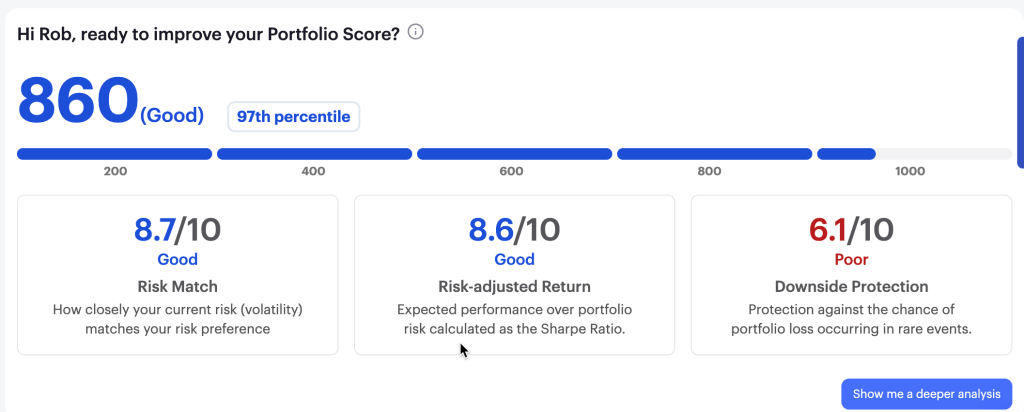
It also gave me a little more insight into my portfolio score4:

Portfolio Score of my retirement holdings, per PortfolioPilot

This view reminds me of how QTrade does their portfolio assessments, something I thought was a plus of that provider. The downside protection warning indicated that I have too much invested in too few holdings, but since I’m on the free version, no further insight was provided. Both AOA and XGRO are tilted towards large US stocks…I suppose my Magnificent Seven holdings are a non-trivial part of the overall portfolio as a result, but I wasn’t able to delve further into this warning. That’s what you get for paying nothing, I suppose.

So some nice stuff here, nice visualizations, customized news based on what’s in your portfolio, all good. But there are some problems I see with their data.

Example one:

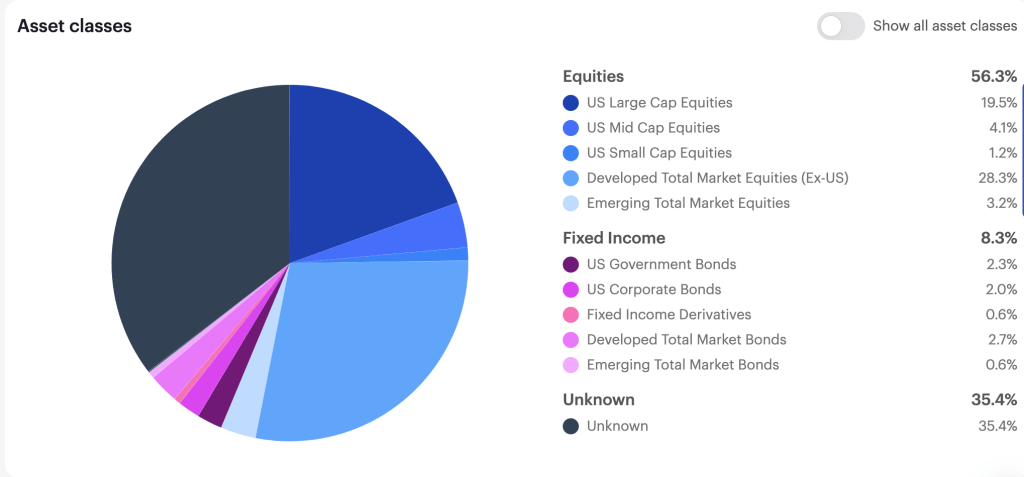
PortfolioPilot Asset class view: 35% “unknown”? Blind spot for Canadian ETFs, maybe?

The asset breakdown is very detailed, which I like, but at 35% “unknown”, it’s kinda useless. No way I can see to figure out what ETFs are causing it trouble. Guess I’ll see what support has to say.

They have specific recommendations, which I also like, but again, I see issues:

PortfolioPilot suggested actions

So here, my issue is with action #2. It was recommending replacing XEQT (an ETF all-star) with VE.

Now, setting aside for a moment that VE and XEQT are pretty different in terms of what they hold, (to start, VE has no Canadian or Far East exposure), the REASON the suggestion was made was to save on management fees. PortfolioPilot claimed that VE attracted no fees, making me a sucker for paying 0.20% to hold XEQT. A quick look at the VE page dispelled that idea immediately — the MER is 0.22%. Following their advice would have led me to pay MORE in fees, not less. Shrug.

Anyway, I spent all of 30 minutes with this tool, and although it shows promise, some of the errors I spotted do not fill me with confidence in recommending it to others.

Anyone out there using it? Got other thoughts? Let me know at comments@moneyengineer.ca!

  1. But per some Reddit threads I have seen, users with more assets with Questrade may get it anyway. I await some sort of official communication before commenting further. As of right now, I still seem to have full access to the tool. ↩︎
  2. I dunno, 95th percentile seems “Excellent” to me.
    ↩︎
  3. Not really sure how to interpret that. Does that mean between 8% and 10% annual return, or does it mean -1% to 19% annual return? I would tend to believe the latter, since that’s more in line with an 80% equity portfolio, but no explanation is offered… ↩︎
  4. I suppose my score is a bit higher because it also includes my remaining QTrade holdings, which Passiv doesn’t support. Or maybe not. ↩︎

Taxes in Retirement

There’s really no avoiding paying taxes, even in retirement. You probably have to do some budgeting to make sure you aren’t being caught unaware, though.

My retirement today is funded from a combination of my spouse’s part-time salary, my/my spouse’s RRIF, selling off assets from my non-registered account, and interest/dividend income from non-registered accounts.

The big difference, as I’m slowly becoming aware, is that aside from my spouse’s paycheque (which has the usual tax deductions / CPP contributions / EI contributions), there is nothing being set aside to pay my tax bill come April 2026. So it goes without saying that I had better make sure there’s a nugget somewhere that I set aside for the upcoming tax bill.

How much should that be? Enter a tool I use to help figure out that sort of thing, referenced in the “Tools I Use” section of this blog: namely, the Basic Canadian Income Tax Calculator1.

The Basic Canadian Income Tax Calculator, from TaxTips.ca

The basic tool, as implied, is pretty basic. It doesn’t include any sorts of deductions aside from the basic personal deduction and dividend tax credits. There’s an advanced calculator that has a bunch more inputs, but for the purposes of this article, the basic tool is good enough.

For the purposes of this tool, your income is in 4 buckets:

  • Other income: This is how 100% of RRIF payments are treated, as well as interest from non-registered assets (e.g. interest from a GIC, bank account, HISA, some ETFs)
  • Capital gains: This is only applicable to non-registered accounts. Note that many ETFs actually generate capital gains and a corresponding T3/T5 slip even if you don’t touch the fund at all2. Larger capital gains are typically generated when you sell an ETF that you’ve held for a while, which includes everything I hold in my non-registered accounts.
  • Canadian eligible dividends: This includes dividends paid by all public companies in Canada.
  • Canadian non-eligible dividends: I don’t have any of those, but if you own shares in a private corporation, you might.

Since my 2025 strategy is to simply collect RRIF minimum payments, I already know what that dollar amount is. I also execute non-registered asset sales monthly to fund my retirement, as I mentioned here. This generates capital gains every month; the exact amount this will sum up to in 2025 is unknowable in advance since it depends on factors like:

  • what specific asset I choose to sell
  • the price of the asset at the time I choose to sell
  • how many shares of the asset I sell at that price

I do track a metric I call “capital gain dollars per dollar of asset sold3” so I can compare the capital gain impact of generating (say) $1000 cash for every asset I own in my non-registered account. So I have a bit of control over the capital gain metric for a given year, but not a lot. My spouse also has non-registered assets in her name, but since she’s earning a salary, I’ll let that be for now.

Some examples might help illustrate the different tax impacts of different withdrawal strategies.

Let’s consider 4 examples, all of which give you 100k gross salary, before taxes:

  • The “RRIF and interest only” strategy: All income for the year is generated by either RRIF payments or interest payments from non-registered accounts.
  • The “non-registered asset sale only” strategy: All income for the year is generated by selling assets in non-registered accounts that create 70 cents of capital gain for every dollar of income thus generated4.
  • The “Dividends only” strategy: All income for the year is in the form of dividends. You’d need a pretty large portfolio to generate 100k of dividend income, just sayin’.
  • The “Blended Approach” strategy: Income comes from a mix of RRIF payments, non-registered asset sales, and dividends. You could play with the percentages yourself; this is an excellent way to see how different liquidation strategies generate (in some cases) very different tax bills.

The table below uses the basic tax calculator to generate the tax bill of the different payment strategies.

Withdrawal strategyRRIF + Interest incomeIncome from asset salesActual Capital GainDividendsTotal Gross IncomeTotal Tax Bill (ON)Avg Tax Rate
RRIF and Interest only100k000100k21.4k21.4%
Non Registered asset sales only0100k70k0100k3.9k5.6%
Dividends only00100k100k3.3k3.3%
A blended approach50k25k17.5k25k100k10.6k11.5%

Fair warning: don’t try to use this table to estimate your own situation. I chose 100k to keep the math easy, but since Canadian tax brackets have different tax rates, the overall gross salary chosen makes a huge difference in the tax bill — enter the numbers yourself!

My retirement planner advised me to target an average tax rate of no more than 15%, and besides the “RRIF and interest only” approach, all of the withdrawal strategies in the table accomplish that. The other takeaway is that on an income of $100k, all of the approaches generate a tax bill in excess of $3k — which happens to be the magic number CRA uses to determine whether or not you have to pay tax in installments.

As a result of doing this exercise, I’ve started a monthly automated contribution to a separate “tax” account5 so that I have money at the ready to pay my tax bill next year. All DIY retirees may want to do the same!

  1. You will probably have to close a bunch of ads before ultimately getting to the page that matters. It’s a forgivable tax to for this useful site, IMHO. ↩︎
  2. If you prefer to avoid annual capital gains, dividends and interest payments, then Global X has ETFs that are designed to do just that. I hold HXT (for Canadian Equity) and HXS (for US Equity) in my non-registered accounts for this reason. ↩︎
  3. This is just the per share capital gain divided by the current share price. I use Adjusted Cost Base to keep track of my capital gains. ↩︎
  4. This is a bit higher than the average of my portfolio, which is about 60 cents for long-held assets. You could choose a different number based on your own holdings. You only pay tax on half of your capital gains, and the calculator knows this. ↩︎
  5. I used Wealthsimple for this since it’s stupidly easy to create a new investment account. And they pay a reasonable amount of interest. ↩︎

News: Deal for DIY Retirement Planning

Disclaimer: I get nothing from pointing out this deal, and I haven’t used the product below myself. But all the same, it might be of possible interest to readers of this blog.

“Cashflows and Portfolios” is one of my top places to get advice. (It’s listed along with other great resources, in the blogroll).

Along with great (and free) advice, the folks behind the blog offer for-fee retirement planning services. But they do have one twist for the hard-core DIYer: they offer access to retirement projection software so you can do your own projections. (Looks like they use Adviice — just like a lot of planners do).

Anyway, their latest newsletter indicates that they’ve lowered the price of their DIY retirement planning service and are offering an additional 10% off. You can get all the details here.

I do recommend paying for some kind of retirement planning service; I did it and it gave me the confidence to set my retirement plan in motion 2 years earlier than I first anticipated. You can read about how I came to the decision to “pull the plug” here.