Ok, I’m ready to fire my advisor. What do I need to do?

So you’ve decided to make the leap and keep more of your own money. Congratulations! Here’s a list of things you need to do to put that plan into action.

Disclaimer: I treat my retirement assets separately from any other assets (rainy day funds, day-to-day expenses). If you blend these sort of things together, it may change things like step 1.

1. Determine your desired asset mix

“Asset mix” is just another way of describing your risk profile, or in really plain English, what percentage of your portfolio is going to be invested in equity. There’s a quick questionnaire over here that will put you in one of 5 buckets:

  • Very Conservative: This means 20% Equity.
  • Conservative: This means 40% Equity.
  • Balanced: This means 60% Equity.
  • Growth: This means 80% Equity.
  • Aggressive Growth: This means 100% Equity.

If you’re happy with the way your existing portfolio is performing, then you can instead calculate the percentage of equity in it and use that as your asset mix. For simplicity, I would consider any stock as “equity” and any cash, HISA, Bond fund or GIC as “not equity”. If your portfolio holds ETFs, then you need to see what’s inside them. You can typically read that on the “fund facts” page. They are usually one or the other, unless you already hold funds like XGRO.

2. Choose your platform and create login(s) for it

But which one? I talk about some of the things to consider over here, or you can investigate a trustworthy source like the Globe and Mail’s annual rankings. Some providers (e.g. QTrade, Questrade) allow you to make trial accounts to test drive them. I myself use QTrade for my investments. Like all providers, it does some things really well, and others, not so much. I have either personal experience or friends using (in alphabetical order) BMO Investorline, Interactive Brokers, iTRADE, QTrade, Questrade and Wealthsimple. Any of them will do. Many of them run promotions1 trying to entice you to switch. Might as well take advantage of that if it makes sense23. Also consider if they will reimburse you the transfer fees imposed by your soon-to-be-ex provider of choice4.

The heading of this section says “login(s)” because if you’re part of a spousal team, you should really do this as a team.

This step also usually entails form-filling and proof of life uploads/emails/faxes5 (photo ID, banking info….). Put on your favourite tunes and the time will be filled with pleasant sounds.

3. Figure out how to move money to and from your new platform

If you’re still contributing to your TFSA/RRSP/RESP, or if you have non-registered accounts, or are close to retirement and about to set up a RRIF, then it’s pretty important to know how money will move in/out of these accounts. Typical things you’ll have to do are

  • set up your new account(s) as “Bill Payees” online banking6
  • set up EFTs7 between your bank account and new platform
  • set up new Interac eTransfers8
  • Get cheques/bank card for your non-registered account, if applicable9

4. Collect all your existing account information

To successfully complete the transfer, you are going to need to know the details of all your existing accounts. The usual information requested is found on your monthly/annual statements. Client number, account number, rough value of what’s in each.

If applicable, you’ll also want to have a very good handle on exactly how much you’ve contributed to capped government savings vehicles (e.g. RRSP, TFSA) so you don’t inadvertently over contribute in the year you make the shift10.

There may be a snag at this step. You may hold assets at your old provider that are not supported at your new provider. This may or may not be a big deal. Typical issues are caused by

  • GICs11. The reason you get good interest rates from them is because the money is locked away. You may or may not be able to move them without incurring penalties. You’ll have to ask your new provider what they are willing to do. In most cases, the answer will be “sorry, can’t help you, if you want to move them, you’ll have to sell them first”12.
  • Mutual Funds. Many of these are private to that provider,13 and constitute, in their estimation, considerable value add. For these, you are almost certainly going to have to say goodbye (and good riddance) .

For GICs, you can choose not to move those assets, wait until they mature, or eat the cost of cashing them in early.

For Mutual Funds, selling them usually isn’t a concern, unless you hold them in a non-registered account, in which case there may be undesirable capital gains that will cause a tax hit.

For most people, the costs involved in moving assets are small compared to the money you’ll ultimately save by firing your advisor. But don’t say I didn’t warn you.

5. Initiate account transfers from your newly selected platform

This is the first step where things get real.

Different providers will do this somewhat differently, but it’s usually called something like “Transfer Account”. In my experience, providers are highly motivated to be highly helpful at this stage ;-).

But in essence, initiating an account transfer will involve two things:

  • The creation of the kind of account you’re moving (e.g. TFSA, RRSP, Spousal RRSP, RRIF14) AND
  • The details of that account (client number, account number….all collected in the previous step)

It’s also possible you have to create the account (TFSA, RRSP….) on your new platform FIRST, and once it’s created THEN you can initiate a transfer.

You will have to answer a question of moving the existing assets “in kind” or “as cash”. If you hold portable assets at your old provider (e.g. cash, stocks, ETF), “in kind” is fine. If you don’t (e.g. GICs, mutual funds) then “as cash” will allow your new provider to trigger a sale of those assets.

You will have to do this for EVERY account you’re moving. Were I to switch, I’d have to move

  • 4 RRIF accounts (2 each for me and my spouse; one in CAD, one in USD)
  • 2 spousal RRIF accounts (1 for each spouse)
  • 2 TFSA accounts (1 for each spouse)
  • 5 investment accounts (2 for me, 1 for my spouse, and 2 joint15)
  • 1 RESP account

6. Wait for the funds to arrive

This always seems to take forever. Expect a delay of 5-10 business days at this point. Expect a panicky call from your soon-to-be-ex advisor. Take the time to set up Trading Authority (TA) for your personal accounts (spouse, adult child, other relative) so they can make trades on your behalf. There’s a form for that. Having TA for my spouse’s accounts means I can see our ENTIRE retirement portfolio from my login which is Highly Desireable.

7. Buy the correct ETF in line with step 1.

As as example, if you were to use the Blackrock family of asset allocation funds:

  • Very Conservative: This means 20% Equity. This means XINC.
  • Conservative: This means 40% Equity. This means XCNS.
  • Balanced: This means 60% Equity. This means XBAL.
  • Growth: This means 80% Equity. This means XGRO.
  • Aggressive Growth: This means 100% Equity. This means XEQT.

The reason for choosing an asset allocation fund is for automatic re-balancing. You pay about 0.15% for that service, which is baked into the price of the fund. It’s more or less what your advisor should do for you today.

8. Pay as much or as little attention as you like

As you invest new funds (e.g. for TFSA/RRSP), buy more units. You might also consider setting up a DRIP at this stage so as dividends roll in (typically, monthly or quarterly), you automatically purchase more of the same. Autopilot.

If you want a second set of eyes to assess your holdings, then dropping some cash on a fee-for-service advisor from time to time may make sense.

Eight steps to save potentially thousands of dollars. You’re worth it!

  1. Googling (for example) “Wealthsimple promotion” would be one way to find the current one. ↩︎
  2. Read the fine print, there are almost always caps on rewards, as well as obligations to stick with the provider for a period of time. ↩︎
  3. Here is one rare case where there may indeed be something pretty close to a free lunch. ↩︎
  4. Almost all providers do this; there is almost always some sort of lower limit…$15k is pretty typical. ↩︎
  5. Any provider wanting faxes should disqualify them as a provider, just sayin’. ↩︎
  6. This is how QTrade does it. ↩︎
  7. Electronic fund transfers. You provide institution/transit/bank account number using a blank cheque. That’s how QTrade knows where to put my RRIF payments. Another form to fill. ↩︎
  8. Only Wealthsimple seems to allow this. It’s fast, but has upper daily/weekly/monthly limits that may make it impractical. ↩︎
  9. Both BMO Investorline and Wealthsimple allow this. I’m guessing that it’s a common feature for providers that also operate bank services (e.g. CIBC, TD, National Bank, Scotiabank). My provider (QTrade) does not. ↩︎
  10. Your new provider will have no idea what your TFSA limits are; only CRA knows that. Most providers will track what you contribute IN THEIR ACCOUNT in a given year, so that’s somewhat helpful. ↩︎
  11. The lack of liquidity of GICs is the main reason I don’t use them. ↩︎
  12. The one exception I’ve encountered thus far is that BMO Investorline was willing to accept the GICs purchased via BMO Advisor Services. There may be others. ↩︎
  13. Manulife and Sunlife, much loved by employers for DPSPs, are notorious for their 1.5% MER index funds. ↩︎
  14. Don’t forget to properly designate beneficiaries or survivor annuitants. ↩︎
  15. These are CAD and USD versions of the cash cushion required by the system I use to pay myself in retirement. ↩︎

What broker(s) do you deal with?

I hang out a bit on Reddit1 to see what people are talking about. Often times, the post reads something like

“I am new to investing, I have $x to invest, who should I use ?”.

The crux of every 5th question posted to r/PersonalFinanceCanada

Personally, I find this kind of question a bit odd. “Investing” is a noble pursuit but it’s a term that means a lot of things to a lot of people. For me, “investing” is reserved for retirement savings since the timelines are long and I don’t need immediate access to the funds therein. A lot of people who ask this question want very near term access to the money, and to me that’s not investing. It’s saving. Timeline matters. The answer I’d give to a saver2 is a lot different than the answer I’d give to an investor.

I suppose the amount of money involved may influence the decision of platform provider (especially if there are freebies associated with having a balance above a certain amount, a common-enough practice), but it’s not the first thing I’d have in mind. Here are the main things I think about when it comes to choosing a financial provider, either for the first time, or if you’re thinking about making a change.

Does the provider have the account types you want?

Any provider I use has to offer Investment accounts, RESP, TFSA, RRIFs and spousal RRIFs. USD options for Investment accounts and RRIFs would be useful to me as well. Your own circumstances will offer up a different list. But don’t dismiss the RRIF if you’re nearing retirement. You may want one sooner than you think!

Does the provider have the products you want?

My needs here are really simple. I need access to trade a handful of ETFs on the US and Canadian markets, and I need a way to get a good interest rate on cash holdings. My assumption is that every major provider has a way to accomplish this. I don’t need access to bond markets3, options trading, fractional trading, margin trading or crypto. You might.

What fees that matter to you are charged by the provider?

The list of fees for any provider can get pretty long, but I only consider the things that impact me in my normal usage of the platform. The things I look for and expect are:

  • They don’t charge anything for “account maintenance”
  • The don’t charge fees for trading the ETFs I care about4
  • They need to offer a way to access daily interest rates in the neighborhood of the Bank of Canada overnight rates (some do this by paying good rates on any cash lying around your accounts, some do this by offering access to purchase HISAs, and as a last resort, there are ETFs that buy HISAs, too5)
  • They need a “much more generous than the bank”6 way of doing forex7

I’ve used QTrade8 as my main provider for the last 15 years or so. They offer the things I need. But for the first time, I’m seriously considering making a switch to Wealthsimple9. I’m test driving them now with part of my retirement portfolio, but I’ve found at least one show-stopper that make them unsuitable for me — they don’t offer spousal RRIFs10 in their self-directed product offering!

Switching providers can be quite onerous, so it’s not something I take lightly, especially since my holdings are paying my monthly salary! The DIY market is getting more competitive, so it can pay to take a look around. What do you like/dislike about your current provider? Drop me a line at comments@moneyengineer.ca.

  1. Specifically, r/PersonalFinanceCanada mostly ↩︎
  2. Put your money in the highest interest rate savings account you can find, or buy a GIC. ↩︎
  3. Beyond bond ETFs. I don’t need to own individual bonds. ↩︎
  4. Had I written this phrase 5 years ago, I would have said “low fees”. However, in today’s competitive landscape, many brokers charge nothing to buy and/or sell ETFs. If yours does, maybe it’s time to take a look around. ↩︎
  5. e.g. CASH by GlobalX, HISA by Evolve ↩︎
  6. Most banks happily tack on 1.5% to spot rates on currency exchanges, just like most credit cards do ↩︎
  7. Norbert’s gambit would apply here, although it’s somewhat cumbersome. I’ll cover forex in some future post. ↩︎
  8. But I’m also somewhat familiar with BMO Investorline, Interactive Brokers and Wealthsimple. ↩︎
  9. Free ETF trading, good interest rates for cash holdings, just-launched zero fee FX transactions for amounts over $100k, and their currently running promo are all rather attractive features. ↩︎
  10. And, as I write this, I get a friendly email from Wealthsimple support confirming this, with a promise to let the development team know about it. ↩︎

Roaming: Is your provider ripping you off?

I’ve been using cell phones1 since their early days2, and the one thing I hate more than bank fees is carrier fees. In bygone days, every US vacation we took involved a trip to the ATT or T-Mobile shop for a cheap travel SIM. All this to say it’s been ingrained in me to make unusual communications preparations in advance of travel.

Back in my working days3 I had a company-reimbursed cell phone plan4 with Rogers. My job involved travel now and again, usually to the USA. And I usually made use of Rogers’ “Roam Like Home” feature. When this feature was first introduced, it was pretty innovative; before it existed, you normally had to contact the carrier to temporarily add roaming to your plan, which was a hassle. The idea behind Roam Like Home was attractive. It was automatic, it allowed you to use your phone in exactly the same way (no need to keep track of your “roaming minutes” or “roaming data usage”)5. And, at launch, it was a reasonably priced, at $5/day for US roaming. As most of my travel was of the day or two variety, this seemed like a perfect fit for the business traveler.

But surprise, surprise, Rogers got greedy. As a shareholder6, I approve, but as a user, their now $12/day charge is nothing short of robbery.

And that’s when I discovered the world of travel eSIMs. An eSIM allows you to install a 2nd, virtual SIM card in your phone so you can benefit from MUCH cheaper roaming rates. I’ve been a long time user of Airalo for my travel eSIMs. And a quick look at the prices will show you why. The $12 Rogers charges me daily would pay for two weeks of typical US travel using Airalo.

Like all things, there’s no free lunch here. A few warnings that may make eSIMs not for you:

  • Your phone has to support eSIM technology. Most phones purchased in the last 5 years do. But do check.
  • The very cheapest eSIMs don’t support voice calling or SMS. Just data7. So if talking on your phone is important, then make sure your eSIM supports voice8. With the plethora of apps that allow texting and voice (WhatsApp, Messenger, Signal, Facetime) and the prevalence of free apps like TextNow, my world hardly ever needs voice or SMS, at least not with friend groups. YMMV.
  • Setting up an eSIM can be a little intimidating the first time; the instructions are clear enough, but you do have to mess around a bit in settings menus you may not be very familiar with

I’ve used Airalo successfully on multiple US trips, in Europe (Germany, Switzerland), and in Asia (Hong Kong, Thailand). Never had a problem.

Airalo isn’t the only one out there, it’s just the only one I’ve personally used. Their focus is more on short-term travel needs with plans as short as 7 days. An alternative provider my trusted neighbour Steven swears by is eskimo. Their focus is on bulk, so if you frequently travel to the same place, it may be a better choice for you.

If you want to give Airalo a spin, mentioning my referral code will get you $4.50: ROB1033.

  1. AKA mobile phone, smart phone, handy ↩︎
  2. And in my very first use of same, the first words I uttered, with no small amount of delight, from a bag phone (remember those?) were “Guess where I’m calling from?” ↩︎
  3. Which ended last month, just to be clear. ↩︎
  4. My current provider now that I’m paying the bills is Fizz, Videotron’s low-cost carrier. So far, so good. My referrer code on Fizz is INSWI, in case you want to get some free cash 🙂 ↩︎
  5. It was not uncommon in those days to hear a tale of woe involving a roaming charge of several hundred dollars charged to a less-attentive traveler. ↩︎
  6. I own Rogers via XGRO since it’s part of the S&P/TSX 60 ↩︎
  7. Be very careful, Apple iOS users. The Messages app is either SMS or a data service, depending on the colour of your bubbles. Blue bubbles — it’s a data service, green bubbles means it’s an SMS. ↩︎
  8. But again, careful. An eSIM with voice comes with its own phone number. That’s fine if you’re the one making calls, but not if you’re the one expecting to be reachable on your usual phone number. An answered inbound call is roaming, I’m afraid. ↩︎

Cheapskate Computing with ChromeOS Flex

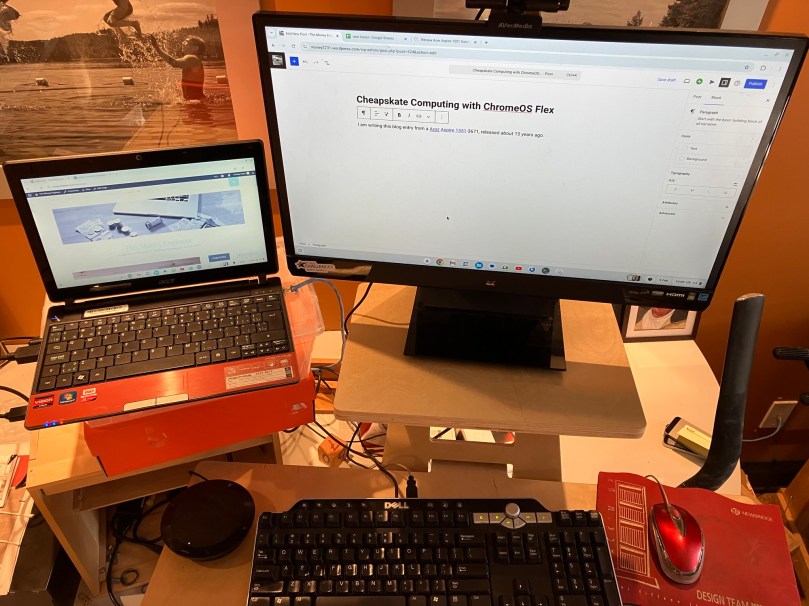
I am writing this blog entry from a Acer Aspire 1551, released about 15 years ago, a time when Windows 7 was the state-of-the-art PC OS. When I took this laptop out of the closet, it had Windows 10 on it, and was essentially unusable because the poor CPU1 just couldn’t eke out enough hamster-wheel turns to make it go. It looked like it was headed to the great bit bucket in the sky2. This caused me a bit of pain, since, after all, I had paid good money for that laptop3.

But then I discovered ChromeOS Flex.45 It seems capable of turning just about any old hardware (PC or Mac, I’ve done both) into something quite usable, if not terribly feature-rich6. Simply put, it’s the operating system used on Chromebooks that have been widely deployed to students everywhere.

And installing it really is quite easy. You just need a USB stick, some other internet-connected computer, and about 30 minutes7 to complete an installation. You can test-drive an installation before committing, too, since you can boot right from the USB stick. All the steps are outlined here.

The result is (more or less) a Chromebook with support for a modern browser (Chrome). And since I write this blog using WordPress, all the tools I need to build this site are accessible from that browser. And of course with Google Sheets, Google Docs and Google Slides (all quite feature-rich from the browser), I have no need for Microsoft Office, either8.

The only investment I made (and even this probably wasn’t strictly necessary) was to purchase a new SSD to replace the creaky old spinning hard drive in the original model. Total cost: $30. The keyboard and mouse are from Value Village9 (about $10 total) and the external monitor I had lying around.

So what’s a ChromeOS Flex machine good for? Off the top of my head,

  • Writing a blog
  • Inexpensive bare-bones laptop to take when traveling
  • Simple laptop/desktop for a favorite relative

If you want to breathe new life into old hardware, then I declare Chrome OS Flex cheapskate-approved. You can see it in action, below:

The Money Engineer’s Retro-Tech Design Environment
  1. An AMD Athlon II Neo X2 K325, no less. I think it had a flux capacitor. ↩︎
  2. City of Ottawa has alternatives: https://ottawa.ca/en/garbage-and-recycling/recycling/waste-explorer ↩︎
  3. The cheapskate refrain! ↩︎
  4. There are of course a plethora of Linux distributions out there for the more adventuresome and/or those with a lot more time on their hands. I’ve played around with a bunch of those, too. But ChromeOS Flex is the simplest installation experience I’ve experienced on a range of computers. On some computers, you can actually get a working Linux shell underneath ChromeOS Flex. ↩︎
  5. “Chrome OS” is what Chromebooks run. “Chrome OS Flex” is what I’m talking about. Similar, but different. Google carefully. ↩︎
  6. You’re probably not editing your Hollywood movie on a Chrome OS Flex machine. ↩︎
  7. Google’s instructions say 5. I think it took me that long to remember how to get into the BIOS so I could boot from the USB stick. ↩︎
  8. Full disclosure, I own shares in Alphabet, Microsoft and 10000 other companies. ↩︎
  9. A most excellent place to get vintage hardware. ↩︎

Getting paid in retirement: a DIY challenge

Summary: The mechanical details of getting paid in retirement require careful review of how your provider allows cash movements between accounts, a handle on how much money is coming in via a RRIF, and, for bonus points, an annual decumulation plan to minimize household taxes.

I covered how I get paid in retirement previously, but this was nothing more than a restatement of how VPW (Variable Percentage Withdrawal) works. My reality is not quite as simple as the Idealized Monthly Routine I laid out in that post.

The actual work required looks more like this:

Actual monthly work needed to get paid in retirement

The first 3 steps are the ones I covered in the last post, and there’s nothing new to talk about there. In brief, you calculate your retirement savings, enter that number into the VPW spreadsheet, and out pops the monthly VPW suggestion (“v”), which is then added to the current value of your cash cushion (“c”) to calculate your salary (“s”).

It’s probably worth noting what specific accounts I hold at my provider to make things a bit clearer1

  • There are 4 total RRIF accounts (two for me, two for my spouse)
  • There are 2 non-registered accounts that hold retirement investments (one for me, one for my spouse)
  • There is 1 non-registered joint account that serves the role of VPW’s cash cushion, which is invested in DYN6004 so I can earn a bit of risk-free interest.

So ideally, my RRIF payments would flow into the cash cushion account, and I would pay myself out of the cash cushion account to my everyday joint chequing account. That is unfortunately NOT how it works.

Let’s pick up the process starting at step 4.

Do the RRIF minimum payments cover the calculated salary?

When I opened my RRIF accounts (and yes, there’s more than one2), one of the questions asked was “what bank account should the payments go to?” Asking for RRIF payments to go to a non-registered account was not presented as an option, and it’s not possible. So already the simple RRIF to cash cushion transaction outlined in the ideal scenario wasn’t possible.

The other questions asked by my provider was: how much do you want to be paid? (RRIF minimum, some percentage/amount higher than that, gross/net?)

(If you’re new to the RRIF world, or if you think that RRIFs are just for 71-year-olds, you may want to check out my previous post on debunking this and other myths.)

The amount each of my RRIFs3 pays me monthly is a well-known fact since I opted to collect RRIF minimum from each RRIF — and RRIF minimum is based on my RRIF value and age as of January 1, 2025. It will stay constant throughout 2025. So while simple, the amounts involved aren’t enough to pay my suggested salary. I’m free to ignore the suggested salary and simply (try to) live off my RRIF minimums, but that would be counter to my “you can’t take it with you” ethos. And so, I have to augment my RRIF minimum salary with money from elsewhere.

If your RRIF minimum payments are higher than the salary, then I suppose it makes sense to re-invest those payments somewhere. Or give the money away. Up to you 🙂

Sell required assets in non-registered account and move $ manually

The title is clear enough — sell something in the non-registered portfolio and use it to make up the salary shortfall. But whose holdings4? Which ones?

To help me decide, at the beginning of the year, I played around with tax scenarios using the calculators referenced in Tools I Use to concoct a high level plan on how to best minimize my household’s collective tax bill. (This was a tip my financial advisor gave me; her advice was to try to pay no more than an average tax rate of 15%5).

I assumed my income sources were

  • My RRIF minimum payments (same for my spouse)
  • My spouse’s salary
  • Minor dividend income6
  • Capital gains caused by the sale of non-registered assets7

Since the first three items above were already known, there was no decision to make; the tax owing on those was already clear8. The capital gains were the only variable — how much should I take versus my spouse? There was a bit of estimation involved in the actual amounts here (the actual gains would depend on the actual sale price), but it gave me a high level plan for 20259. Any additional income needed would be paid by capital gains realized from MY holdings since my income was forecast to be lower than that of my spouse10.

With the pre-work done, it boils down to making the required sell trade, waiting two days for the cash to settle, and then clicking the right buttons to get the cash out of my investment account and into my chequing account. Should be simple, but if you’ve never done it before, you need to make sure it’s all working as you expect.

Sell required assets in RRIF

Yes, you have to make sure that there’s cash available in your RRIF accounts (and remember, I have 4) BEFORE the monthly payment goes out. My provider would only be too happy to do this on my behalf, charging me their “telephone trading rates” for the trade — something like $30 plus $0.06 a share for XGRO. Compared with “free” if I do the work myself, that’s a pretty decent hourly rate…Do not forget that it takes two days for a trade to settle into cash. Since my provider does not pay interest on cash holdings, I’m highly motivated to keep any cash balance to a strict minimum. I hate not earning money on my money.

Adjust cash cushion up or down by comparing VPW suggestion to calculated salary

In my previous post I talked about moving “v” to the cash cushion and then simply taking 1/6th of it as salary. And that is exactly what I do. But practically, it’s impossible to do this maneuver in exactly the way I describe with my current provider (QTrade). Here are the specific reasons I can’t do what VPW asks me to do:

  • QTrade RRIF payments must be made to an external bank account. So right away, part of my salary cannot flow through an intermediary cash cushion account.
  • QTrade does not allow cash transfers between non-registered accounts on their online platform. This means that the asset sales in my non-registered account cannot be moved directly to the cash cushion accounts either11.

I have worked around the limitations imposed by my provider by either

  • moving money from my chequing account to my cash cushion if the VPW suggestion is higher than my salary (market is moving up)
  • moving money from the cash cushion to my chequing account if my salary is higher than the VPW suggestion (market is moving down)

I have set up smart-ish spreadsheets to break down all the various movements of money which I will share at some point once I figure out how to make them a bit more generic. I’ve also documented a step-by-step guide for my spouse which she uses as we sit together walking through the monthly tasks12 so that I have confidence she could execute on them if I became incapacitated. There is no substitute for handing over the controls to see where the gaps in knowledge — and documentation — are.

The future

Having witnessed what happens to savvy adults as they get older, I know deep down that this DIY strategy isn’t sustainable forever. There are too many moving parts, and too many opportunities to make mistakes.

At present, I don’t have a future plan mapped out. I have updated my “death binder“, but beyond this, nothing more. I will dedicate more research (and future posts) on that topic.

  1. For your benefit I have not mentioned the USD variants I have of a few of these. This post is long enough as it is, and I presume that most readers don’t hold assets that are traded on US stock exchanges. ↩︎
  2. My own RRIF and my spousal RRIF account for two, and my spouse has two as well. Total four. They are with the same provider. Spousal RRIFs are generated from spousal RRSPs, in case you were wondering. If you deal with more than one RRIF provider (I would NOT recommend that), you’ll also have to consider that. All this to say that I saw 4 distinct payments made to my joint chequing account on Friday last week, one for each of the 4 RRIFs. ↩︎
  3. I keep saying “my RRIFs” for simplicity, but all 4 RRIFs (2 in my name, 2 in my spouse’s) are treated the same way. All four payments end up in our joint chequing account. ↩︎
  4. Both my spouse and I have non-registered accounts. My spouse’s was funded via a spousal loan I set up years ago to achieve some degree of income splitting. ↩︎
  5. After years of thinking of taxation in terms of what I paid on the LAST dollar I earned, this was admittedly a very different way of considering the problem. ↩︎
  6. Most of my dividend income (via XGRO and AOA) is buried in my RRIF and TFSA to avoid any taxation of it ↩︎
  7. Because I make a lot of use of HXS and HXT in my non-registered portfolio, I earn no dividend income; it’s all capital gains… ↩︎
  8. If you’re not aware, RRIF payments are treated as no-special-treatment taxable income, reported on a T4-RIF form by CRA. ↩︎
  9. Since I get paid monthly, I could always adapt if my assumptions were radically off. ↩︎
  10. I could have also paid the extra from my TFSA holdings, but my advisor suggested that this is the LAST bucket to use in retirement. ↩︎
  11. Unless I like waiting on hold. I do not. ↩︎
  12. Who says romance is dead? ↩︎