The HISA table April 2025

Summary: High Interest Savings Accounts (HISAs) are a way for cash to earn half-decent, risk-free interest. These “Series F” HISAs are likely available through your online broker, but you may have to ask how to get at them, exactly.

We talked about HISAs in February over here if you need a quick reminder: https://moneyengineer.ca/2025/02/14/earn-money-with-your-cash-the-hisa-table-february-2025/

On March 12, the Bank of Canada reduced their overnight rates by another 0.25%.1 Unsurprisingly, this had a knock-on effect to the interest rates provided by the series F HISAs I track.

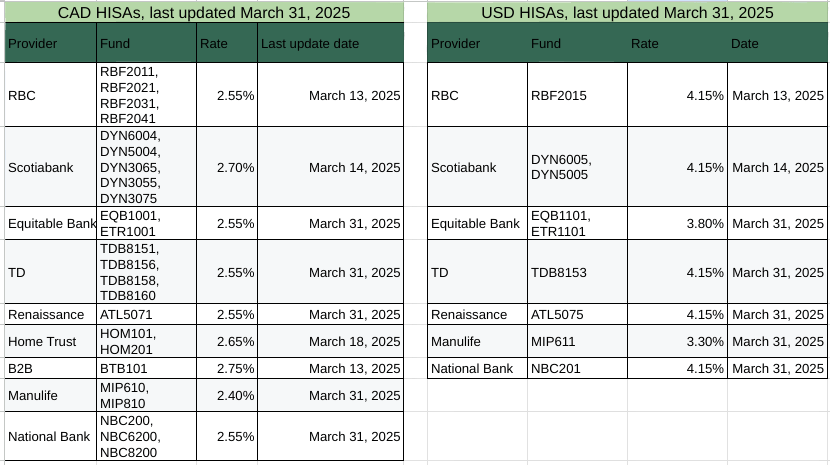
Equally unsurprisingly is that the US Federal Reserve didn’t touch their rates, and as a result, there were no changes in the HISA rates paid out for USD accounts. Here’s the full breakdown:

Current HISA rates for HISAs available via QTrade

There’s also a Google Sheets version with a bit more detail (source links) if you prefer.

For Canadian Dollar HISAs, B2B bank remains top of the heap: https://b2bbank.com/advisor-broker-rates/banking-rates.

For those of you who hold US cash in your brokerage accounts, you can benefit from the much higher US interest rates, and you have multiple choices since multiple providers are paying the same rate.

  1. You can also say “25 basis points” if you want to impress your friends ↩︎

ETFs for parking your money safely

Since my new DIY broker (Questrade) does not support the purchase of high interest savings accounts (HISAs), I need to find a free-to-trade alternative. 5% of my retirement portfolio is invested in what is characterized as “cash”, but I expect that money to earn some sort of return with essentially zero risk. (Another 15% of my portfolio is in the bond market, which, as we all learned in the last few years, has its downsides1.)

Questrade (like Wealthsimple) offers free trades of all ETFs. So it makes sense for me to go looking for ETFs that invest in safe havens. Here’s what I turned up for investments in Canadian dollars, based on some Google searches and some reading of similar questions posted in the public domain. Not all of them are what I would call “equivalent” to a HISA.

Fund SymbolFund CompanyWhat it invests inMERCurrent annual yield2Commentary
CASHGlobal X“high-interest deposit accounts with one or more Canadian chartered banks”0.11%2.68%This invests in the HISAs I currently invest in
CBILGlobal X“short-term Government of Canada T-Bills”0.11%2.88%Not a HISA but a safe investment
HISAEvolve“high-interest deposit accounts”0.15%2.71%Equivalent to CASH but with a higher MER
MCADEvolve“Canadian dollar high-quality short term debt securities (with a term to maturity of 365 days or less)”0.20%3.17%Very short term bond fund. 18% of holdings have due dates of less than 30 days
ZMMKBMO“high-quality money market instruments issued by governments and corporations in Canada, including treasury bills, bankers’ acceptances, and commercial paper. 0.13%3.6%Not a HISA but a very short term bond fund3. 31% of holdings have due dates of less than 30 days.
CAD ETF Candidates for investing Canadian dollars

Based on this quick analysis, ZMMK looks pretty attractive — a lot of very short term (and hence safer) debt as compared to MCAD, excellent returns. It is clearly a riskier investment than something like CASH or HISA. Between CASH and HISA I lean to smaller MERs every time, so CASH wins. CBIL might be a sort of happy middle ground…a T-Bill ought to be as good as a bank. All of these ETFs have a pretty stable NAV, either $50 or $100 per unit, so there should be little to worry about in terms of capital gains.

Since I hold a lot of USD, (not convinced this is a good idea), I need to do the same exercise for USD safe havens.

Fund SymbolFund CompanyWhat it invests inMERCurrent Annual Yield4Commentary
HISUEvolve“primarily in high interest US dollar deposit accounts”0.11%4.05%This invests in the HISAs I currently invest in
HSUVGlobal X“primarily in high interest U.S. dollar deposit accounts with Canadian banks…not currently expected to make any regular distributions”0.2%n/aGlobal X “corporate class” ETFs convert interest payments into capital gains. This sort of ETF makes sense in a non-registered account to minimize taxes.
ICSHBlackRock“broad range of short term U.S. dollar-denominated investment-grade fixed- and floating-rate debt securities and money market instruments”0.08%4.31%Not HISA but 46% is invested in debt with less than 30 days maturity
MUSDEvolve“primarily in U.S. dollar-denominated high-quality short term debt securities (with a term to maturity of 365 days or less).”0.20%3.49%Similar in strategy to ICSH, but only 20% in debt with 30 days maturity and only 40 holdings.
UCSHGlobal X“primarily invests in high-interest U.S. dollar deposit accounts, which provide a higher interest rate than a traditional USD savings account.”0.16%4.08%HISA-like, based on term deposits
USD ETF Candidates for investing US dollars

ICSH is the clear winner in terms of return, but, like ZMMK, a little riskier than a simple bank account. It has a nice broad portfolio (363 individual holdings) which makes it feel safer. HISU looks like the straight-up HISA replacement.

What ETFs do you use to park your cash? Let me know at comments@moneyengineer.ca.

  1. Excellent graphic of historical returns available at https://themeasureofaplan.com/investment-returns-by-asset-class/ ↩︎
  2. Take the latest monthly distribution, divide by the unit price, multiply by 12. If BoC holds their interest rates steady for the year, you could expect to achieve this rate for the next year. As of March 3, 2025. ↩︎
  3. “Commerical paper” refers to very short term debts, 30 days average maturity. Like a credit card debt, maybe. ↩︎
  4. US based funds like this one report a “30 day SEC yield”, it represents “interest earned after deducting the fund’s expenses during the most recent 30-day period by the average investor in the fund”. ↩︎

What’s the deal with AOA?

As mentioned elsewhere, I rely heavily on all-in-one ETFs in my retirement portfolio. New to all-in-ones? Read a bit about them here.

Previously, I covered what’s in XGRO, which is an all-in-one you can purchase on the Canadian market. Because I also happen to have a lot of US dollar-based retirement savings, I have the majority of those funds invested in AOA. AOA is an 80/20 fund 1 offered by BlackRock. It seems that this sort of all-in-one is not as popular in the US as Canada, not sure why2. I see offerings from State Street that sound similar. BlackRock has other members of their asset allocation family with different equity percentages — there’s something for everyone!3

I thought it would be interesting to see what, exactly, is underneath every $100 you invest in AOA. So by reading AOA’s ETF description, following the ETF descriptions of what’s inside AOA, and doing a little math, I came up with the following breakdown4:

FundWhat is it?How much?Colour Commentary
IVV US stock coverage that tracks the S&P 500 Index, 500 of the largest US companies $46.44 of your $100 investment

(of which ~3$ is in each of Apple, Nvidia, and Microsoft, another $2 is in Amazon and Alphabet and $1 in each of Meta and Broadcom)
The Magnificent 7 and 493 other companies
IDEVBroad international (ex-US) developed market stock coverage that tracks the MSCI WORLD ex USA IMI Index, about 2250 companies $21.90 of your $100 investment

(of which SAP gets 29 cents ASML gets 28 cents…)
This also includes a tiny slice of Canada…top holding is RBC at 16 cents of your $100
IUSBBroad US Bond market exposure, about 16,000 bonds from government and corporate entities$16.37 of your $100 investment

(of which $6.29 is in US Treasury, $1.42 is in the Federal National Mortgage Association…)
12 month trailing yield is 4.07%, not too shabby
IEMG3500 or so international companies from emerging markets, following the MSCI Emerging Markets Investable Market Index $8.37 of your $100 investment

(of which 72 cents is in Taiwan Semi, 36 cents is in TenCent..)
27% China, 19% Taiwan, 18% India, 10% South Korea…
IAGGAbout 5800 international bonds tracking the Bloomberg Global Aggregate ex USD 10% Issuer Capped (Hedged) Index5$2.83 of your $100 investment

(of which 5 cents is Chinese T-Bills)
Trailing 12 month yield = 4.27%, even less shbby
IJHUS Midmarket stocks that track the S&P MidCap 400 Index$2.67 of your $100 investment (of which 2 cents is in Williams Sonoma)21% Industrials, 18% Financials…
IJRUS Small Cap stocks that track the S&P SmallCap 600 Index $1.87 of your $100 investment
(largest holding is Hims Hers Health — 2 cents)
IJH+IJR+IVV is sort of similar to ITOT
Main components of AOA as of February 2025

Like XGRO, investing in an all-in-one like AOA provides you with exposure to a bunch of different asset types across many different geographies in one product, including all of the “hot” stocks you read about ad nauseam. Diversification under one banner.

The big difference from XGRO is the very tiny representation of Canada overall. I worked it out to about 2.5% of the overall number, which makes sense given the size of Canada on a global scale.

I came across the “Three Fund Portfolio” popularized by Bogleheads over 15 years ago. AOA and its family members is more or less that concept.

  1. Shorthand for “80% equity, 20% bonds”. There remains a lot of disagreement about the appropriate asset allocation, e.g. https://www.bogleheads.org/forum/viewtopic.php?t=210178 ↩︎
  2. Instead, I see a lot of “target date” retirement ETFs, which are in some ways similar, but lower the equity percentages as you get closer to the target date. ↩︎
  3. There’s also AOR (60% equity), AOM (40% Equity) and AOK (30% Equity) ↩︎
  4. Compare with the XGRO breakdown at https://moneyengineer.ca/2025/01/30/whats-the-deal-with-xgro/ ↩︎
  5. That’s a mouthful. ↩︎

Earn money with your cash: The HISA table February 2025

Summary: High Interest Savings Accounts (HISAs) are a way for cash to earn half-decent, risk-free interest. These “Series F” HISAs are likely available through your online broker, but you may have to ask how to get at them, exactly.

The high interest savings account (HISA1) is a different animal than the bank accounts offered by the likes of Simplii, Tangerine, EQ, or Wealthsimple2. The bank accounts are more intended for very short term savings for day to day use. They frequently offer attractive promotional rates for new clients. And while these are all good ways to earn a few extra bucks on cash in your account, it’s not the focus here.

The HISAs I’m talking about are usually only offered via a broker, and many of the DIY brokers3 allow you to purchase the so-called “Series F” version of these, which do not have any hidden trailer fees. They are “special” bank accounts insured by CDIC4 that pay rates that are tied to the overnight rates. When those change, expect the HISA rates to follow suit.

There was a mini-explosion in ETFs that invested in HISAs: CASH and HISA are two examples5. I never bothered with these since they weren’t free to trade on QTrade and trading costs would be a significant drag on the ROI.

Part of my investment philosophy is to have 5% of my overall holdings in cash (as for the rest, it’s 15% in bonds, 80% in Equity). And so I’m quite motivated to have some sort of real return6 from my cash position since it is a measurable part of my net worth.

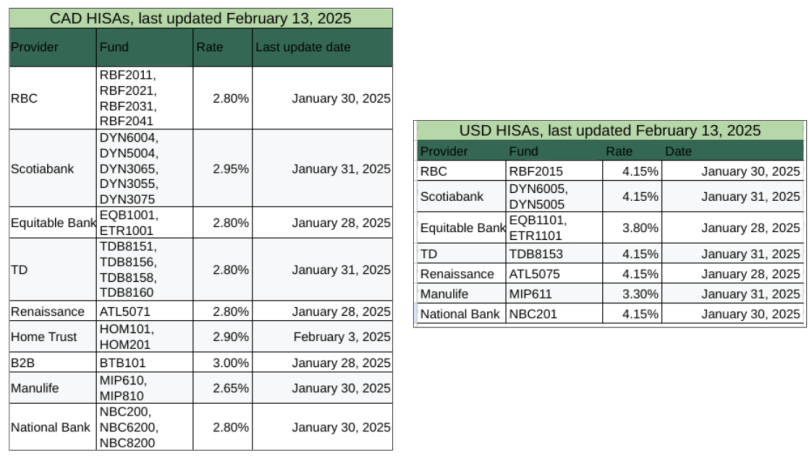
So I do pay attention to the ups and downs of the HISA rates. And I figured I’d share them with you:

Current HISA rates for HISAs available via QTrade

There’s also a Google Sheets version with a bit more detail (source links) if you prefer.

Hopefully most of the fields are self-explanatory. The “fund” column shows the identifier you would need to use to actually trade the HISA on your trading platform. How to access it will vary by provider. QTrade hides their HISAs in the “Mutual Fund” tab which is incorrect; these are not mutual funds, but are often modeled that way in the DIY platforms.

For Canadian Dollar HISAs, Scotiabank7 has been usurped! They have long been the highest-paying provider but the title now falls to B2B bank: https://b2bbank.com/advisor-broker-rates/banking-rates.

For those of you who hold US cash in your brokerage accounts, you can benefit from the much higher US interest rates8, and you have multiple choices since multiple providers are paying the same rate.

Before taking the leap and trading in HISAs, I was surprised by how they were handled on QTrade. There were a few differences possibly specific to QTrade, but pay attention to how your provider handles HISA trades:

  • QTrade considers holdings in HISAs part of your cash position for the purposes of buying stocks and ETFs9. If you successfully complete a trade that exceeds your ACTUAL cash position (i.e. cash NOT in the HISA) you will also have to sell the correct amount of your HISA to get rid of the negative cash balance in your account and avoid interest fees
  • HISA trades are not tracked in the “orders” tab of QTrade10 so be careful that you don’t inadvertently trade the same thing twice
  • QTrade limits all HISA purchases to $1000 minimum; there are no restrictions on sales, and there are no fees for either buying or selling HISAs.

Does your DIY broker give you access to other funds? Let me know about them at comments@moneyengineer.ca!

  1. An aside about the image chosen for this post…I pronounce the acronym HISA….and it’s on a TABLE, get it? ↩︎
  2. Looking at these websites, I may have to consider breaking up with CIBC for my day to day banking… ↩︎
  3. QTrade and iTrade definitely allow you to purchase these. Wealthsimple and BMO Investorline do not. Wealthsimple as a matter of course offers pretty competitive rates for any cash floating around in your account, especially if you have over $500k with them. BMO Investorline has high interest savings too, but you access to their product only (BMT104). ↩︎
  4. My personal bias is that I don’t much pay attention to CDIC-insured or not. I figure if major Canadian banks start failing, I had better make like Survivorman, because no insurance is going to save me. Perhaps that’s naive. ↩︎
  5. Great names for both, by the way ↩︎
  6. That’s return above the current inflation rate. Hiding money under a pillow would typically earn a negative real return, equal in magnitude to the current inflation rate. ↩︎
  7. All my cash holdings are in DYN6004 or DYN6005. ↩︎
  8. US Fed has not been as aggressive in cutting interest rates as compared to Bank of Canada. ↩︎
  9. Since I don’t have a margin account, if I try to buy something I don’t have the money for, I’m normally strongly discouraged from doing so with a clear warning. ↩︎
  10. BMO Investorline is the king of confusing handling of cash positions in your account. ↩︎

Ok, I’m ready to fire my advisor. What do I need to do?

So you’ve decided to make the leap and keep more of your own money. Congratulations! Here’s a list of things you need to do to put that plan into action.

Disclaimer: I treat my retirement assets separately from any other assets (rainy day funds, day-to-day expenses). If you blend these sort of things together, it may change things like step 1.

1. Determine your desired asset mix

“Asset mix” is just another way of describing your risk profile, or in really plain English, what percentage of your portfolio is going to be invested in equity. There’s a quick questionnaire over here that will put you in one of 5 buckets:

  • Very Conservative: This means 20% Equity.
  • Conservative: This means 40% Equity.
  • Balanced: This means 60% Equity.
  • Growth: This means 80% Equity.
  • Aggressive Growth: This means 100% Equity.

If you’re happy with the way your existing portfolio is performing, then you can instead calculate the percentage of equity in it and use that as your asset mix. For simplicity, I would consider any stock as “equity” and any cash, HISA, Bond fund or GIC as “not equity”. If your portfolio holds ETFs, then you need to see what’s inside them. You can typically read that on the “fund facts” page. They are usually one or the other, unless you already hold funds like XGRO.

2. Choose your platform and create login(s) for it

But which one? I talk about some of the things to consider over here, or you can investigate a trustworthy source like the Globe and Mail’s annual rankings. Some providers (e.g. QTrade, Questrade) allow you to make trial accounts to test drive them. I myself use QTrade for my investments. Like all providers, it does some things really well, and others, not so much. I have either personal experience or friends using (in alphabetical order) BMO Investorline, Interactive Brokers, iTRADE, QTrade, Questrade and Wealthsimple. Any of them will do. Many of them run promotions1 trying to entice you to switch. Might as well take advantage of that if it makes sense23. Also consider if they will reimburse you the transfer fees imposed by your soon-to-be-ex provider of choice4.

The heading of this section says “login(s)” because if you’re part of a spousal team, you should really do this as a team.

This step also usually entails form-filling and proof of life uploads/emails/faxes5 (photo ID, banking info….). Put on your favourite tunes and the time will be filled with pleasant sounds.

3. Figure out how to move money to and from your new platform

If you’re still contributing to your TFSA/RRSP/RESP, or if you have non-registered accounts, or are close to retirement and about to set up a RRIF, then it’s pretty important to know how money will move in/out of these accounts. Typical things you’ll have to do are

  • set up your new account(s) as “Bill Payees” online banking6
  • set up EFTs7 between your bank account and new platform
  • set up new Interac eTransfers8
  • Get cheques/bank card for your non-registered account, if applicable9

4. Collect all your existing account information

To successfully complete the transfer, you are going to need to know the details of all your existing accounts. The usual information requested is found on your monthly/annual statements. Client number, account number, rough value of what’s in each.

If applicable, you’ll also want to have a very good handle on exactly how much you’ve contributed to capped government savings vehicles (e.g. RRSP, TFSA) so you don’t inadvertently over contribute in the year you make the shift10.

There may be a snag at this step. You may hold assets at your old provider that are not supported at your new provider. This may or may not be a big deal. Typical issues are caused by

  • GICs11. The reason you get good interest rates from them is because the money is locked away. You may or may not be able to move them without incurring penalties. You’ll have to ask your new provider what they are willing to do. In most cases, the answer will be “sorry, can’t help you, if you want to move them, you’ll have to sell them first”12.
  • Mutual Funds. Many of these are private to that provider,13 and constitute, in their estimation, considerable value add. For these, you are almost certainly going to have to say goodbye (and good riddance) .

For GICs, you can choose not to move those assets, wait until they mature, or eat the cost of cashing them in early.

For Mutual Funds, selling them usually isn’t a concern, unless you hold them in a non-registered account, in which case there may be undesirable capital gains that will cause a tax hit.

For most people, the costs involved in moving assets are small compared to the money you’ll ultimately save by firing your advisor. But don’t say I didn’t warn you.

5. Initiate account transfers from your newly selected platform

This is the first step where things get real.

Different providers will do this somewhat differently, but it’s usually called something like “Transfer Account”. In my experience, providers are highly motivated to be highly helpful at this stage ;-).

But in essence, initiating an account transfer will involve two things:

  • The creation of the kind of account you’re moving (e.g. TFSA, RRSP, Spousal RRSP, RRIF14) AND
  • The details of that account (client number, account number….all collected in the previous step)

It’s also possible you have to create the account (TFSA, RRSP….) on your new platform FIRST, and once it’s created THEN you can initiate a transfer.

You will have to answer a question of moving the existing assets “in kind” or “as cash”. If you hold portable assets at your old provider (e.g. cash, stocks, ETF), “in kind” is fine. If you don’t (e.g. GICs, mutual funds) then “as cash” will allow your new provider to trigger a sale of those assets.

You will have to do this for EVERY account you’re moving. Were I to switch, I’d have to move

  • 4 RRIF accounts (2 each for me and my spouse; one in CAD, one in USD)
  • 2 spousal RRIF accounts (1 for each spouse)
  • 2 TFSA accounts (1 for each spouse)
  • 5 investment accounts (2 for me, 1 for my spouse, and 2 joint15)
  • 1 RESP account

6. Wait for the funds to arrive

This always seems to take forever. Expect a delay of 5-10 business days at this point. Expect a panicky call from your soon-to-be-ex advisor. Take the time to set up Trading Authority (TA) for your personal accounts (spouse, adult child, other relative) so they can make trades on your behalf. There’s a form for that. Having TA for my spouse’s accounts means I can see our ENTIRE retirement portfolio from my login which is Highly Desireable.

7. Buy the correct ETF in line with step 1.

As as example, if you were to use the Blackrock family of asset allocation funds:

  • Very Conservative: This means 20% Equity. This means XINC.
  • Conservative: This means 40% Equity. This means XCNS.
  • Balanced: This means 60% Equity. This means XBAL.
  • Growth: This means 80% Equity. This means XGRO.
  • Aggressive Growth: This means 100% Equity. This means XEQT.

The reason for choosing an asset allocation fund is for automatic re-balancing. You pay about 0.15% for that service, which is baked into the price of the fund. It’s more or less what your advisor should do for you today.

8. Pay as much or as little attention as you like

As you invest new funds (e.g. for TFSA/RRSP), buy more units. You might also consider setting up a DRIP at this stage so as dividends roll in (typically, monthly or quarterly), you automatically purchase more of the same. Autopilot.

If you want a second set of eyes to assess your holdings, then dropping some cash on a fee-for-service advisor from time to time may make sense.

Eight steps to save potentially thousands of dollars. You’re worth it!

  1. Googling (for example) “Wealthsimple promotion” would be one way to find the current one. ↩︎
  2. Read the fine print, there are almost always caps on rewards, as well as obligations to stick with the provider for a period of time. ↩︎
  3. Here is one rare case where there may indeed be something pretty close to a free lunch. ↩︎
  4. Almost all providers do this; there is almost always some sort of lower limit…$15k is pretty typical. ↩︎
  5. Any provider wanting faxes should disqualify them as a provider, just sayin’. ↩︎
  6. This is how QTrade does it. ↩︎
  7. Electronic fund transfers. You provide institution/transit/bank account number using a blank cheque. That’s how QTrade knows where to put my RRIF payments. Another form to fill. ↩︎
  8. Only Wealthsimple seems to allow this. It’s fast, but has upper daily/weekly/monthly limits that may make it impractical. ↩︎
  9. Both BMO Investorline and Wealthsimple allow this. I’m guessing that it’s a common feature for providers that also operate bank services (e.g. CIBC, TD, National Bank, Scotiabank). My provider (QTrade) does not. ↩︎
  10. Your new provider will have no idea what your TFSA limits are; only CRA knows that. Most providers will track what you contribute IN THEIR ACCOUNT in a given year, so that’s somewhat helpful. ↩︎
  11. The lack of liquidity of GICs is the main reason I don’t use them. ↩︎
  12. The one exception I’ve encountered thus far is that BMO Investorline was willing to accept the GICs purchased via BMO Advisor Services. There may be others. ↩︎
  13. Manulife and Sunlife, much loved by employers for DPSPs, are notorious for their 1.5% MER index funds. ↩︎
  14. Don’t forget to properly designate beneficiaries or survivor annuitants. ↩︎
  15. These are CAD and USD versions of the cash cushion required by the system I use to pay myself in retirement. ↩︎