News: Questrade and QTrade changes afoot

I have financial relationships with 4 different brokers, soon to be reducing to 2, if things go according to plan:

  • My long-term relationship with QTrade will come to an end by the end of the year as I move the last of my RRIF accounts out1
  • Questrade holds the vast majority of my retirement savings; they will inherit most of my remaining QTrade holdings this year2
  • Wealthsimple holds a small percentage of my retirement holdings, normally because I’ve been chasing a particularly attractive promotion (free money, or last year, a free MacBook Air)
  • My mother’s estate is held by BMO Investorline and if all goes according to plan (CRA willing), I’ll be done with them early next year as the estate wraps up.

I mention all this because I sometimes get wind of new developments from these providers in near-real-time, if they chose to share those developments with their existing clients. You benefit by hearing about them at the same time I do.

QTrade joins the realm of commission-free brokers

Starting October 28th, QTrade is eliminating trading fees on ALL stocks and ETFs, bringing them in line with Questrade, Wealthsimple, Desjardins, and National Bank. This, combined with their reasonably generous cash back offer3 that runs until the end of the year, makes them a serious contender for your investing dollars. Read more at https://www.qtrade.ca/en/investor/campaign/cashbackoffer.html.

Questrade to ditch Passiv in favour of home-grown tool

One of the things I like about Questrade is their support for Passiv, which I covered here. The main thing I like about Passiv is the integrated dashboard that can span both mine and my spouse’s accounts, especially since Questrade’s native support of Authorized Traders is absolutely abysmal.

This week I received an email from Questrade with subject line “Your Passiv integration will be changing soon”.

Uh-oh.

Anyway, in what I suppose is an effort to make their product “stickier”, Questrade appears to be working on their own Passiv-like “Portfolio Monitoring and Rebalancing Tools”, which are supposed to launch “in 2026”. As a result, the current annual access to Passiv Elite will end at the end of the current renewal date, or on January 30, 2026, whichever is later.

Passiv Elite4 is the tier of Passiv that can do rebalancing trades on your behalf. It’s not a feature I really cared about since Passiv doesn’t model all-in-one ETFs the way I think about them. You might say Passiv is an alternative way of getting the benefits of all-in-one ETFs without actually holding them.

Passiv Elite is $99/year, (which is a bargain compared to the cost of all-in-ones), so I’d expect Questrade’s own tools to be bundled into some tier of their current Questrade Plus offering.

No action required at this juncture, but I’m very curious as to how Questrade’s intended offer will work…and what it will cost.

  1. As mentioned elsewhere, it was mostly because I decided to chase some free money being offered by Questrade at the time. ↩︎
  2. I would have moved everything back in March, but I hit a snag concerning how RRIFs work. In essence, there’s no support offered for changing RRIF providers mid-year. Once the RRIF calculation has been done for the calendar year, your current broker is obligated to pay out the RRIF minimum. If you decide to move RRIF providers mid-year, the current RRIF provider still has to pay you your RRIF minimum for the entire year before allowing the transfer. Read about it here: https://moneyengineer.ca/2025/03/27/cautionary-tale-changing-brokers-when-you-have-a-rrif/ ↩︎
  3. Up to $2000 available for the taking ↩︎
  4. I think this is what I have, currently. I became a Questrade client just before the launch of Questrade Plus and probably got access to the “full” Passiv experience for the current year (March 2026 to be exact) by virtue of the assets Questrade has under their management from me aka “Questrade Elite”. ↩︎

Passiv guide to investing

Passiv is a tool I was introduced to via my online broker of choice, Questrade1. As I mentioned elsewhere, Passiv’s main mission is offer an alternative to all-in-one ETF funds by automating trades to make sure your individual holdings support your overall target.

Anyway, Passiv is a nice add-on for me because it’s a way better way for me to see accounts for which my spouse has given me trading authority (it’s a real weakness of the Questrade platform). On one screen, I can see all the accounts in the retirement portfolio.

Anyway, since I use Passiv, I get the occasional email from them. Recently, they posted a blog called The Beginner’s Guide to Passive Investing which I think is a pretty good summary of my own approach to investing; it’s a pretty good article to share with a new investor, too. There’s lots we agree on:

  • Saving is different from investing (my view here)
  • Passive investing is the way to go (I own no individual stocks in my retirement portfolio)
  • You don’t need an advisor. We disagree on why. For me, it’s because there’s all-in-one ETFs. For Passiv, it’s because there’s Passiv 😉
  • Invest consistently, and without thinking. Pay yourself first.

They end the blog with a section called How Do I Start Investing?, which has a lot in common with an article I wrote called Ok, I’m ready to fire my advisor. What do I need to do? Let’s take a look at what I agree with and what I disagree with in that part of the article.

Open a Brokerage Account

Passiv seems to think there’s only two brokers out there, namely Wealthsimple and Questrade2. Given that the Passiv platform supports direct connections to these two brokers, this is somewhat understandable. But make no mistake, there’s plenty of other options out there. And what’s right for your neighbour may not be right for you. What broker to use will depend on a bunch of factors, and I talked about some of them here.

Set up Your Accounts

Yup, that’s something you need to do. I broke it down in some detail over here, since I switched brokers earlier this year. Since the target audience is new investors, non-registered accounts don’t get a mention here, but for many long-term investors, a non-registered account ends up being part of the mix. And RRIFs, of course.

Choose Your Investments

Passiv doesn’t have any use for all-in-ones (aka asset allocation ETFs) since that’s kinda core to what they offer. So while their recommendations are sound if you want to buy into the five funds they recommend3, it’s more complicated than it needs to be. For me, it’s a two-step process

Set up Passiv

It’s of course a bit self-serving, but a tool like Passiv is quite useful to track your allocations if you choose not to use an all-in-one. Or you can use a spreadsheet like I do.

Fund Your Account

If you’re transferring from some other financial services provider expect a lot of form filling. I documented some of the issues with transfers in a general sense here and specific to the RRIF holder here.

Buy Your Investments

No argument here; if you don’t actually invest, your money is just sitting idle. If you buy an all-in-one ETF, that’s one trade per account.

Automate and Chill

Yes, Passiv can in fact do trades on your behalf. (That’s an upcharge, though). A Passiv-run portfolio is possible4. All-in-one ETFs are also automated, since part of what they do is periodically rebalance their holdings automatically. In retirement, automation seems difficult. There’s a lot of steps to get paid.

In conclusion

Passiv’s blog is an excellent primer on how to get started; feel free to share it with your kids, colleagues and relatives. Just be aware that it promotes the Passiv approach which, if followed to its logical conclusion, requires a subscription to Passiv Elite — worth it, if that’s the direction you prefer.

  1. Like most online brokers, Questrade is good at some things, not so good at others. You can read my review here. ↩︎
  2. They are both fine providers; I have accounts at both. And QTrade too, but that should be done by the end of 2025. Anyway, buying and holding ETFs is offered by all Canadian brokers. No need to limit yourself to just these two. ↩︎
  3. Three equity ETFs for the Canadian (VCN), US (VFV), and International markets (VDU) and two bond ETFs covering the Canadian (VAB) and US (AGG) markets. Before I retired, I had a similar approach, but chose different ETFs. In retirement, I chose to simplify. ↩︎
  4. Be mindful that trades executed in non-registered accounts generally have tax implications. ↩︎

Review: Questrade

I switched online brokers a few months ago to take advantage of Questrade’s bonus offer. The amount of money to switch was sufficiently attractive to tackle the not-insignificant hassle of going through with it1.

Shortly after getting started, I posted a short “unboxing” review, but now that I’ve been using Questrade for a few months I can provide a bit more detail.

It’s probably worth stating that my needs for an online broker are pretty simple and straightforward.

  • I hate paying fees.
  • I’m a buy-and-hold investor: I buy pretty much only what’s on my ETF all-stars list.
  • I hold USD denominated ETFs.
  • I need to easily (and preferably quickly) move money to and from my bank account. My “how I get paid in retirement” scheme necessitates at least monthly money moves.
  • I need a way to cheaply convert USD to CAD. Because I have a fair bit of retirement holdings in USD.
  • I need to be able to easily manage accounts that are held in my spouse’s name
  • I have a bunch of different accounts (RRIFs, Spousal RRIFs, TFSAs, non-registered accounts) and being able to quickly see which is which is highly desirable.
  • I’d like the ability to use a mobile app to do the tasks I need to do.

The TL/DR here is that Questrade meets my needs, but there is certainly a lot of room for improvement, especially in the domain of managing accounts for which you have been granted trading authority.

With that in mind, let’s see how Questrade stacks up.

Platform General Thoughts

I spend about half my time using the web interface2, and half using the mobile app. I have not bothered with the “desktop” app3 because I move from computer to Chromebook too frequently for that to be useful.

Questrade serves two rather different market niches. Investors like me are one, and high-frequency traders are another. There are two different web interfaces for these two audiences, called “My Portal” and “Edge Web”, respectively. I’d be happy to stick with “My Portal” (it’s the prettier interface) but am forced to use Edge Web in order to access accounts in my spouse’s name. The integration of the two is very clunky. Useable, but not pretty.

I’ve experienced a few issues with the web platform, and I don’t seem to be the only one:

  • There are random, reasonably frequent logouts (or partial logouts, where you can’t see any of your accounts)
  • Saving banking information for EFT deposit/withdrawal gets broken pretty frequently

The mobile app is more polished, but only offers a subset of the features of the web interface. Whether this impacts you or not will generally only be discovered when you want to do something and can’t find it in the mobile app. (e.g. currency conversion, accessing accounts your spouse owns). In my experience, lots of development time and effort goes into improving mobile apps, so shortcomings reported here may be gone by the time you try them out.

A quick word about security. Questrade offers the option to do 2FA using an authenticator app4 which I appreciate. Phone discussions with agents also rely on 2FA, but here you need to have access to your mobile phone since they only do SMS.

Fees: Excellent

Questrade charges no fees to buy or sell any stocks or ETFs. This is most excellent. They do charge a $9.95 journaling fee which is required in order to pull off a Norbert’s gambit but since this is not something I do frequently, it’s a small annoyance. It’s still way cheaper than converting USD to CAD using Questrade’s “Exchange” feature.

One quirk that I found annoying is that Questrade charges $25 if you want to donate shares to a charity. Seems a little mean-spirited, and discourages smallish donations, something I had been wanting to do.

And the other quirk is that there is no way to buy HISAs without paying a transaction fee. Of course there are substitute ETFs you can buy instead (e.g. CASH, HISA) but they skim off MER fees. That’s the main reason ZMMK and ICSH are now in my portfolio.

Trading interface: Meh

It works well enough, but it feels like I have to click around a lot to get things done. And there are some annoyances:

  • Good: The web interface allows you to automatically set a limit price equal to either the Bid or the Ask price, which is a nice touch. That’s not offered in the mobile app.
  • Bad: The interface won’t calculate the max number of shares of your chosen ETF you can buy with cash on hand5.
  • Bad: For margin accounts6 the interface favours displaying “buying power” over “cash on hand” which of course encourages margin trades. I suppose this is understandable, but not what I want to see.
  • Meh: for all the web space Questrade dedicates to fractional trading, none of the ETFs I routinely buy and sell are eligible for fractional trading7. This isn’t a big deal to me but figured I’d mention it since Questrade likes to promote this capability so heavily.

CAD/USD support: Good

Questrade’s accounts (e.g. TFSA, RRIF) allow you to hold both CAD and USD assets simultaneously. The interface is very flexible on how your assets are displayed in your accounts:

  • You can show JUST CAD assets by selecting “CAD” (and this hides the USD ones)
  • You can show JUST USD assets by selecting “USD” (and this hides the CAD ones)
  • You can show ALL your assets in CAD or USD by selecting “”combined in CAD” or “combined in USD”

Two things I have not tried

Moving Money: Good

Moving money between accounts and moving money to my USD and CAD bank accounts is easy with EFTs. I use Bill Pay from my bank account for TFSA contributions. All seem to work quite well, as long as the interface doesn’t “forget” your already linked bank account, which is a problem that’s cropped up a few times in the past few months.

Using trading authority: Terrible

Setting up trading authority in Questrade was a royal PITA…forms to fill out and upload, and then special enablement links, secret passwords…very labour-intensive. And then? From the web interface, you are forced to use the Edge Web platform if you want to trade on your spouse’s accounts. This interface hides the carefully crafted nicknames you’ve chosen in the “My Portal” view of things, so this is just barely usable.

You are also not able to move money involving your spouse’s accounts, even if the bank account is jointly held. This isn’t how my former provider (QTrade) handled things, and this feels like a significant downgrade.

If you use Passiv, it’s actually a much better view of you/your spouse’s combined accounts. Passiv Elite is moving behind the paywall of Questrade Plus, so you won’t be able to trade using Passiv unless you pony up for the subscription fee. But the combined view is nice, something you can’t get with Questrade’s own platform.

Forms: Meh

Although most of the forms are now done with (trading authority were the last ones I had to deal with), there are still forms for day to day management. RESP withdrawals for instance require a form. Searching for forms you need is reasonably straightforward but auto-population of form fields that Questrade knows (e.g. like account number, sometimes names/addresses) isn’t a thing. So it’s just busywork.

What’s nice is you can see the status of submitted forms from the web interface (not mobile) and you get prompt notification when forms are processed via email.

One big annoyance with the account setup process is that the automated emails generated by the document workflow do not reference the account number. So if you’re submitting multiple forms for multiple accounts, there’s no way of knowing which one is having a problem unless you log in to the web, and even then you are generally given a one liner description of the problem that may or may not be meaningful to you.

And you cannot submit forms on behalf of your spouse.

Support: Meh

Although I was initially excited about a support feature based on chat, the day to day use of it has been less than stellar. I always feel that the agents staffing chat are less knowledgeable. So now I rely on the phone when I need to talk to somebody.

Questrade Reserve exists if you have a larger balance and trade frequently which gives you access to a “better” support team. Although I don’t qualify since I don’t trade enough, I think I’ve somehow been included in this service. (It might be temporary, part of the transition time as Questrade Plus rolls out. I covered that here).

During their promo it was downright painful, to get a hold of someone, but in “normal” times it’s generally pretty easy to get a hold of someone who can help. Perhaps avoid calling during busy times of the year (promos, RRSP deadline, end of year).

Reporting: Meh

The Questrade built-in reporting is pretty basic, but it’s fine. I don’t really rely on it. The included access to Passiv is a much better tool for visualising your portfolio across multiple accounts. QTrade (my former broker) had much better tools in this domain.

All in all, the money involved with making the switch more than outweighs the new annoyances I have to deal with. I have found the Questrade subreddit a good place to keep tabs on what’s going on at Questrade. Questions? Your thoughts? Let me know at comments@moneyengineer.ca.


  1. As a retired person, I don’t pull in a traditional salary so I look at form-filling for cash as a way to contribute to our household’s net income. ↩︎
  2. Various browsers, various platforms with no real discernible difference in user experience. There are actually TWO web interfaces that are jerry-rigged together — the pretty one (Portal) and the “powerful” one (Edge). ↩︎
  3. AKA “Edge Desktop” per https://www.questrade.com/self-directed-investing/active-trader#advanced-platforms-and-tools ↩︎
  4. Including MS Authenticator, Google Authenticator, Apple’s Passwords ↩︎
  5. Unlike Wealthsimple. ↩︎
  6. And I had to open margin accounts in order to get a joint non-registered account with Questrade. On my to-do list is to see whether I can convert them to non-margin joint accounts or not. ↩︎
  7. Unlike Wealthsimple, if you’re keeping score ↩︎
  8. And it looks like you CANNOT convert between USD and CAD from the mobile app. Annoying. ↩︎

Mini-Review: PortfolioPilot

I discovered PortfolioPilot (https://portfoliopilot.com/), a product of Global Predictions, because it’s mentioned in passing on Passiv’s dashboard. (You can read a bit about Passiv over here — the premium version of Passiv used to be offered for free to all Questrade users, but it’s now part of their shiny new subscription service1.)

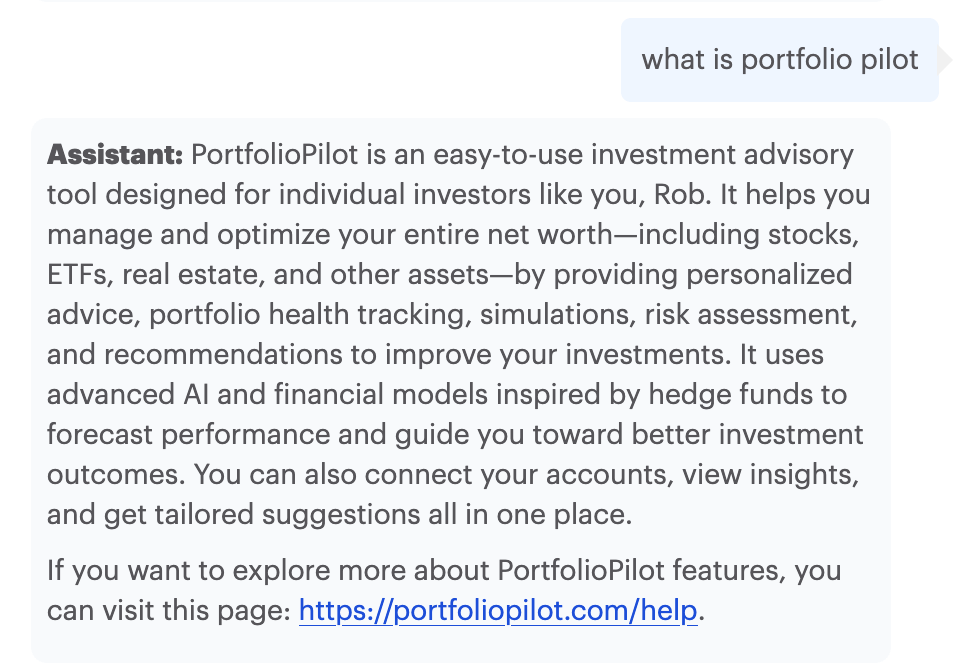
So what is PortfolioPilot? Let’s hand it over to their AI assistant to weigh in on that question 🙂

PortfolioPilot AI Assistant v1.3 explaining what it is

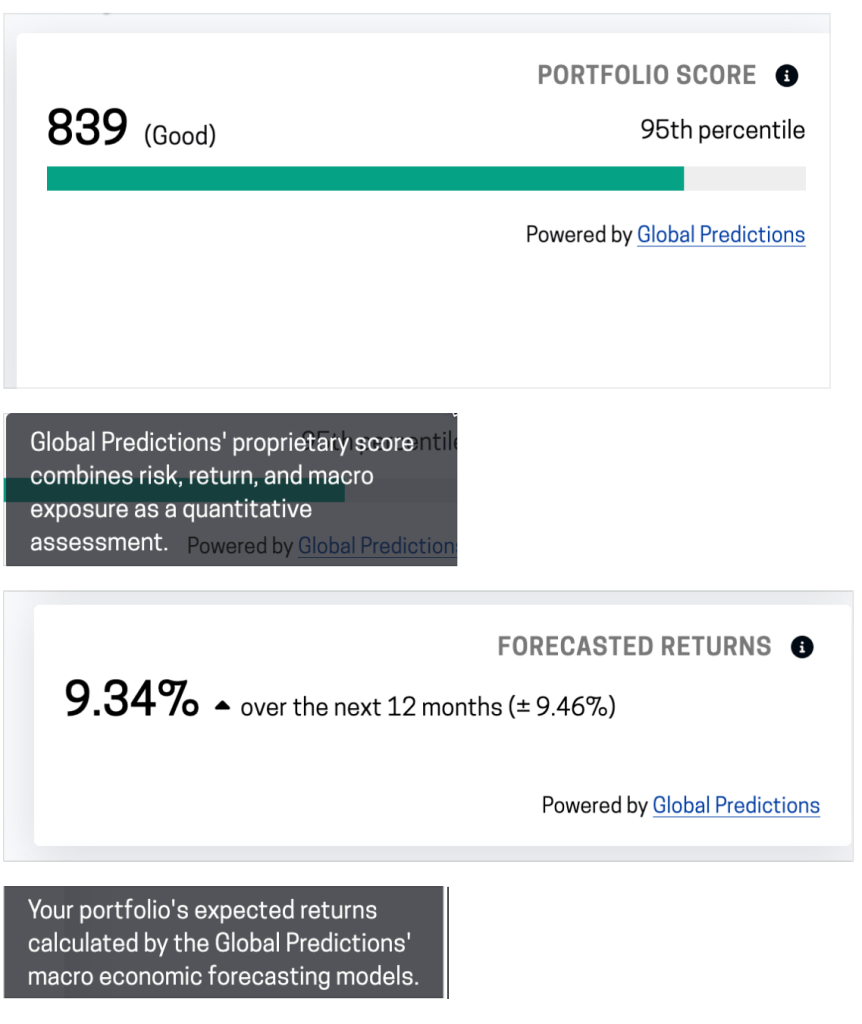
On Passiv, the data provided by PortfolioPilot is limited to a portfolio score (out of 1000) and a “Forecasted Return” metric. The Global Predictions/PortfolioPilot assessments for my portfolio as presented on the Passiv dashboard are depicted below.

Global Predictions/ Portfolio Pilot’s scoring of my portfolio, as depicted on the Passiv dashboard23

When I headed over to the PortfolioPilot website, I decided to set up an account and take a closer look.

After an initial set of questions to help figure out my risk profile, I was able to enter my entire portfolio manually, since it’s down to just 12 holdings these days. Pro tip: this is a US tool, so if you enter Canadian stocks/ETF, you have to add “.TO” to the name of the holding in question, e.g. XGRO.TO not just “XGRO”.

So once I did that, it spat out all kinds of pretty data. I do like the visualization per ETF held…this one is showing 3 month returns per ETF. Whether or not it’s including dividend payouts is not known.

3 month return of ETFs held in my retirement portfolio

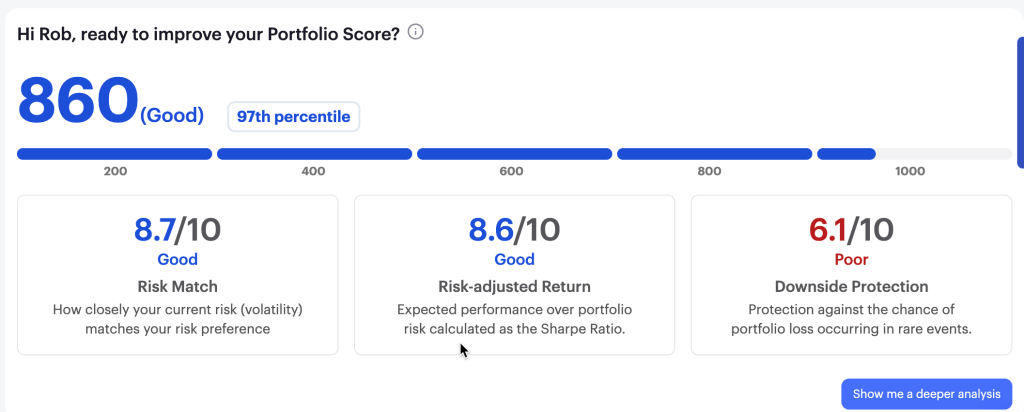
It also gave me a little more insight into my portfolio score4:

Portfolio Score of my retirement holdings, per PortfolioPilot

This view reminds me of how QTrade does their portfolio assessments, something I thought was a plus of that provider. The downside protection warning indicated that I have too much invested in too few holdings, but since I’m on the free version, no further insight was provided. Both AOA and XGRO are tilted towards large US stocks…I suppose my Magnificent Seven holdings are a non-trivial part of the overall portfolio as a result, but I wasn’t able to delve further into this warning. That’s what you get for paying nothing, I suppose.

So some nice stuff here, nice visualizations, customized news based on what’s in your portfolio, all good. But there are some problems I see with their data.

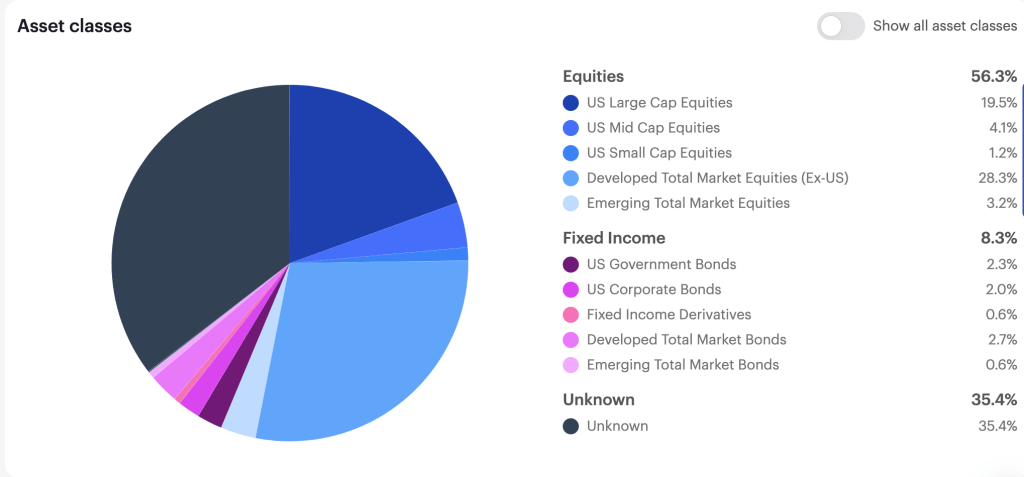
Example one:

PortfolioPilot Asset class view: 35% “unknown”? Blind spot for Canadian ETFs, maybe?

The asset breakdown is very detailed, which I like, but at 35% “unknown”, it’s kinda useless. No way I can see to figure out what ETFs are causing it trouble. Guess I’ll see what support has to say.

They have specific recommendations, which I also like, but again, I see issues:

PortfolioPilot suggested actions

So here, my issue is with action #2. It was recommending replacing XEQT (an ETF all-star) with VE.

Now, setting aside for a moment that VE and XEQT are pretty different in terms of what they hold, (to start, VE has no Canadian or Far East exposure), the REASON the suggestion was made was to save on management fees. PortfolioPilot claimed that VE attracted no fees, making me a sucker for paying 0.20% to hold XEQT. A quick look at the VE page dispelled that idea immediately — the MER is 0.22%. Following their advice would have led me to pay MORE in fees, not less. Shrug.

Anyway, I spent all of 30 minutes with this tool, and although it shows promise, some of the errors I spotted do not fill me with confidence in recommending it to others.

Anyone out there using it? Got other thoughts? Let me know at comments@moneyengineer.ca!

  1. But per some Reddit threads I have seen, users with more assets with Questrade may get it anyway. I await some sort of official communication before commenting further. As of right now, I still seem to have full access to the tool. ↩︎
  2. I dunno, 95th percentile seems “Excellent” to me.
    ↩︎
  3. Not really sure how to interpret that. Does that mean between 8% and 10% annual return, or does it mean -1% to 19% annual return? I would tend to believe the latter, since that’s more in line with an 80% equity portfolio, but no explanation is offered… ↩︎
  4. I suppose my score is a bit higher because it also includes my remaining QTrade holdings, which Passiv doesn’t support. Or maybe not. ↩︎

Questrade Bonus Capability: Passiv

**** Update: Per email communication on October 24 2025, as of January 31, 2026, Passiv will not be offered at all by Questrade, as they are planning to launch their own integrated portfolio monitoring and rebalancing tools”.

**** Update: As of June 1, 2025, Passiv Elite is no longer offered for free for Questrade Clients. It’s now part of a subscription service called Questrade Plus***

As you may have heard, I’m in the middle of a transition between online brokers1. And so I’ve been spending some more time getting to know what Questrade offers to the DIY investor besides free buying and selling of stocks and ETFs.

One thing I looked into lately was Passiv, a service that is offered for free for all Questrade clients.

In brief, Passiv is a 3rd party web application2 that allows you to track your investments from a single screen, no matter if they are found in multiple investment vehicles (e.g. TFSA, RRSP, RRIF) or if they are found across multiple providers (full list of supported brokers is here)3.

What’s more, it also evaluates your portfolio against a model that you define. For example, if you (like me) have an investment portfolio with a target allocation of 5% cash, 15% bonds, 20% Canadian equity, 36% US equity, and 24% international equity, Passiv can assess your current holdings against these targets, and even do the trades to rebalance the portfolio!

Astute readers will note these are a lot of the same benefits I’m a fan of — and one of the big reasons most of my portfolio is invested in all-in-one asset allocation ETFs. (Are these ETFs unfamiliar? You can read about them here.)

I tried to use Passiv to model my own portfolio, but discovered that all-in-one asset allocation ETFs aren’t really supported by the tool4. Once I thought about it some more, it’s clear why — Passiv really markets itself as an ALTERNATIVE to using all-in-ones. Here’s a clear marketing pitch from Passiv that demonstrates its approach: https://passiv.com/feature-posts/model-portfolios-that-cost-less-than-all-in-one-funds-or-robo-advisors.

So to get the full benefit of Passiv, instead of holding XGRO, you would instead hold the constituent components of XGRO, a fund I’ve broken down previously. This would save you some management fees over time. Passiv helpfully does the math to calculate how much here5.

As a certified cheapskate, I’m always interested in saving a bit of money. But there are some downsides I could see in the Passiv approach:

  • You have to actually DO the rebalancing now and then. Not a big deal, but a fund like XGRO does this as part of their offer6.
  • You have to do the rebalancing no matter what. By this I mean that you have to buy when others are selling, and sell when others are buying. You can’t get overly attached to any one segment of your portfolio, because then you start making bad decisions based on “gut instinct”. Humans are notoriously bad at this7.

On the plus side, you will definitely save on management fees, and you could certainly tweak the contents to avoid products you wouldn’t normally buy (e.g. XGRO has some hedged funds, which I don’t like, typically).

An unknown for me is how foreign exchange is handled. That’s always something I consider since a lot of my retirement savings are in USD. Some experiments required 🙂

Anyway, it’s given me something to think about. I’ll have to see how easy it is to use in practice once all my accounts are back in place. Any Passiv users out there? I’m interested in your take — just drop a line to comments@moneyengineer.ca.

  1. And some (not all) of the funds are now showing up in Questrade, about 3 weeks after starting the process. Switching providers is not for the impatient. ↩︎
  2. WARNING: they don’t have an app. But someone named “Pasiv” does, and it looks very similar. ↩︎
  3. Other benefits include tracking of dividends, performance charts, etc. All stuff Questrade is apparently not very good at. ↩︎
  4. One asset class per stock symbol. My home-grown spreadsheet supports dividing symbols by asset class. ↩︎
  5. The calculation doesn’t include Passiv’s fees for the service, which are waived if you are Questrade client. ↩︎
  6. Per BlackRock “XGRO’s portfolio will be monitored relative to the asset class target weights and will be rebalanced back to asset class target weights from time to time at the discretion of BlackRock Canada and/or BTC. Generally, XGRO’s portfolio is not expected to deviate from the asset class target weights by more than one-tenth of the target weight for a given asset class.” [source] ↩︎
  7. If you’re interested in how behavior shapes investing, https://www.looniedoctor.ca/2024/12/13/etf-investor-behavior/ is a very good introduction to the topic. ↩︎