News: QTrade launches free money promo

What seems to be normal nowadays is to have online brokers write cheques to investors in an attempt to attract new money. I wrote about Wealthsimple’s latest offer yesterday, and now I see that QTrade is the latest broker to try to entice investors to move their money. I’ve been a QTrade client for many years (you can read my take on them here), but this year moved most of my holdings to Questrade1 (my take here).

Anyway, the maximum possible free money you can earn is $2000 with this latest QTrade promotion. All the details are captured here, and the fine print is found here.

I’ll save you the trouble, the details as I see them:

  • To be eligible, you can be a new or existing client, but you have to open a new account23 with QTrade before November 30, 2025 using the promo code QTRADE20254
  • Fund your account5 before the end of the year to be eligible for your free money
    • 5% matching on the first $15k (total possible: $750)
    • 1% matching on the next $125k (total possible: $1250)
    • No matching after that (i.e. the total reward is capped at $2000)
  • Keep your money there until December 31, 2026 and get paid in a lump sum in February 20276.
  • If you’re also a new client, you get free trades7 until the end of the year

Comparing Wealthsimple’s latest offer to QTrade’s offer might be fun. In the table below, I’m ignoring the margin account bonus offered by Wealthsimple and the impact of free trades offered by QTrade8.

If you move…Wealthsimple BonusQTrade BonusWinner
$15k$09$75010QTrade
$25k$250$850QTrade
$50k$500$1200QTrade
$100k$1000$1600QTrade
$150k$1500$200011QTrade
$200k$2000$2000Wealthsimple12
>$200k1% of amount, up to $20k$2000Wealthsimple

QTrade’s offer is the clear winner for amounts up to $200k, but Wealthsimple wins if you’ve got more loose change. One big difference is how fast you get your hands on the bonus money. Wealthsimple starts paying out 1/12 of your bonus 60 days after the money lands, whereas QTrade makes you wait a whole year (and then some) before giving you the money.

As a certified cheapskate, I’m always happy to take advantage of free money, and more and more providers13 seem to be taking this route in an effort to attract new customers. It’s a good time to be a DIY investor!

  1. To take advantage of THEIR free money offer, naturally ↩︎
  2. My interpretation of the Ts and Cs is that opening multiple accounts will NOT increase your ability to collect free money. The limit is $2000 per client, across all new accounts opened by that client ↩︎
  3. There’s no restrictions that I see on the type of account. QTrade provides all of the ones you might care about: TFSAs, RRSPs, RRIFs, RESPs, non-registered. They also support USD accounts. ↩︎
  4. Speaking as a current QTrade client, opening a new account takes only a minute or two. I would expect it take a little longer for a new client, but this step needn’t dissuade you. ↩︎
  5. Has to be “net new” money, so my thought of shifting from one account to another isn’t eligible. Darn. ↩︎
  6. Paying out bonuses month by month seems to be a more common way of doing this, but to each his own I guess. ↩︎
  7. Most of the ETFs I care about are included in QTrade’s “Free to Trade” list ↩︎
  8. And the time value of money. ↩︎
  9. Wealthsimple requires minimum $25k before paying out ↩︎
  10. 5% for the first 15k, 1% after that ↩︎
  11. QTrade’s bonus cap is $2k which kicks in at $140k ↩︎
  12. Because Wealthsimple pays out faster than QTrade does ↩︎
  13. WeBull and moomoo (not making those names up, promise), two new providers on the scene, also have promotions. ↩︎

Give more to charities, less to the CRA

It’s probably not news to most of you that charitable giving in Canada attracts tax breaks that reduce your tax owing to the CRA. It’s a nice deal — support the causes that are meaningful to you while saving a bit of tax owed.

But for those of you with non-registered accounts holding stocks and ETFs, did you know there’s even a better option that can save you even more tax? By donating shares in-kind to your chosen charity, you get the same donation credit AND you avoid paying capital gains tax on the shares donated!

The differences can be sizeable depending on the unrealized capital gains you have in your portfolio.

Here’s a quick example: let’s say I bought $10,000 of XGRO1 5 years ago in my non-registered account. Per this dividend calculator featured in “Tools I Use” I see that it’s currently2 worth $15,850.

Say I want to donate $1000 to a charity — selling $1000 of XGRO today would generate a capital gain of $369. That’s taxable at 22.48% marginal rate in Ontario in 20253, so I have to pay an additional $83 in taxes4.

If I instead donate the shares in kind to the charity, I pay nothing on the capital gain, and I keep $83 either for me, or for additional charitable works.

So how do you do this? Well, it will depend on the online broker you deal with, but generally the steps are something like:

  • Let the charity know you’re intending to do this. Larger charities will have a published process, for example the Ottawa Food Bank’s is here5. Smaller charities can still benefit if you use a service like CanadaHelps6.
  • Let your broker know your intent. Every broker will have a different process, usually including some kind of form. Here’s some examples I found:7

And that’s it. The receiving charity will issue a donation receipt reflecting the market value of the donated securities for your tax filing. The nullification of the capital gain is done using form T11708 when it comes time to file your taxes.

I plan to do this more systematically for the charities I support; it’s admittedly a bit more effort than automated contributions. Since Questrade (my current broker) charges me $25 every time I do this, I’ll have to be a bit more strategic about amounts and timing.

  1. XGRO is a significant part of my portfolio, and as such it is included in my ETF all-stars page. What is also true is that I don’t hold much of it in my non-registered portfolio, but that’s just a historical investing habits showing up. ↩︎
  2. 5 year return, WITHOUT dividends reinvested as of July 17, 2025. Not reinvesting the dividends means my cost base is clearly $10k, useful for the example that follows. ↩︎
  3. Per https://www.taxtips.ca/taxrates/on.htm for taxable income between $114k and $150k. Don’t forget that capital gains are only taxed at 50% of the value of the gain. ↩︎
  4. Ignoring the tax savings generated by the charitable donation in the first place since that’s the same in both scenarios. ↩︎
  5. Googling “donate securities” <charity name> is helpful ↩︎
  6. They do keep a portion of the donation to offset their expenses, so it may not be a good idea for small donations. ↩︎
  7. Sorry Scotia iTrade users, I did my best but could not find their form. Let me know if it’s available somewhere and I’ll update. I’ve successfully used the process with both BMO and QTrade. ↩︎
  8. i’m not an accountant. Consult a professional if you have concerns. ↩︎

The Mechanics of Getting Paid in Retirement

***This is no longer accurate; my new diagram is found at The Mechanics of Getting Paid in Retirement: 2026 Edition ***

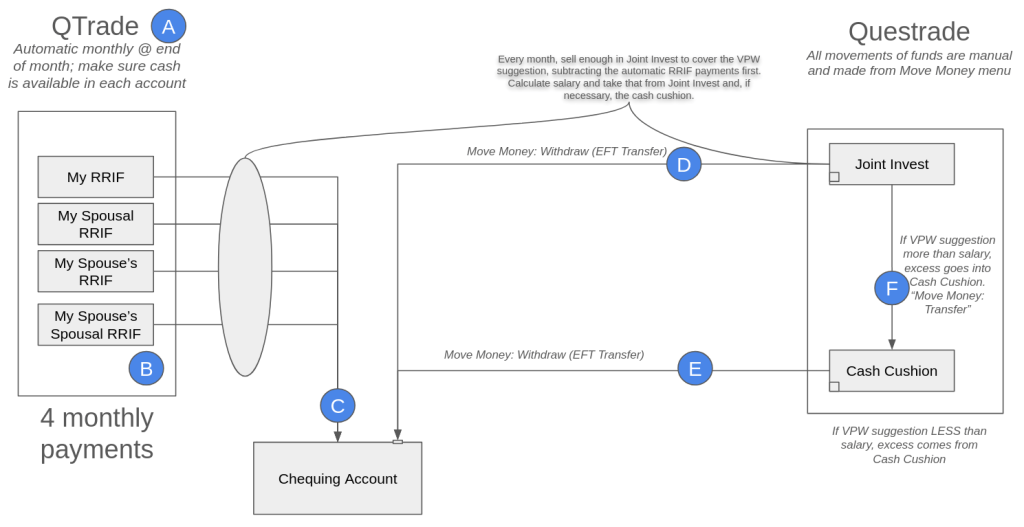
DIY investing also means DIY decumulation. I recently completed a change in online broker from QTrade to Questrade and this is how I get paid in retirement; I’ll refer to the letters in the diagram below so you can follow along.

How I get paid, April 2025

A: QTrade? What?

I know I started by saying I completed the transfer from QTrade to Questrade, but due to an unexpected snag, I still have 4 accounts with QTrade which are currently paying a monthly obligatory RRIF-minimum contribution to my salary. I talked about the snag here, but suffice it to say I could have moved these accounts too, but at the expense of foregoing monthly payouts for the remainder of 2025, which I didn’t think was worth it.

Next year, those accounts will disappear and Questrade will handle the RRIF minimum payments.

B: Yes, there are multiple RRIF accounts

When I started the paperwork to open RRIF accounts, I was surprised that the same choices were offered as were offered for RRSPs — individual and spousal. I’m sure that some of the reason is due to the attribution rules for spousal RRIFs, but anyway, there are 4 RRIF accounts generating 4 individual payouts every month. This is automatic, so I have to make sure that there is cash available in the 4 accounts each month, or else my provider will happily charge me an arm and a leg1 to do the necessary asset sale.

The asset sale takes a few seconds; and with T+1 settlement, the cash is available the next day. Right now I try to do all my moves on the 22nd of the month, but admittedly, this is more time than strictly necessary.

C: Opening the RRIF account includes providing your banking information

I don’t know whether there is any provider out there who permits RRIF payments to be paid to a non-registered account, but so far it seems that they all prefer to make EFTs into a bank account. That’s not a problem for me but this may not be what you’re expecting. The money just shows up like a paycheque on or near the last day of the month.

D/E: The sum of all RRIF payments isn’t enough to fund my desired lifestyle

I’m withdrawing RRIF minimum payments and funding the rest of my monthly paycheque by liquidating assets held in my non-registered account. Another approach would be to increase the RRIF payments, but then that attracts withholding tax, which I hate. The monthly liquidation of assets in my non-registered account generates taxable capital gains each time, naturally. The advice I got from my retirement planner suggested I should be able to maintain an overall 15% tax rate by making sure that I have a mix of favorable taxable income (capital gains and dividends) along with the unfavorable2 RRIF income.

I keep an eye on my 2025 tax bill by using the tax calculator I mention on https://moneyengineer.ca/tools-i-use/. I can always choose to switch gears if needed.

In Questrade, movements of cash are done from their aptly-named “Move Money” menu. Setting up your bank account in Questrade was a bit clunky3 and relied on some app like Plaid to get the job done. Moving funds in this way isn’t instant, expect a delay of at least two business days in each case.

Another oddity with Questrade is that any joint non-registered account is set up as a margin account, which means it’s shockingly easy to borrow money you don’t have4.

One unknown with Questrade — I was able to move money instantly after an asset sale. It’s not clear to me whether this uses margin or not5. I’ll know more once I get my April statement, I guess. If I get charged margin interest, I’ll have to hold off moving money until the day after the asset sale.

F: Variable Percentage Withdrawal (VPW) requires the use of a cash cushion

I described the methodology I use to calculate my take-home pay in a previous post, but in essence my salary is related to my real-time net worth, filtered through a 6-month moving average so an anomalous month on the stock market doesn’t impact my take-home pay quite so quickly. VPW makes a “suggestion”, this suggestion is added to the cash cushion, divide by 6, and presto, the “suggestion” is converted to a monthly “salary”.

In any given month, the cash cushion is either being augmented by the sale of some assets in my non-registered account (the suggestion is larger than the salary), or the cash cushion is being depleted to make up the shortfall in my calculated salary (the suggestion is less than the salary). All of those movements are manual. Transferring cash between non-registered accounts is supported by Questrade, but it wasn’t supported by QTrade6.

All in all, this process should take less than 15 minutes a month. The first time included a learning curve and extra setup, but now that pre-work is done. Next step is making sure my spouse knows how to do this, too!

  1. Assuming your arm and leg are worth $40. ↩︎
  2. Unfavorable because it’s treated as straight income, and since RRIF-minimum, no witholding tax. I’m expecting a decent tax bill come April next year. ↩︎
  3. Bank accounts showed up in my mobile app but not on the web portal. To get them to show up there I had to set up my account — again — and successfully transfer a nominal amount. Only then would the web app remember my bank accounts. ↩︎
  4. Which I inadvertently did, paying myself from the wrong non-registered account. Sigh. ↩︎
  5. Since the transfer isn’t instantaneous, and since the cash really is available the day after, one could make the case that this doesn’t require margin. But I really have no idea. ↩︎
  6. For QTrade I had to use my bank account to get around this restriction. ↩︎

Switching online brokers recap

Switching online brokers is a time-consuming process; I just lived through moving from QTrade to Questrade to take advantage of Questrade’s 3% cash-back promotion. I covered the basic steps you need to take to switch brokers here. It took even longer than I expected, and here I break down some of the reasons it took as long as it did1.

Form filling was error-prone

The Questrade process to request a transfer looks something like this:

  1. You navigate to the Questrade account that is going to get the transfer (e.g. your TFSA)
  2. You initiate the transfer request by hitting a link. This, behind the scenes, creates a formal Transfer Request ticket that is processed by the front and back office.
  3. You are asked a series of questions online (sending broker, account numbers, kind of transfer)
  4. A pdf is automatically created2 that you then have to print, sign, and then…
  5. Upload.

The first problem was unique to the dying days of the promotion as me and every other person on the planet was trying to complete the same steps. Step 5 sometimes did not work, and you were left with a generic error message which encouraged you to try, try, again. Which I dutifully did. Unfortunately, this meant there was an explosion in the number of Transfer Request tickets that I mentioned in step 2, which I am sure completely overwhelmed the humans on the other side of the ticket.

The second problem was a bit more subtle. Sometimes, it seemed that the answers provided in step 3 were not populated on the resultant pdf. And hence, in some cases, forms were submitted with some mandatory fields missing. This would have been prevented had I bothered to carefully review the pdfs from step 4, but when you’re asking for a dozen different account transfers, it’s easy to miss a radio button that’s not filled out.

This problem was particularly noticeable on the RESP transfer forms, which are different from all of the others since there is a CRA form that also needs to be filled out. I believe I attempted to fill out the form correctly 3 times before getting it right. Rejection of an incorrectly filled form takes DAYS to process so timelines rapidly extend.

There’s not a lot of transparency in transfer progress

It took me a while to figure out where the transfer requests are hidden on the Questrade portal (you have to go to Move Money: Move Money History: Transfer: Transfer account to Questrade history)3 and here you see one of three states: Transfer Complete, Transfer in Progress, Action Required. There’s no detail beyond that.

  • “Action Required” is code for “call us, there’s a problem”; the old broker probably rejected the transfer for some reason. One reason is specific to RRIFs, but I covered that previously.
  • “Transfer in Progress” means one of:
    • Your filled out your transfer form correctly
    • We are initiating the request to your old broker
    • Your old broker is working on the request
    • Your old broker has accepted the request, but we don’t have it yet

Questrade also helpfully provides automated emails indicating when the Transfer starts and is nearing completion (they have your stuff, it’s just not showing up in the system yet), but — and this is a major irritant — the automated emails don’t include what account is being discussed. When you’re moving as many accounts as I did, this is not much better than noise.

One other small clue I had that my old provider got the request from Questrade is that they were usually pretty fast to charge their $150 transfer-out fee, plus HST4. So when I saw that I knew that my old provider was the one holding up the process…and if I didn’t see a transfer-out fee, I could safely assume that Questrade was to blame.

Did I say it was done? Well, almost…

I noted in a few cases that not 100% of the funds moved to Questrade. Unfortunately, the timing of the transfers meant that the likelihood of a quarterly dividend payout overlapping with the process was high. And yes, I see some residual cash left in my old broker in some cases for this reason. I suppose i’ll have to chase that down at some point, but the vast majority of stuff is now taken care of…well, except for my Canadian dollar RRIF, which is going to stay with QTrade a little longer until more of my mandatory RRIF payments have been made.

  1. My TFSA was the fastest, with the transfer request being accepted on February 26 and the holdings showing up on March 21. The joint investment account was the last to be processed, with holdings showing up in my Questrade account on April 15. ↩︎
  2. Whether a pdf is created or not I think is partially dependent on who the sending institution is. Not sure about that. ↩︎
  3. And although I show this as a menu structure, it’s not really. Move Money is a menu, but Move Money History is included on the page about halfway down. I’m not a big fan of how Questrade structures their web experience; it’s useable but it took a while to figure out where to find things and then remember where those things were… ↩︎
  4. Covered by Questrade, except for the HST part. But that’s another document submission to prove that the old provider charged the transfer out fee. Which is a bit ridiculous since ALL providers do this. ↩︎

The HISA table April 2025

Summary: High Interest Savings Accounts (HISAs) are a way for cash to earn half-decent, risk-free interest. These “Series F” HISAs are likely available through your online broker, but you may have to ask how to get at them, exactly.

We talked about HISAs in February over here if you need a quick reminder: https://moneyengineer.ca/2025/02/14/earn-money-with-your-cash-the-hisa-table-february-2025/

On March 12, the Bank of Canada reduced their overnight rates by another 0.25%.1 Unsurprisingly, this had a knock-on effect to the interest rates provided by the series F HISAs I track.

Equally unsurprisingly is that the US Federal Reserve didn’t touch their rates, and as a result, there were no changes in the HISA rates paid out for USD accounts. Here’s the full breakdown:

Current HISA rates for HISAs available via QTrade

There’s also a Google Sheets version with a bit more detail (source links) if you prefer.

For Canadian Dollar HISAs, B2B bank remains top of the heap: https://b2bbank.com/advisor-broker-rates/banking-rates.

For those of you who hold US cash in your brokerage accounts, you can benefit from the much higher US interest rates, and you have multiple choices since multiple providers are paying the same rate.

  1. You can also say “25 basis points” if you want to impress your friends ↩︎