Stop me if you’ve heard this before, but yes, there’s another offer out in the market that demonstrates the seemingly never-ending gravy train for the DIY investor who isn’t too dedicated to any particular broker.
It’s Wealthsimple’s turn, again, with a promotion they are calling “The Un(Real) Deal”. Marketing page here, Ts and Cs here, but step one, as in all Wealthsimple promotions, is a registration for the promotion that is painless, but must be done by March 31, 2026. After registering, you have 30 days to initiate account transfers.
In this promotion, Wealthsimple is trying to keep the rewards modest for the deal-hopper, but are pretty darn attractive for the more loyal investor. When you register for the promotion, you pick a lock-in period for transferred-in funds of one of:
1 year, and get 1% cash back payable over 12 months
2 years, and get 3% cash back payable over 36 months
5 years, and get 3% cash back payable over 60 months1
What is particularly noteworthy about this promotion (besides the 3% cash back) is that the maximum you can earn in free money is 3% of five million dollars2. That’s (checks math) $150,000 possible in free money. That is a nice slice of pizza, if you ask me.
It appears that the usual kinds of accounts count as eligible for the promotion: non-registered, TFSAs, RRSPs, RRIFs, RESPs, LIRAs…One missing is spousal RRIFs, but spousal RRSPs are shown, so not sure about that.
If you’re tired of missing out on the gravy train, this could be an even better deal than the aforementioned Questrade deal.
Anyway, there you have it. This is one that I will take a closer look at. If you want a little extra incentive, you can use my referral code and get some additional free cash.
I (meaning chatGPT) ran the numbers at various discount rates (0%,5%,10%) and the present value of 5 year deal always came out ahead. My MSci prof would be so proud of me. At 10% discount rate, the PV of the three options assuming $200k is moved is $1900, $3350, and $4720. ↩︎
Yeah, ok, I know most people aren’t moving that kind of dosh, but normally these promotions are capped at a much lower dollar amount. The aforementioned Questrade deal is capped at a maximum reward of $20k, requiring $750k to be moved across 3 accounts. ↩︎
I got wind of ZGRO.T through Reddit, specifically r/CanadianInvestor. ZGRO and ZGRO.T are both all-in-one asset allocation ETFs from BMO, but with vastly different yield characteristics. I was confused, but in the end, decided that ZGRO.T was probably not a bad pick for use in a RRIF account as it might save you the hassle of selling shares. Their TOTAL returns (assuming all dividends are invested) are effectively identical.
4th-ranked post of 2025: Spousal RRIF Attribution Rules
I think I was first warned about this nuance of spousal RRSPs/RRIFs by my DIY neighbour (thanks, Steve) and is the main reason I’m only drawing RRIF minimum for the next two years1. I think most of the visits to this article were search-driven. Either that, or people came to admire what might be my favourite article thumbnail2 I’ve posted thus far.
3rd-ranked post of 2025: Norbert’s Gambit with Questrade
As someone who holds more USD-denominated assets than might be wise, I do very much appreciate the existence of a cheapskate way of converting between USD and CAD assets. I think I first learned about this trick via The Loonie Doctor’s blog. The #3 blog entry explains how it works if Questrade is your broker. I would also recommend https://moneyengineer.ca/2025/08/21/tracking-norberts-gambit-costs-with-questrade/ for a very clear picture of what it actually costs (in time and fees) to execute the Gambit: in three of four instances, the time delay of executing the gambit has worked in my favor as the FX rate has drifted a bit to my advantage.
2nd-ranked post of 2025: TD versus iShares all-in-ones
I’m a fan of all-in-ones (and am a little sad https://moneyengineer.ca/2025/01/21/why-you-can-fire-your-advisor-asset-allocation-etfs/ didn’t crack the top five last year). I am genuinely puzzled why people seem to get so wound up about which family of all-in-ones to choose3. I examined TD’s only because their cost to own is a bit cheaper than iShares (who I use primarily), and I’m a cheapskate. (I studied the cost of owning an all-in-one here.) Anyway, in the end, the biggest difference is visible in TGRO versus XGRO because TGRO, unlike any other GRO ETF, uses 10% bond allocation and not 20%. This gooses its return a bit, at the cost of additional volatility. Otherwise, it’s a case of tomato/tomahto. Pick one, or pick them all, it doesn’t matter much.
This was, as the title implied, a quick review of a made-in-Canada tool to help craft a retirement plan. And again, my DIY neighbour gave me a heads-up about it4. It got a lot of interest, probably because the kind folks at Optiml linked to my review from their website ;-). I was impressed by the completeness of the tool during my test drive, and it seems like a good and fairly priced way for a DIYer to do some validation of their retirement plan. Having validation of my plan was one of the ways I knew I could retire.
Looking forward to seeing what the 2026 list might look like! Got a topic or question? Send it along to comments@moneyengineer.ca, or comment below!
RRIF minimum withdrawals are never subject to spousal attribution ↩︎
Questrade’s offer of free money (to a maximum of $20k) applies to both new and existing clients. (Regrettably, I think that since I started my — still uncompleted — transfer last year, I won’t be eligible myself. Now isn’t that a kick in the head? Of course, I’m still collecting from the transfer I did in early 2025.)
Base reward: 1% cash back for registered1 accounts, 2% cash back for non-registered accounts
Move 3 or more kinds of accounts (one of which has to be non-registered) and double your base reward to 2% for registered accounts, 4% for non-registered accounts
Maximum cashback for registered accounts: $10k
Maximum cashback for non-registered accounts: $10k
Must start the transfer before Feb 2, 2026, and it has to complete by May 29, 2026
So one way to qualify for the maximum reward would be:
Move a TFSA worth $250k to get $2500 base
Move an RRSP worth $250k to get $2500 base
Move a non-registered account worth $250k to get $5000 base
This is 3 accounts so this triggers the multiplier that doubles the reward:
$5000 for the TFSA, $5000 for the RRSP, total $10k
$10k for the non-registered account
So by moving $750k, one could take advantage of a $20k reward. Which, admittedly, is a pretty high bar, but $20k is not nothin’ either3.
To me, if you’ve grown tired of not getting free money this seems like a pretty good deal, but only if you’re able to qualify for the bonus by moving 3 kinds of accounts. Otherwise, the reward is just 1% and brokers have been more generous than that of late (e.g. QTrade).
So act quickly and decisively, this one will be over before you know it. If you want to show some love, you can even use my Questrade referral code4 🙂
For example: TFSA, RRSP, RRIF, RESP. LIRAs are not listed in the Ts and Cs, though. ↩︎
You’re allowed to withdraw 5% with no penalty. If you exceed that, then you don’t get any more bonus payments. Exception: RRIF minimum payments :-). ↩︎
Something I never paid much attention to when I was building my retirement savings were the delays built into the system when it comes to moving money around. The Mechanics of Getting Paid in Retirement: 2026 Edition shows the steps I use to get a monthly paycheque, but it doesn’t show the delays. When I was working, I could predictably expect a paycheque twice a month. No guesswork. Now that I rely on these money movements to do things like pay bills, I’ve become a lot more attentive to where things slow down. Stressing about them isn’t helpful, but knowing about them in advance means you can build them into your plan so you don’t get caught in a cash flow crunch.
I should preface this by saying that I use Questrade and Wealthsimple for my providers, and how your provider handles things can be quite different, so take these as examples, not as absolutes. So where have I seen things slow down?
Time between selling an asset and having useable cash
Here I’m talking about cash as cash, not cash to immediately do another trade, i.e. sell ETF “a” and then use the proceeds to buy ETF “b”. For that example, I think most brokers allow you to sell to buy immediately after the trade executes, at least in my experience.
Here I’m talking about selling ETF “a” so you have the cash to pay your credit card balance. This is usually a multi-step process. The first step is having access to the cash you gain from the proceeds of a sale. This is generally speaking a business day after the trade executes. So if you sell on Monday, the cash appears in your account on Tuesday. If you have a margin account (which I do for my non-registered holdings), then it has the nice side benefit of providing access to the cash immediately after the trade executes.
So now that the cash is there in your trading account, you then have to get it to a place where you can spend it. And here there will be a lot of variability depending on who your broker is, who you bank with, and how you actually move the money (EFT, wire transfer, physical cheque).
For me, I use EFT withdrawals to my CIBC chequing account. And this has delays too.
As an example, I executed a trade in my Questrade non-registered account to help fund my December paycheque.
December 23rd: sold some HXT in the morning, immediately requested a withdrawal to my CIBC account using an EFT. The money was available instantly because I have margin in that account.1
December 29th: deposit received to my chequing account
# of business days: Dec 23rd (0.5) Dec 24th(1), December 29th (2)= 2.5 days to get my $$$
I also sold some funds in my Wealthsimple account on December 23rd. I wasn’t able to withdraw anything until the following day since this account isn’t a margin account. But on the 24th, when I made the request via EFT, the money appeared in my chequing account in minutes. This was 1.1 days2 to get my $$$$.
I do recall when I managed my parent’s BMOI account cash in a non-registered account could immediately be used for bill pay, cheque writing, eTransfers or ATM withdrawals, thanks to their “AccountLInk” service.
Delays in moving money between accounts at the same brokerage
In my VPW-driven decumulation methodology, I have a non-registered Questrade account that is exclusively used as the “cash cushion” — about 5 months of rolling average salary, invested in ZMMK and ICSH, two funds that are on my ETF All-Stars page. Every month, I either get paid from this account or I move money into it from my non-registered account. Getting paid undergoes the same delays as I mentioned above: about 2.5 days, but moving money into this account from another account (one would think) is instantaneous, no? No, not with Questrade.
Typically, it takes a day before the money becomes useable in the destination account. Not so with Wealthsimple, where transfers are instantaneous.
Delays in getting dividend payments
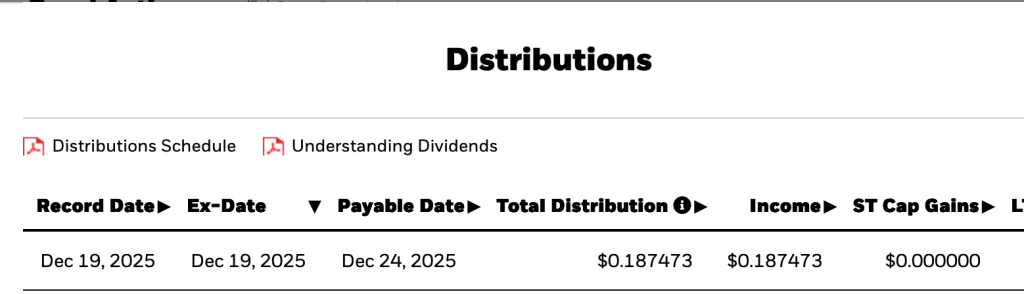
All ETFs publish their dividend schedule. For example, here’s what ICSH’S looks like:
“Ex-Date”, at least for my provider (Questrade) is the date used to indicate a “dividend event” notification. But “ex-date” isn’t when you should look for your dividend payment; you have to own the ETF in question by ex-date to take part in the next dividend payment. And so “Payable Date” is the one of interest, and the lag between the ex-date and the payable date is highly dependent on the ETF in question. Since most of my ETFs pay out either quarterly or monthly, often declaring ex-dividend on the last business day of the month, the first week of January will be active with new dividend funds rolling into my various accounts.
Delays: Just Roll with it
While I do find it irritating that my own money gets tied up for days at a time for no discernible reason, I’ve adapted my expectations accordingly and don’t worry about it. In the early days of retirement, be aware that things may not happen as quickly as you expect, so it’s probably a good idea to have a bit of cash flow leeway in the first month or two as you work out the kinks in your own decumulation system.
And no, I don’t get charged interest when I do this. I’m not sure why, but if I did, I would simply wait a day. I just like being able to make the move in the moment — still logged in, the amounts are fresh in my mind…. ↩︎
Fast transfers seem to be part of the Wealthsimple ethos. ↩︎
Right after the final, final deadline of Wealthsimple’s last free money offer, it appears that Wealthsimple is now offering spousal RRIFs as an account type for the DIY investor (they’ve had them for quite a while in their robo-advisor accounts).
This had always struck me as silly, especially since they have offered spousal RRSPs for a while now.
With this development, Wealthsimple is nearly a viable option to host all of my retirement funds1. My needs are pretty simple:
support for all the account types I need (RRIF/Spousal RRIF, TFSA, joint non-registered, individual non-registered)
zero cost ETF buy/sell
support for Norbert’s Gambit (which implies support for USD accounts, naturally)
Norbert’s Gambit is planned in early 2026 for Wealthsimple, per the very limited info found here.
So, if you’ve been on the fence about Wealthsimple, here’s one more reason to consider them. Once Questrade’s free money gravy train ends for me in March 2027, they become a personal serious contender, especially if they are willing to throw free money my way, which, historically, has certainly been a recurring theme. On that note, if any reader wants to give them a whirl, I have referral codes, just shoot me a note at comments@moneyengineer.ca; if you act quickly2, there might be some free Apple gear in it for you too.
QTrade and Questrade both offer all three. There may be others. ↩︎






 The Money Engineer