News: HISA Table for May, Questrade Plus, WealthSimple Self-Directed RESPs

Happy May to all, here’s some news from the world of Canadian DIY investing.

HISA rates are stable

HISAs, for those in the know, are “High Interest Savings Accounts” and offer a nearly zero risk1 way to earn some interest on your cash holdings. Read all about them here. “Class F” funds are usually available via your online broker, often bought and sold in the same module as mutual funds, although they are NOT mutual funds.

The periodically updated HISA table I maintain has been updated for May. No changes seen from last month, which is unsurprising, given both Canada and the USA have held interest rates steady over the past month. Here it is:

ProviderFundLinkRate SheetRate
RBCRBF2011, RBF2021, RBF2031, RBF2041RBCLink2.55%
ScotiabankDYN6004, DYN5004, DYN3065, DYN3055, DYN3075ScotiabankLink2.70%
Equitable BankEQB1001, ETR1001Equitable Bankn/a2.55%
TDTDB8151, TDB8156, TDB8158, TDB8160TDn/a2.55%
RenaissanceATL5071Renaissancen/a2.55%
Home TrustHOM101,
HOM201
Home TrustLink2.65%
B2BBTB101B2B Bankn/a2.75%
ManulifeMIP610, MIP810Manulifen/a2.40%
National BankNBC200, NBC6200, NBC8200NBI Altamira CashPerformern/a2.55%
Canadian HISA rates, last updated June 9, 2025

Here are the USD rates offered:

ProviderFundLinkRate SheetRate
RBCRBF2015RBCLink4.15%
ScotiabankDYN6005,
DYN5005
ScotiabankLink4.15%
Equitable BankEQB1101,
ETR1101
Equitable Bankn/a3.80%
TDTDB8153TDn/a4.15%
RenaissanceATL5075Renaissancen/a4.15%
ManulifeMIP611Manulifen/a3.30%
National BankNBC201NBI Altamira CashPerformern/a4.15%
USA HISA rates, last updated June 9, 2025

Questrade Plus Launches: Meh

In other news, Questrade launched a new subscription service2. Dubbed “Questrade Plus”, $11.95/month gets you free journaling, better quote data, and a subscription to Passiv Elite.

As a newly-minted Questrade user (got my first bonus payment yesterday, yay!) I see this as a net negative. Let’s look at why.

Passiv Elite is no Longer Free

One nifty (and unexpected) bonus I discovered being a Questrade client was getting access to Passiv’s advanced features. Questrade Plus means that particular freebie is coming to an end. Passiv’s “community” (i.e. free) service is still somewhat useful, but if you want automated rebalancing, you’re going to have either pay Questrade (and subscribe to Questrade Plus) or Passiv (currently $99/year) for that privilege in the near future.

Unlimited Journaling of Limited Use

The unlimited journaling feature of Questrade Plus targets people like me who do Norbert’s Gambit to convert USD to CAD on the cheap, but since I don’t do this sort of thing super-frequently (maybe 5-6 times a year at most), I’d rather pay-as-I-go (currently priced at $9.95 per request).

Real Time Data Streaming of No Interest

The “real time data streaming” feature targets the day trader. Other providers include this sort of thing for free (QTrade, Interactive Brokers). That’s not my thing. It does make me wonder who Questrade sees as their ideal client. Are they trying to be Wealthsimple? Or are they trying to be Interactive Brokers?

Wealthsimple Self-Directed RESPs, coming soon

Wealthsimple continues to chip away at the gaps in their self-directed portfolio offerings. RESPs were one of those gaps, but now it’s been filled, and the main website has been updated to reflect this. I can confirm that I have been offered a spot on the beta launch, so its release to the general public is imminent. Wealthsimple has offered robo-advisor RESPs for a while, but the DIY investor has been forced — until now — to look elsewhere for this.

  1. Unless banks fail. We are all in a lot more trouble if that happens. ↩︎
  2. Because, we all know, you can never have enough subscriptions, right? ↩︎

The Mechanics of Getting Paid in Retirement

***This is no longer accurate; my new diagram is found at The Mechanics of Getting Paid in Retirement: 2026 Edition ***

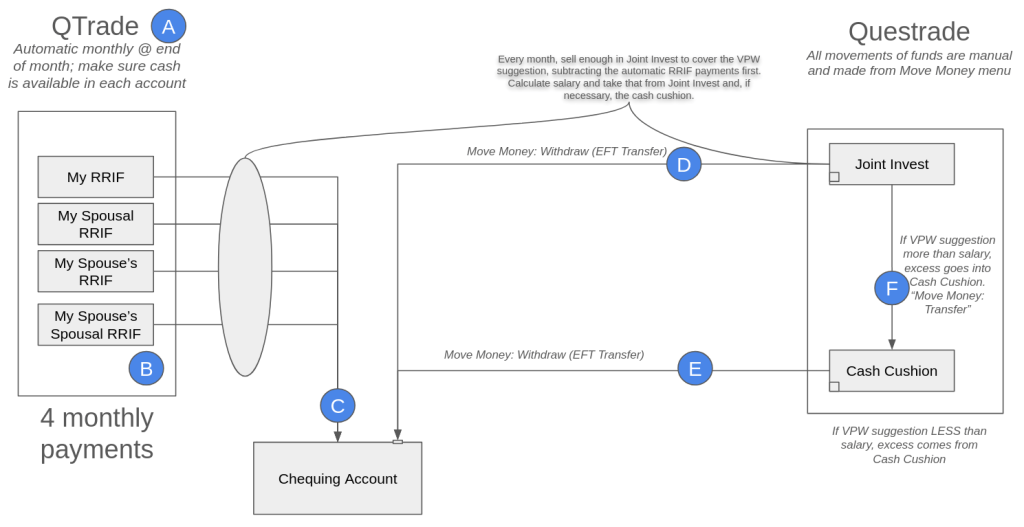
DIY investing also means DIY decumulation. I recently completed a change in online broker from QTrade to Questrade and this is how I get paid in retirement; I’ll refer to the letters in the diagram below so you can follow along.

How I get paid, April 2025

A: QTrade? What?

I know I started by saying I completed the transfer from QTrade to Questrade, but due to an unexpected snag, I still have 4 accounts with QTrade which are currently paying a monthly obligatory RRIF-minimum contribution to my salary. I talked about the snag here, but suffice it to say I could have moved these accounts too, but at the expense of foregoing monthly payouts for the remainder of 2025, which I didn’t think was worth it.

Next year, those accounts will disappear and Questrade will handle the RRIF minimum payments.

B: Yes, there are multiple RRIF accounts

When I started the paperwork to open RRIF accounts, I was surprised that the same choices were offered as were offered for RRSPs — individual and spousal. I’m sure that some of the reason is due to the attribution rules for spousal RRIFs, but anyway, there are 4 RRIF accounts generating 4 individual payouts every month. This is automatic, so I have to make sure that there is cash available in the 4 accounts each month, or else my provider will happily charge me an arm and a leg1 to do the necessary asset sale.

The asset sale takes a few seconds; and with T+1 settlement, the cash is available the next day. Right now I try to do all my moves on the 22nd of the month, but admittedly, this is more time than strictly necessary.

C: Opening the RRIF account includes providing your banking information

I don’t know whether there is any provider out there who permits RRIF payments to be paid to a non-registered account, but so far it seems that they all prefer to make EFTs into a bank account. That’s not a problem for me but this may not be what you’re expecting. The money just shows up like a paycheque on or near the last day of the month.

D/E: The sum of all RRIF payments isn’t enough to fund my desired lifestyle

I’m withdrawing RRIF minimum payments and funding the rest of my monthly paycheque by liquidating assets held in my non-registered account. Another approach would be to increase the RRIF payments, but then that attracts withholding tax, which I hate. The monthly liquidation of assets in my non-registered account generates taxable capital gains each time, naturally. The advice I got from my retirement planner suggested I should be able to maintain an overall 15% tax rate by making sure that I have a mix of favorable taxable income (capital gains and dividends) along with the unfavorable2 RRIF income.

I keep an eye on my 2025 tax bill by using the tax calculator I mention on https://moneyengineer.ca/tools-i-use/. I can always choose to switch gears if needed.

In Questrade, movements of cash are done from their aptly-named “Move Money” menu. Setting up your bank account in Questrade was a bit clunky3 and relied on some app like Plaid to get the job done. Moving funds in this way isn’t instant, expect a delay of at least two business days in each case.

Another oddity with Questrade is that any joint non-registered account is set up as a margin account, which means it’s shockingly easy to borrow money you don’t have4.

One unknown with Questrade — I was able to move money instantly after an asset sale. It’s not clear to me whether this uses margin or not5. I’ll know more once I get my April statement, I guess. If I get charged margin interest, I’ll have to hold off moving money until the day after the asset sale.

F: Variable Percentage Withdrawal (VPW) requires the use of a cash cushion

I described the methodology I use to calculate my take-home pay in a previous post, but in essence my salary is related to my real-time net worth, filtered through a 6-month moving average so an anomalous month on the stock market doesn’t impact my take-home pay quite so quickly. VPW makes a “suggestion”, this suggestion is added to the cash cushion, divide by 6, and presto, the “suggestion” is converted to a monthly “salary”.

In any given month, the cash cushion is either being augmented by the sale of some assets in my non-registered account (the suggestion is larger than the salary), or the cash cushion is being depleted to make up the shortfall in my calculated salary (the suggestion is less than the salary). All of those movements are manual. Transferring cash between non-registered accounts is supported by Questrade, but it wasn’t supported by QTrade6.

All in all, this process should take less than 15 minutes a month. The first time included a learning curve and extra setup, but now that pre-work is done. Next step is making sure my spouse knows how to do this, too!

  1. Assuming your arm and leg are worth $40. ↩︎
  2. Unfavorable because it’s treated as straight income, and since RRIF-minimum, no witholding tax. I’m expecting a decent tax bill come April next year. ↩︎
  3. Bank accounts showed up in my mobile app but not on the web portal. To get them to show up there I had to set up my account — again — and successfully transfer a nominal amount. Only then would the web app remember my bank accounts. ↩︎
  4. Which I inadvertently did, paying myself from the wrong non-registered account. Sigh. ↩︎
  5. Since the transfer isn’t instantaneous, and since the cash really is available the day after, one could make the case that this doesn’t require margin. But I really have no idea. ↩︎
  6. For QTrade I had to use my bank account to get around this restriction. ↩︎

Questrade Example: Exchanging USD/CAD with Norbert’s Gambit

Norbert’s Gambit is a way to change USD to CAD or vice-versa cheaply. (Most brokers take 1.5% off of such transactions). I talked a bit about the Gambit previously, and a very up-to-date blow by blow account of how to do it is found here, but I figured I’d show the practical benefits of doing it.

On April 14th, I decided it was time to covert some of my USD RRIF holdings into CAD. I did this by selling some of my AOA shares. I then immediately purchased DLR.u on the TSX, using the US dollars from the AOA sale. (DLR is the usual ETF people use to do the Gambit, but any inter-listed stock/ETF will do.)

After making sure I had sufficient cash in my account to cover the journaling fees ($9.95 plus HST = $11.24 CAD), I submitted the journal request on the Questrade website.

Two days later (April 16th), the journaling fee was charged to my account.

And then one day later, April 17, DLR showed up in my account, replacing the DLR.u that had been there.

I immediately sold the DLR shares to create CAD in my account, which I then used to buy XEQT.

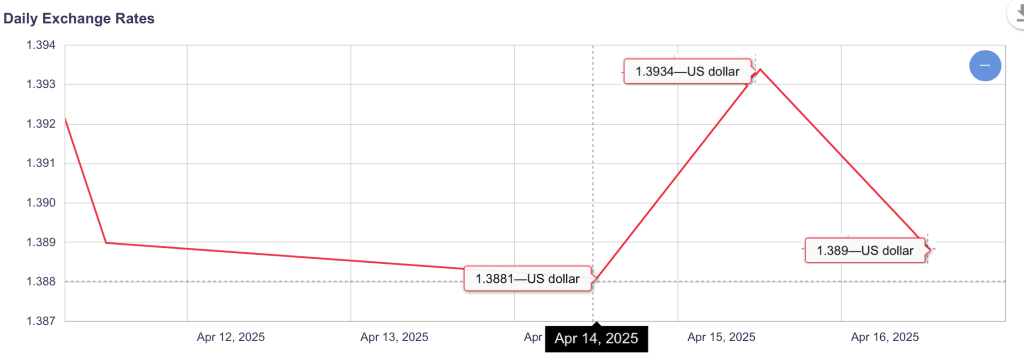
After subtracting the fees, my effective conversion rate was 1.385. Compare this to the Bank of Canada’s published rates, and I think you’ll agree that it’s a pretty sweet deal:

I’m tracking all my Gambit transactions over here, so I can see how often I come out ahead.

Switching online brokers recap

Switching online brokers is a time-consuming process; I just lived through moving from QTrade to Questrade to take advantage of Questrade’s 3% cash-back promotion. I covered the basic steps you need to take to switch brokers here. It took even longer than I expected, and here I break down some of the reasons it took as long as it did1.

Form filling was error-prone

The Questrade process to request a transfer looks something like this:

  1. You navigate to the Questrade account that is going to get the transfer (e.g. your TFSA)
  2. You initiate the transfer request by hitting a link. This, behind the scenes, creates a formal Transfer Request ticket that is processed by the front and back office.
  3. You are asked a series of questions online (sending broker, account numbers, kind of transfer)
  4. A pdf is automatically created2 that you then have to print, sign, and then…
  5. Upload.

The first problem was unique to the dying days of the promotion as me and every other person on the planet was trying to complete the same steps. Step 5 sometimes did not work, and you were left with a generic error message which encouraged you to try, try, again. Which I dutifully did. Unfortunately, this meant there was an explosion in the number of Transfer Request tickets that I mentioned in step 2, which I am sure completely overwhelmed the humans on the other side of the ticket.

The second problem was a bit more subtle. Sometimes, it seemed that the answers provided in step 3 were not populated on the resultant pdf. And hence, in some cases, forms were submitted with some mandatory fields missing. This would have been prevented had I bothered to carefully review the pdfs from step 4, but when you’re asking for a dozen different account transfers, it’s easy to miss a radio button that’s not filled out.

This problem was particularly noticeable on the RESP transfer forms, which are different from all of the others since there is a CRA form that also needs to be filled out. I believe I attempted to fill out the form correctly 3 times before getting it right. Rejection of an incorrectly filled form takes DAYS to process so timelines rapidly extend.

There’s not a lot of transparency in transfer progress

It took me a while to figure out where the transfer requests are hidden on the Questrade portal (you have to go to Move Money: Move Money History: Transfer: Transfer account to Questrade history)3 and here you see one of three states: Transfer Complete, Transfer in Progress, Action Required. There’s no detail beyond that.

  • “Action Required” is code for “call us, there’s a problem”; the old broker probably rejected the transfer for some reason. One reason is specific to RRIFs, but I covered that previously.
  • “Transfer in Progress” means one of:
    • Your filled out your transfer form correctly
    • We are initiating the request to your old broker
    • Your old broker is working on the request
    • Your old broker has accepted the request, but we don’t have it yet

Questrade also helpfully provides automated emails indicating when the Transfer starts and is nearing completion (they have your stuff, it’s just not showing up in the system yet), but — and this is a major irritant — the automated emails don’t include what account is being discussed. When you’re moving as many accounts as I did, this is not much better than noise.

One other small clue I had that my old provider got the request from Questrade is that they were usually pretty fast to charge their $150 transfer-out fee, plus HST4. So when I saw that I knew that my old provider was the one holding up the process…and if I didn’t see a transfer-out fee, I could safely assume that Questrade was to blame.

Did I say it was done? Well, almost…

I noted in a few cases that not 100% of the funds moved to Questrade. Unfortunately, the timing of the transfers meant that the likelihood of a quarterly dividend payout overlapping with the process was high. And yes, I see some residual cash left in my old broker in some cases for this reason. I suppose i’ll have to chase that down at some point, but the vast majority of stuff is now taken care of…well, except for my Canadian dollar RRIF, which is going to stay with QTrade a little longer until more of my mandatory RRIF payments have been made.

  1. My TFSA was the fastest, with the transfer request being accepted on February 26 and the holdings showing up on March 21. The joint investment account was the last to be processed, with holdings showing up in my Questrade account on April 15. ↩︎
  2. Whether a pdf is created or not I think is partially dependent on who the sending institution is. Not sure about that. ↩︎
  3. And although I show this as a menu structure, it’s not really. Move Money is a menu, but Move Money History is included on the page about halfway down. I’m not a big fan of how Questrade structures their web experience; it’s useable but it took a while to figure out where to find things and then remember where those things were… ↩︎
  4. Covered by Questrade, except for the HST part. But that’s another document submission to prove that the old provider charged the transfer out fee. Which is a bit ridiculous since ALL providers do this. ↩︎

Cautionary Tale: changing brokers when you have a RRIF

Summary: If you’re changing online providers with an active RRIF, the old provider is (apparently) obligated to pay out the ENTIRE RRIF amount for the current year before releasing your funds.

As you may have read previously, I’m (still) in the middle of changing online brokers from QTrade to Questrade1. Things are moving along…glacially2. I’m at step 6 of the guide.

Background

If you’re not that familiar with RRIFs, you may want to give Demystifying RRIFs a read.

At QTrade, I had 3 separate RRIF accounts:

  • One individual RRIF in CAD
  • One individual RRIF in USD
  • One spousal RRIF in CAD

QTrade makes you have different accounts for CAD and USD, whereas Questrade does not (hooray)3.

The individual and spousal RRIFs are set up to pay out RRIF minimum on a monthly basis, on the last day of the month. I expect this is a little unusual, since a lot of people seem to take their payments annually. In a weird QTrade wrinkle, one can only make payments from a CAD RRIF account, even though the USD RRIF account is used to calculate RRIF minimums4.

The RRIF transfer-out requests were initiated the instant the RRIF account was approved by Questrade, in the opening days of March (March 2 or March 3), a day or two after my February RRIF payment was processed by QTrade. Plenty of time, I figured.

Trouble Afoot?

About 2 weeks ago now, I got a cryptic email indicating that my RRIF transfer out request had been rejected by QTrade due to having “insufficient funds for RRIF payout”. Looking at my QTrade account, it looked to me like the US RRIF was moving (QTrade had already kindly charged me the $150 transfer-out fee), but the CAD RRIFs showed no signs of a transfer being initiated.

Thinking a little about it, I realized that perhaps QTrade wouldn’t release the RRIF assets to Questrade unless they could be sure Questrade could make the monthly RRIF minimum payment, which strikes me as silly, but I expect there’s some regulation that makes this mandatory. And so I immediately sold a few shares of XGRO in each of the RRIF accounts to ensure enough cash existed to cover the RRIF minimum payments and re-initiated the transfer out request.

But again, rejection. What?

But that, apparently, was not fully correct.

Current State of Play, and Some Advice

Today, I was informed by QTrade that no, they are obligated to pay out the ENTIRE RRIF payment for the year before they hand off the account to Questrade. Given the state of the market, I’m not exactly jumping up and down at the thought of having to sell 9 months worth of RRIF payments all at once. (This was, after all, EXACTLY why I set up the RRIFs to pay out monthly.)

So, I’ve decided to leave the QTrade RRIFs alone for the time being. This is far from ideal (multiple providers breaks all my rules about retirement investments being simple), but I take solace in the fact that

  • I will fix this at the end of the year, once most of my RRIF has been paid out
  • Maybe there will be another promotion before then 🙂

All this to say that make sure you have sufficient funds to cover any anticipated RRIF payouts BEFORE initiating a transfer-out request!

  1. And in what may be a minor miracle, I had BOTH providers call ME ON THE SAME DAY without prompting. ↩︎
  2. Most of the account transfer requests are 20+ days old at this point. I did struggle with completing the RESP transfer form correctly. The TFSAs moved quickly. The individual investment account moved quickly. The joint investment accounts are taking a lot longer. And the RRIFs longer still. The RESP, no idea. ↩︎
  3. Having filled out 14 different account transfer requests, ANYTHING that will reduce my account count is welcome. ↩︎
  4. This weird treatment was one of the reasons I started looking at other providers. QTrade claimed they could allow USD RRIF payments, but rejected my initial efforts to make that happen. The day before I started moving everything to Questrade, and two months after I complained about it, QTrade support contacted me to tell me that, oops, sorry, you can withdraw USD from your RRIF. Too late! ↩︎