iPhone Cheapskate

I know Apple devices have a reputation as being premium/pricey devices and so seeing “iPhone” and “cheapskate” in the same sentence is probably controversial, but if you’re a long time owner of Apple devices (4 Mac computers1, 2 iPads, 2 iPhones, one old iPod still ticking), there is a strong ecosystem factor that makes it hard to break free2. Addtionally, the hardware3 is really quite rock solid (if nearly impossible to repair nowadays), so you do get a bit of longevity when you spring for an iDevice.

But let me share with you a new thing I discovered yesterday that may save you from an upgrade that isn’t necessary.

I’ve been struggling with “out of storage” warnings on my iPhone4 for a number of months now. Every time I got one, I checked for the usual culprits:

  • Too many photos/videos on my phone. I try to keep the number very small (often zero) since I use Google Photos to back up any image to the Google cloud. No need for local copies, since I can grab them on demand from the cloud5.
  • Too many photos/videos sent via messaging apps (and I use a bunch: Messenger, WhatsApp, Messages, Slack)
  • Too many downloaded podcasts (listening to podcasts while on road trips or runs is a favorite habit of mine; the offerings of Pushkin are generally very high quality)
  • Too many apps that I used once and then moved on from

And after going through the list, I would normally clear up enough space to quiet the warnings for a while. The last time I got one, i got a little infuriated and deleted 95% of the music I keep on my iPhone because I don’t listen to music on it all that often.

But less than 2 weeks after the extreme purge, I got yet another “storage low” warning. I was a bit exasperated at this…what’s the point of having a phone if I’m spending hours every week reducing its capabilities? No photos, no music, no podcasts? No way!

So I took a much closer look at the “storage” report on the iPhone, and it looked something like this6:

“System Data”, the light grey bar (not to be confused with iOS, the dark grey bar) had grown to take up an ENORMOUS amount (~30GB) of data on my phone. What, exactly is “System Data”, you may ask?

That, it would seem, is a rather accurate description. Once I determined that this stuff was probably expendable, I set out researching how to get rid of it. I’ll save you sifting through dozens of bad videos and terrible advice and cut to the chase. Here’s what my iPhone storage looks like this morning:

You’re seeing that right — 38GB free, up from 1GB free. “System Data” reduced from around 30GB to 5.75GB. So what did I do?

Rather than spend hours trialing and erroring deleting apps and re-installing them, I went nuclear. I backed up the phone to iCloud and completely erased it7, then restored it. This is an extreme measure that isn’t for everyone but the results are quite clear.

Here’s a non-exhaustive list of why you should be very careful before doing this to prevent loss of data — don’t say I didn’t warn you!

  • you don’t back up your photos/videos anywhere
  • you haven’t backed up your iPhone to iCloud
  • you don’t have your music backed up somewhere (if purchased in iTunes, all can be re-downloaded; if synced from a computer, that can be redone)

Anyway, for me, having migrated phones more than once, I was pretty confident I wouldn’t have much in the way of downsides in doing this. Some things you have to re-do

  • rescan your fingerprint for TouchID
  • retrain Siri to respond to your voice
  • Re-enter your payment cards for Apple Pay
  • Re-authenticate into some/all of applications that require it
  • Resync your music

Anyway, all this to say that before you think you need to upgrade your phone because you’re out of space, maybe take a closer look…

  1. One running Linux MX because it’s over 10 years old, one gifted to me from Wealthsimple, one in the upstairs office that I should probably sell, and one that I’m typing this from (another ancient laptop with a “battery” in name only that should probably get the Linux MX or Chrome OS treatment at some point). ↩︎
  2. Most lately, Apple’s Passwords app is so so good ↩︎
  3. The collection of still-functioning and largely functional hardware is a testament to that. ↩︎
  4. A 64GB iPhone SE gen 3, if you’re wondering. Yes, it’s old. I’m a cheapskate, remember? ↩︎
  5. Of course my free Google storage is beginning to get squeezed, but a small time investment can usually generate pretty big gains; a lot of what I take pictures of nowadays is stuff I’m trying to get rid of. ↩︎
  6. Not from my phone, just a nice image with the correct attributes I found; enormous System Data contribution, and less than 1GB of free space on my phone. ↩︎
  7. Except for my Airolo eSIMs, that was something iOS offered to keep around after selecting “Erase Content and Settings”. ↩︎

Mini-Review: ValueInvesting.io Backtesting

“Backtesting” is a commonly-used tactic to see how well the portfolio you have (or are considering) would have performed historically. While “past performance does not guarantee future results” it’s better than not knowing.

I stumbled upon valuetesting.io when I was trying to backtest…something, I don’t really remember what I was up to. Anyway, my random internet walk found valueinvesting.io, which seems to be chock full of all kinds of tools that I haven’t looked at, so I’m just going to focus on the backtesting tools, which I did spend a few hours playing around with. You have to navigate to https://valueinvesting.io/backtest-portfolio to access this portion, and if you want to save portfolios, you have to create an account.

So what, in a nutshell, does this tool do? In their words:

Our portfolio backtesting tool allows you to evaluate the historical performance of up to 3 portfolios. We support 2 portfolio types: asset classes and tickers (stock, ETF, mutual funds). Multiple backtesting scenarios are supported such as periodic capital inflows or outflows, allocation rebalancing frequency and leverage type. Our tool provides historical returns, risk metrics, drawdowns and rolling returns information about your selected portfolios.

https://valueinvesting.io/backtest-portfolio

Let’s take a look at the two kinds of portfolio types they support: asset classes and tickers.

Backtesting using asset classes

The downside of this tool as a Canadian investor is pretty obvious when you try to build a portfolio using asset classes. (Asset classes are integral to the way I think about my retirement portfolio — you can read more about my approach here.) There’s no “Canadian Equity” category to choose (boo!).

The class that would hold the most Canadian equity would be “Intl Developed ex-US Market”1, so let’s compare that to say the “US Large Cap” (which I take to be a good proxy for the S&P 500).

The good old S&P has left the rest of the developed world in the dust, it seems…Well, except for THIS year:

Anyway, the asset classes are good fun and all, but without a Canadian index to track, it’s not too useful to me. (And, inexplicably, nowhere could I find a definition of any of these in the tool, and an email to the support address remained unanswered at the time of publication). So let’s move on to something more interesting, namely the ticker backtesting!

Ticker Backtesting

As the name implies, this portion allows you to enter tickers, and there’s full and complete support for Canadian ETFs that I tried.

So of course I immediately tried to build my idealized portfolio, which is what my “What’s in my Retirement Portfolio” would look like without the non-registered assets2.

The problem? XEQT and XGRO (two of my ETF all-stars) haven’t been around all that long, and so I can’t backtest very far. No matter, by looking at the composition of XEQT and XGRO and doing some clever math, I can create the equivalent decomposed portfolio:

And I can prove that I got it right by backtesting the two against each other. Pretty good, eh?

So with my decomposed portfolio at the ready, I can compare its performance long-term against (for example) just buying the S&P 500 index (VOO) or the International Developed ex-US index (VEA).

As expected, my portfolio has quite a bit poorer performance than the S&P, but better than the International ex-US. The bond/cash component smooths out the standard deviations (that’s “volatility”) so my worst years (although still a bit scary) are still a bit less than experience of owning 100% equity.

One more thing to look at — this backtesting assumes we don’t rebalance anything. That’s not correct, since that’s one of the benefits of holding ETFs like AOA, XGRO and XEQT — they automatically rebalance periodically. valueinvesting.io lets you choose monthly, quarterly, semiannually and annually. I know for a fact that AOA rebalances twice a year, so we will assume XGRO/XEQT do the same. This is what the result looks like:

This reduces the volatility and the return a bit, which if you stop and think about it, makes sense: equities consistently outperform bonds and cash over time so the rebalancing exercise makes sure the equities remain at an 80% contribution to the portfolio.

Conclusion

The backtesting portion of valueinvesting.io is a good tool to test various combinations of ETFs / stocks you may be interested in. There’s not very much documentation on the site, but it’s easy enough to use. The free account (which requires registration) is enough to get you that far.

  1. Did a bunch of tests and determined that VEA was the ETF that matched the performance of this index most closely. This ETF is about 11% Canadian Equity. ↩︎
  2. The non-registered assets are being sold off, little by little, to fund my retirement. This year, they have provided about 2/3 of my “salary” (RRIF minimum payments gave me the other 1/3), so I am –slowly– drifting toward the ideal portfolio. The AOA percentage in the ideal portfolio will get smaller over time as I transmogrify it as needed to XGRO using Norbert’s Gambit. ↩︎

What’s in my retirement portfolio (Nov 2025)?

This is a monthly look at what’s in my retirement portfolio. The original post is here.

Portfolio Construction

The retirement portfolio is spread across a bunch of accounts:

  • 6 RRIF accounts (2 for me1, 3 for my spouse, 1 at an alternative provider as a test)
  • 2 TFSA accounts
  • 4 non-registered accounts, (1 for me, 1 for my spouse, 2 joint)

The target for the overall portfolio is unchanged:

  • 80% equity, spread across Canadian, US and global markets for maximum diversification
  • 15% Bond funds, from a variety of Canadian, US and global markets
  • 5% cash, held in savings-like ETFs.

You can read about my asset-allocation approach to investing over here.

The view post-payday

I pay myself monthly in retirement, so that’s a good trigger to update this post. On November 25th, this is what it looks like:

ETF Breakdown of retirement investments, November 2025

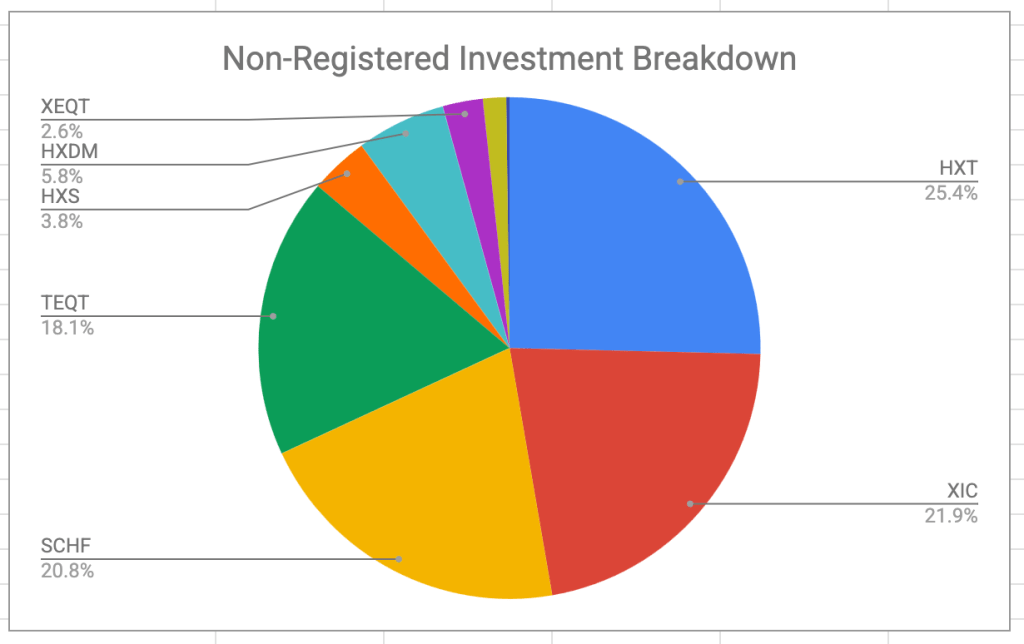
The portfolio is dominated by my ETF all-stars; anything not on that page is held in a non-registered account and won’t be fiddled with unless it’s part of my monthly decumulation. Otherwise I’ll rack up capital gains for no real benefit.

No notable changes this month; HXT is down slightly because that’s the fund I sold in my non-registered account this month to help pay the bills. I’ve sold quite a few shares of this fund this year and I’m seeing the capital gains mounting, but it’s around where I expected to be. I try to keep taxes owing reasonable; nonetheless I’m guessing I will certainly be moving to quarterly instalments in FY 2026; that’s the downside of having no withholding tax of any kind this year.

Plan for the next month

The asset-class split looks like this

It’s looking pretty close to the targets I have, which are unchanged:

  • 5% cash or cash-like holdings like ICSH and ZMMK
  • 15% bonds (almost all are buried in XGRO and AOA)
  • 20% Canadian equity (mostly based on ETFs that mirror the S&P/TSX)
  • 36% US equity (dominated by ETFs that mirror the S&P 500)
  • 24% International equity (mostly, but not exclusively, developed markets)

All looks to be in order from an asset allocation perspective, no need to do anything here. Cash is slightly elevated as a result of the pending closure of the three remaining QTrade accounts and will drift back to the normal 5% over the coming few weeks, I expect.

Overall

Net worth overall stopped its 6 month winning streak and I’m down slightly month over month. But I will reiterate: my net worth is still growing even though I’m taking a living wage every month. You might think that “decumulation” means “a steady reduction in net worth” but it needn’t be the case. And, in my particular case, my retirement income will include no pensions, so it’s probably a good thing that it keeps increasing overall.

My VPW-calculated salary continues to grow for the 7th straight month in spite of the step back this month in my net worth. That’s a feature of the “cash cushion” that is integral to the VPW withdrawal. It serves as a shock absorber to the monthly ups and downs of the stock market.

Next month will end my relationship with QTrade as I move the final 3 RRIF accounts to Questrade2.

  1. My QTrade one is no more, transferred to Wealthsimple to take advantage of their Summer promotion. ↩︎
  2. I had hoped to move these to Wealthsimple and generate more free money, but alas, they still don’t support self-directed spousal RRIFs, which is very odd indeed. ↩︎

News: Vanguard reduces fees on their all-in-ones

Summary: Vanguard asset allocation funds aka all-in-one funds VEQT, VGRO, VBAL, VCNS. VSIP have reduced their management fees to 0.17%, down from 0.22%, effective November 18, 2025.

It’s a good time to be an all-in-one investor, as I am. New to all-in-ones? Read all about them here.

The summary pretty much says it all. It just got cheaper to own Vanguard’s all-in-one funds. The amount of the reduction amounts to 50 cents for every $10001 invested per year, but compounded over many years, and multiplied by however much you have saved for retirement, it can be a surprisingly large number.

All-in-ones are much cheaper than either roboadvisors or your typical financial advisor, but as we studied before, they’re not without some cost, so fee reductions are always welcomed. Vanguard joins TD and BMO in reducing the cost of their all-in-ones. We looked at the makeup of each of these funds lately; there’s not a huge amount of difference, no matter which one you pick.

Anyway, you may note that Blackrock’s XEQT/XGRO/XINC family is now the most expensive of the lot; there’s no reason for that to be true given the competitive landscape. I would expect Blackrock to follow suit, or if not, I’ll probably be making some moves to get to lower fees, since a lot of my retirement portfolio is currently tied up in XEQT/XGRO. ZEQT/ZGRO I think is the closest in makeup to the XEQT/XGRO family.

  1. Of course, if you only have $1000 saved for retirement, you have other worries. ↩︎